Best Software for Students
Get through the semester without losing your mind.
The best software for students — note-taking, research, writing, study, and productivity tools to help you learn faster, stay organized, and hand it in on time.
- 51
 0
0Source Dir is a curated directory of premium AI tools tailored for professionals and high-performance teams. We feature only the most advanced, high-quality AI solutions to help users enhance productivity, streamline operations, and achieve exceptional results. Whether you're in marketing, design, analytics, education, or development, Source Dir connects you with powerful software that drives innovation and growth. Discover trusted tools across dozens of categories—carefully selected for quality, utility, and professional value. Experience the future of work with Source Dir.
- 52
 0
0VoiceBrief turns PDFs into deep AI learning. Get professor-style lectures (1–3 hrs) that cover every section of textbooks and papers—far beyond 15-min recaps. Ask an AI professor by voice and get cited explanations. Create premium audio lectures for commuting. Auto-generated flashcards use spaced repetition. Text chat gives quick, cited answers. Built for med, engineering, law, MBA, and exams like CPA, CFA, MCAT. Upload a PDF and learn.
- 53
 0
0The App Tools is a modern software directory built to help you discover the apps that drive productivity, creativity, and innovation. Whether you're searching for AI-powered tools, automation platforms, design solutions, or niche SaaS products, The App Tools makes it simple to find what you need—fast. Explore a wide range of categories with curated recommendations, featured tools, and powerful search capabilities tailored to professionals, developers, and creators. From personal projects to business workflows, we connect you with tools that solve real problems. Plus, if you’ve built something great, submit your tool and reach a global audience actively looking for smart solutions. With an intuitive interface and ever-growing listings, The App Tools is your shortcut to working smarter, not harder.
- 54
 0
0mp3totext.net is an AI Powered MP3 to text online tool built for students, researchers, and solo creators. Upload an audio file, click Transcribe, and get a clean block of text in seconds. Start free with 30 minutes, then unlock more time with a simple one-time Study Pack—no subscriptions, no automatic payments.
- 55
 0
0AI Picture Answer is an advanced, AI-powered educational tool designed to help students solve homework problems instantly by simply uploading a photo. Whether it's a handwritten note, a printed textbook page, or a PDF document, this platform uses cutting-edge artificial intelligence to accurately recognize and solve questions across a wide range of subjects, including math, chemistry, physics, biology, and more. With a strong emphasis on learning, not just answers, it provides step-by-step explanations to help students truly understand the underlying concepts. Used by over 100,000 students and rated 4.8 out of 5 stars, it’s praised for its speed, accuracy, and ease of use. AI Picture Answer is available 24/7, completely free to use, and requires no sign-up or credit card. Ideal for high school and college students, it supports subjects from algebra and calculus to genetics and quantum physics, making it a comprehensive solution for academic success.
- 56
 0
0JustPDF is a fast, lightweight, and privacy-focused platform that offers a complete suite of PDF tools directly in your browser. Unlike many traditional PDF services that require file uploads to external servers, JustPDF operates entirely on-device. This means your files never leave your computer, ensuring maximum privacy and security. The platform is designed for users who want quick, efficient document processing without compromising sensitive information or going through complicated sign-up processes. At its core, JustPDF emphasizes simplicity and speed. Users can perform essential tasks like compressing PDFs in just seconds by simply dragging and dropping their files into the interface. There is no need to create an account, and the platform offers free daily usage without adding watermarks to your files. This frictionless experience makes it ideal for both casual users and professionals who need reliable tools without unnecessary steps. Additionally, because everything runs locally in the browser, many features can even work offline, adding another layer of convenience. One of the strongest aspects of JustPDF is its wide range of tools. It goes far beyond simple compression by offering features such as merging multiple PDFs into one file, splitting documents into separate pages, and converting PDFs into editable formats like Word or Excel. Users can also convert images into PDFs, rotate documents, flatten files, and unlock protected PDFs. This versatility makes it a one-stop solution for handling almost any common PDF-related task. In addition to standard tools, JustPDF incorporates more advanced and modern features. For example, users can add electronic signatures to documents, making it useful for business and legal workflows. Another standout feature is the “Chat with PDF” functionality, which uses AI to allow users to ask questions about the content of a document. This transforms static files into interactive resources, making it easier to extract information quickly and efficiently. The platform also offers OCR (Optical Character Recognition) capabilities, allowing users to scan and convert images or non-editable PDFs into searchable and editable text. This is particularly useful for digitizing physical documents or working with scanned files. Combined with its conversion tools, this feature significantly expands the usability of documents that would otherwise be difficult to edit or analyze. JustPDF follows a freemium model, where users can access many tools for free with limited daily usage, while unlimited access is available through an affordable subscription. Despite this, the free version remains highly functional and does not impose intrusive limitations like watermarks, which are common in other services. This makes it an attractive option for users who need occasional PDF processing without committing to a paid plan. Overall, JustPDF stands out by combining speed, privacy, and functionality into a single, browser-based solution. It removes the common frustrations associated with PDF tools—such as slow uploads, privacy concerns, and complicated interfaces—and replaces them with a seamless, user-friendly experience. Whether for personal use, academic work, or professional tasks, JustPDF provides a reliable and secure way to manage and manipulate PDF documents efficiently.
- 57
 0
0GWA Calculator is a free tool website built for students in the Philippines. It offers four tools — GWA Calculator, Cumulative GWA Calculator, GWA to Percentage Calculator, and GWA to GPA Calculator. All tools are free, require no sign-up, and are designed specifically for the Philippine grading system. Built by GWA Calculator Team for Filipino college and senior high school students.
- 58
 0
0TimerJet is a free online timer, alarm clock, and stopwatch that runs entirely in the browser. No account, nothing to install, no paywall. Set a countdown for any duration, or start a preset in one click. Common durations like 5, 10, 25, and 30 minutes each have their own page, so you can bookmark the exact timer you use most. A full-screen mode shows oversized digits that stay readable across a room, which makes it practical on projectors and shared screens. You can adjust the accent color, font, and digit size, and preview any alert sound before starting. TimerJet also includes a stopwatch with lap timing and a world clock with live seconds. Timers can be embedded on other websites. Built for classrooms, study sessions, workouts, cooking, and desk work. Available at timerjet.com.
- 59
 0
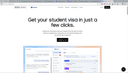
0TeestaAI is an AI agent that takes you from your documents to your student visa — no expensive consultant, no agent fees. Upload your transcripts, passport and test scores; the AI reads your profile, matches universities that fit your grades, budget and target country, then drafts your applications and statement of purpose, fills your visa and financial forms, writes your embassy emails, and preps you for the interview — tracking every deadline on one roadmap so nothing is missed. Unlike a general chatbot that only gives advice, TeestaAI actually does the work. 163,000+ programs, 68 countries, 0% commission.
- 60
 0
0CodaOne AI is an all-in-one, browser-based platform that offers over 101 free tools designed to simplify everyday digital tasks, especially in writing, document handling, image editing, and development workflows. What makes the platform stand out immediately is its promise of zero signup requirements for most features, allowing users to access powerful tools instantly without friction. The core philosophy behind Coda One revolves around privacy, accessibility, and efficiency—ensuring that users can complete their tasks quickly while keeping their data सुरक्षित and fully under their control. One of the flagship features of Coda One is its AI Writing suite, particularly the AI Humanizer tool. This tool is built to transform AI-generated text into natural, human-like writing that can bypass major AI detection systems such as GPTZero, Turnitin, and Originality.ai. Instead of changing the meaning of the text, it focuses on improving tone, flow, and authenticity. Users can choose from multiple writing modes such as Standard, Academic, Blog, Formal, and Simple, making it adaptable for different contexts. This is especially useful for students, writers, and professionals who rely on AI assistance but want their content to feel organic and undetectable. Complementing the Humanizer is the AI Detector, a completely free and unlimited tool that allows users to check whether their text appears AI-generated. This creates a seamless workflow where users can write, humanize, and then verify their content—all within the same platform. The fact that this tool operates without any API costs or usage limits makes it particularly attractive compared to many competitors. Beyond writing tools, Coda One offers a robust set of PDF tools, including merging, splitting, compressing, converting, and protecting documents. These tools are entirely browser-based, powered by WebAssembly, which means files are processed locally on the user’s device and never uploaded to external servers. This ensures maximum privacy and eliminates concerns about sensitive data leaks. Unlike many other platforms, there are no restrictions such as daily limits or watermarks, making these tools genuinely free and unlimited. The platform also includes image tools for tasks like background removal, compression, resizing, and text extraction, as well as developer tools such as JSON formatters, regex testers, and JWT decoders. By bringing all these utilities together in one place, Coda One eliminates the need to switch between multiple websites for simple tasks. In terms of pricing, Coda One maintains a transparent and flexible structure. Most tools—including PDF, image, and developer utilities—are permanently free. For AI writing features, users can access a limited number of free uses per day, with optional paid plans that expand word limits and unlock advanced capabilities. Overall, Coda One positions itself not just as a tool directory, but as a thoughtfully designed productivity toolkit that prioritizes user convenience, privacy, and simplicity.
- 61
 0
0Unite List brings the best AI and productivity tools together in one place—so you don’t have to waste time searching. Whether you're building, scaling, learning, or creating, Unite List helps you discover powerful apps to streamline your workflow, boost focus, and spark innovation. Browse a growing library of handpicked tools across 60+ categories including AI Assistants, Audio, Design, Marketing, Finance, Education, and more. Search by need, explore curated collections, or submit your own solution to get noticed. With a clean interface, clear summaries, and a mission to cut noise, Unite List is where creators, developers, and professionals find what really works. One list. Endless solutions.
- 62
 0
0NotesnChat is an all-in-one productivity and organization platform designed to help individuals manage their daily lives more efficiently. Combining note-taking, task management, reminders, document scanning, communication tools, and privacy features into a single mobile application, NotesnChat eliminates the need to switch between multiple apps and provides a unified workspace for both personal and professional use. Built for modern users who need to capture ideas quickly and stay organized throughout the day, NotesnChat offers a seamless experience across tasks, notes, and communication. Whether users are managing work projects, planning personal goals, organizing study materials, or simply keeping track of everyday responsibilities, the platform provides the tools needed to stay focused and productive. One of the platform’s standout features is its intelligent reminder system. Users can create reminders for tasks, events, appointments, deadlines, and important notes, ensuring that nothing important gets overlooked. These smart reminders help users maintain consistency, improve time management, and stay on top of their responsibilities without unnecessary stress. NotesnChat also includes a powerful note-taking environment that supports rich content creation. Users can create detailed notes containing text, images, audio recordings, and various formatting options, making it suitable for everything from quick thoughts and shopping lists to meeting notes, research materials, and long-term planning. The platform is designed to capture information quickly while keeping it organized and easy to access. Task management is another core component of the application. Users can create task lists, organize projects, track progress, and manage daily activities through a simple and intuitive interface. Whether handling personal to-do lists or coordinating larger workflows, NotesnChat helps users stay organized and maintain clarity on priorities. To further improve productivity, the platform offers Smart Organization capabilities that automatically categorize and organize notes, tasks, and conversations. This intelligent structure reduces clutter and allows users to find important information faster, helping them focus on their work instead of managing folders and files manually. NotesnChat also includes integrated communication features such as in-app messaging and voice calling. These tools allow users to communicate directly within the platform without switching to external applications, making collaboration faster and more convenient. Teams, colleagues, friends, and family members can share information, discuss tasks, and stay connected within a single environment. For users who regularly work with physical documents, the built-in File Scan feature enables quick document digitization. Users can scan receipts, contracts, study materials, forms, and other documents, converting them into clear and shareable digital files that can be stored alongside notes and tasks. Privacy and security are major priorities within the platform. The Ghost Lock feature provides advanced protection for sensitive notes, tasks, and personal information, giving users greater control over their private data. Combined with secure synchronization across devices, users can access their information anytime while maintaining confidence in its protection. NotesnChat serves a wide variety of users, including students, professionals, entrepreneurs, creators, teams, and anyone seeking a more organized lifestyle. Students can manage class notes and assignments, professionals can organize meetings and projects, entrepreneurs can track ideas and business plans, and creators can capture inspiration whenever it strikes. By bringing reminders, task management, note-taking, document scanning, communication, organization, and privacy features together into a single application, NotesnChat provides a complete productivity ecosystem that helps users work smarter, stay organized, and manage their lives with greater efficiency and control.
- 63
 0
0MindMap AI is the #1 AI-powered mind mapping software for professionals and teams. It instantly transforms ideas, files (PDFs, docs, slides, images), and recordings (meetings, lectures, training) into dynamic visual maps. With features like Co-Pilot Chat (chat with your map), auto-expansion, summarization, and second-order connections, every map becomes an interactive workspace. Instead of searching manually, you can ask questions, refine strategies, and uncover hidden insights directly. Built for corporate productivity, MindMap AI helps teams brainstorm, organize knowledge, and turn complexity into actionable workflows, projects, and strategies in minutes. It works across web, mobile, and extensions, with multi-format exports (Word, PPTX, PDF, PNG, Markdown, and more). Whether for planning, capturing meeting knowledge, aligning strategies, or analyzing research, MindMap AI helps organizations move from chaos to clarity—faster and smarter.
- 64
 0
0Acid Tools is a curated directory featuring the latest and most powerful AI and productivity tools across a wide range of categories, including content creation, SEO, business, marketing, design, development, and more. Whether you're a freelancer, startup founder, marketer, or tech enthusiast, Acid Tools helps you discover top-rated software that boosts efficiency and creativity. Easily browse through categories like AI assistants, image editing, chatbots, analytics, and productivity to find tools that match your goals. With fresh listings and featured recommendations, Acid Tools is your one-stop platform for staying ahead in the fast-evolving world of tech and automation.
- 65
 0
0Oncourse AI is an all-in-one, AI-powered study platform built specifically for medical students preparing for major licensing and postgraduate entrance exams worldwide. Described as "Anki on steroids," Oncourse combines neuroscience-backed learning algorithms, gamified study tools, and AI personalization to help students remember more in less time and walk into every exam with confidence.
- 66
 0
0TutorGPT is an AI-powered homework helper and personal tutoring platform designed to help students solve academic problems quickly and understand concepts more clearly. By simply uploading a photo of a homework question or typing a problem, TutorGPT analyzes the content and provides clear, step-by-step explanations to guide students through the solution process.
- 67
 0
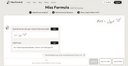
0Miss Formula - Image to Word Equations & LaTeX Online Access, No Download Required Miss Formula is entirely web-based, eliminating the need for bulky software installations. Whether you are in the lab or the library, simply open your browser to start—perfect for users who prioritize convenience. Cost-Effective Mathpix Alternative We offer more economical pricing plans and initial free credits. We provide professional-grade accuracy while significantly reducing costs for research and study. Beyond LaTeX: Direct Word Equation Support In addition to generating standard LaTeX code, Miss Formula can convert images directly into editable Word equations. This saves you from the hassle of manual re-formatting; just copy and paste to use immediately. Ultra-Fast Upload via Ctrl+V Say goodbye to traditional file selection or drag-and-drop. With Miss Formula, you simply take a screenshot and press "Ctrl+V" on the page to upload and recognize the formula instantly, dramatically boosting your workflow efficiency.
- 68
 0
0Paywall Reader is a tool that helps you read articles blocked by paywalls. It doesn’t hack into sites or break paywalls directly. Instead, it sends you to archived or cached versions of the page. These versions are saved copies from places like Archive.Today, the Internet Archive, or even Google Translate. It works best with soft paywalls—those pop-ups that block the screen but still have the full text underneath. To use it, you just paste the article’s URL, pick an option from the three services, and it tries to find a version without the paywall. If one doesn’t work, you can try another. Not every paywall can be bypassed, especially if a site blocks archiving, but most major news sources work fine. It’s considered legal because it doesn’t tamper with the website itself—it just finds copies that are already available online. People use it to access news without needing tons of subscriptions or for things like schoolwork and research. The site isn’t connected to any of the archive services or news outlets, and it leaves the responsibility of use to you.
- 69
 0
0Hush Touch is a next-generation AI voice-to-text application built exclusively for macOS, designed to deliver faster, cleaner, and more intelligent dictation—entirely on-device. Unlike cloud-based alternatives, Hush Touch leverages the powerful dictation engines already inside your Mac and enhances them with a final pass powered by Apple Intelligence. The result is a seamless, privacy-first dictation experience that feels native, responsive, and remarkably accurate. At just 5.5 MB, Hush Touch is lightweight yet powerful. It blends two Apple speech recognition systems—DictationTranscriber for natural flow and punctuation, and SFSpeechRecognizer for advanced vocabulary detection. By combining both engines and applying an Apple Intelligence refinement layer, the software produces highly accurate transcriptions, even for complex terminology such as technical jargon, brand names, or medical terms. Designed for hands-free productivity, Hush Touch integrates with Siri activation. Simply say, “Hey Siri, start touch” to begin dictation, and the app automatically inserts text after two seconds of silence. You can also double-click a customizable hotkey to activate a Siri-style auto-stop mode. When you’re finished, voice commands like “okay send message” can automatically send your dictated text, streamlining communication without touching the keyboard. Hush Touch includes a robust smart text processing pipeline. It removes filler words, auto-corrects common speech patterns, inserts punctuation naturally, supports emoji dictation, formats numbered lists, and enables voice-based formatting commands. The system also offers four context modes—General, Email, Code, and Notes—optimizing recognition behavior depending on what you’re writing. A key differentiator is adaptive learning. The software detects when you manually correct a transcription and automatically adds the corrected term to your personal vocabulary. Users can store up to 500 custom terms, with frequency-weighted learning and per-app profiles that adjust recognition based on context. Voice snippets allow up to 50 custom phrase mappings for repeated text. Privacy is foundational. Hush Touch operates 100% offline with zero cloud dependency. All speech processing—including the Apple Intelligence final pass—happens locally on your Mac. There are no network requests during dictation, no analytics, no telemetry, and no user tracking. The App Store privacy label confirms “Data Not Collected.” Available for a one-time $20 lifetime license, Hush Touch eliminates subscriptions while delivering professional-grade AI dictation. It requires macOS 26+ for dual-engine mode and macOS 15+ for the classic engine. For Mac users who value speed, accuracy, and complete privacy, Hush Touch transforms voice into text—smarter, cleaner, and entirely under your control.
- 70
 0
0GoSkoly is a modern and comprehensive school management platform designed to simplify educational administration and improve communication between schools, teachers, students, and parents. Built with the goal of digitizing everyday school operations, the platform helps educational institutions manage academic, administrative, and financial activities through a single, user-friendly system. School management software has become an essential tool for modern educational institutions, and GoSkoly aims to provide an efficient solution that saves time, reduces paperwork, and enhances overall productivity. One of the key strengths of GoSkoly is its centralized management approach. Instead of using multiple systems for attendance, fee collection, communication, examinations, and student records, schools can access everything from one integrated platform. This allows administrators to streamline operations, reduce manual errors, and gain real-time visibility into school activities. The cloud-based nature of the platform also enables users to access important information from anywhere using a computer, tablet, or smartphone.
- 71
 0
0Video Transcription AI is a frictionless, web-based intelligence platform designed to unlock knowledge trapped inside video and audio formats. It converts linear media consumption into searchable, structured text databases, entirely eliminating the overhead of manual note-taking. Perfect for content creators, students, academic researchers, and remote professionals who need to decode vast amounts of media content quickly and maximize their daily productivity.
- 72
 0
0ToolChase is an ad-free AI tools directory and comparison platform built to help users discover, evaluate, and choose the right AI software with clarity and confidence. The platform features 600+ AI tools, 2,000+ side-by-side comparison pages, expert-written reviews, pricing breakdowns, feature summaries, alternatives, FAQs, and practical use-case guidance across major AI software categories including AI writing tools, AI SEO tools, AI video generators, AI image generators, AI coding assistants, AI chatbots, AI productivity tools, AI presentation software, AI automation platforms, AI research tools and AI detection tools. ToolChase helps users answer high-intent buying questions such as which AI tool is best for a specific workflow, how two tools compare, what each platform costs, which alternatives are available, and whether a tool is suitable for content creation, marketing, SEO, automation, sales, research, design, customer support, development, or productivity.
- 73
 0
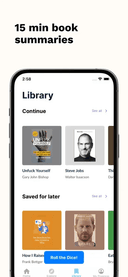
0Sumizeit is a micro-learning app that helps you learn faster without spending hours reading. It turns the world’s best nonfiction books into clear, structured summaries you can finish in just 5–10 minutes. Each summary breaks down big ideas into bite-sized lessons, making it easy to absorb key insights anytime, anywhere. Designed for busy minds (and especially great for people with ADHD), Sumizeit focuses on clarity, speed, and retention. Learn through short reads, audio options, and quick quizzes that reinforce what you’ve just learned. Topics range from personal finance, business, psychology, health, and productivity to science, history, and self-improvement. Whether you want to replace doom-scrolling with something meaningful, prepare for a conversation, or steadily build knowledge every day, Sumizeit makes learning feel effortless. No fluff, no filler just the core ideas that actually matter, delivered in a format that fits real life.
- 74
 0
0Math AI is an online AI math solver and tutor that accepts typed equations, mathematical word problems, and uploaded problem photos. It provides clear step-by-step explanations across algebra, geometry, trigonometry, calculus, probability, statistics, and related topics, helping students understand both the answer and the reasoning behind each operation. Solution and tutor modes support homework checks, practice, exam preparation, and guided learning, while visual support helps explain graphs and geometric relationships.
- 75
 0
0Every job application starts the same way: find the posting, copy the description, paste it into some AI tool, paste your resume, tweak the prompt, edit the output. Repeat 50 times. PathwiseAI eliminates all of it. Type "Stripe Product Manager" and the platform finds the real job posting, pulls your resume from your profile, and generates a tailored cover letter in seconds. No tabs. No copy-pasting. No prompt engineering. That same automation powers every tool on the platform. PathwiseAI is built around six studios that share a single profile, so you never re-enter information: The Writing Studio generates cover letters, college application essays, and scholarship essays matched to specific prompts and programs. Resume Lab scores your resume against industry benchmarks and provides line-by-line improvement suggestions. The Email Center covers 38+ scenarios — networking, follow-ups, thank you notes, resignations, cold outreach, and salary discussions. Interview Prep turns your real experience into structured STAR stories and generates company-specific research briefs so you walk in prepared. Salary & Offers builds counter-offer emails, responds to lowball offers, and compares multiple offers side by side with total compensation breakdowns. LinkedIn Studio rewrites your headline, summary, and experience sections to rank higher in recruiter searches.
Frequently asked questions
Limit is a great tool that allows students to set time limits on distracting websites. You can choose how many minutes a day to spend on each site, and once that limit is reached, the website is blocked. This helps students stay focused and avoid distractions.
Rewritebar is an excellent tool for improving writing in any macOS application. It provides AI assistance to quickly correct grammar mistakes, change writing styles, or translate text, making it a valuable resource for students looking to enhance their writing skills.
Duolingo is a highly recommended app for learning languages. It offers short, interactive lessons that cover practical communication skills. With a variety of languages available and engaging game-like features, Duolingo makes language learning fun and accessible for students.
BlazePDF is a fast and intuitive PDF app designed specifically for students. It allows for quick highlighting and annotating, and it features customizable shortcuts to enhance the studying experience. This makes it an ideal choice for managing notes and study materials.
Momentum is a fantastic tool that replaces your default new tab screen with a personalized dashboard. It includes a pomodoro timer, to-do lists, and focus time features, all while providing a visually appealing interface that can help keep students motivated and organized.
ChatGPT is an advanced AI tool that can assist with coding tasks and other one-off tasks. It is widely regarded for its capabilities and is worth the subscription fee for students who frequently engage in programming or need help with various assignments.
Complete HeartX is an interactive app designed for exploring the human heart in detail. It features photo-realistic 3D models and simulations, making it an excellent resource for medical students and anyone interested in anatomy.
Block & Focus is a simple yet effective extension that allows you to block distracting websites for a specified period. You can customize which sites to whitelist or blacklist, helping you maintain focus during study sessions.
AppMole is an all-in-one platform that offers a variety of AI-driven tools and resources tailored for creators and developers. It helps students streamline their workflows and stay updated with the latest software applications, making it a valuable resource for enhancing productivity.
AdBlock is a browser extension that helps students eliminate distracting ads while browsing. By providing a calmer browsing experience, it allows students to focus better on their studies and research without interruptions from advertisements.