Best Apple Software
Made to feel at home on a Mac.
The best software for the Apple ecosystem — Mac, iPhone, and iPad apps that look and work the way Apple users expect, from pro tools to everyday essentials.
- 76
 0
0Schemity is a native desktop ERD tool built for software engineers who need a fast, reliable way to design and document database schemas without the friction of cloud-based tools. Most ERD tools are either too primitive for real-world schema work or bloated with features you never use. Schemity sits in the middle: powerful enough for complex schemas, lightweight enough to install in seconds at just 9MB. It connects directly to PostgreSQL, MySQL, and SQL Server, reverse-engineering your existing database into a visual diagram instantly. From there, you have full control over the canvas. Relationship lines are freely routable, tables are freely positionable, and nothing is locked behind an auto-layout algorithm you cannot override. Key features include offline-first architecture, plain JSON schema storage, no account or internet connection required, N:N relationship support with automatic intermediate table generation, and one-time pricing with no subscription. Schemity is designed around how engineers actually think. You can organize your diagram to reflect domain boundaries, focus on specific areas of a large schema, and use keyboard-driven interactions to move fast. The schema file is plain JSON, so it lives in your repository alongside your code. It runs on Windows, macOS, and Linux, installs in under a minute, and does not require a cloud account or ongoing subscription. You pay once and own it. If you have spent time fighting with tools that are too limited, too slow, or require you to be online just to open a diagram, Schemity was built for you.
- 77
 0
0A cross-platform (windows, macOS) window management application inspired by Rectangle. Snap windows to predefined positions using keyboard shortcuts. Features Window Snapping: Snap windows to halves, quarters, thirds, and more Keyboard Shortcuts: Customizable hotkeys for all window actions System Tray: Runs quietly in the background with a system tray icon Cross-Platform: Works on Windows and macOS (Linux support planned)
- 78
 0
0Airway Trainer is a health-focused mobile application designed to help users reduce snoring and improve sleep quality through simple, natural exercises. Unlike traditional solutions such as nasal strips, mouthpieces, or surgical interventions, this app takes a completely non-invasive approach by targeting the root cause of snoring: weak airway muscles. By strengthening the muscles in the mouth and throat, Airway Trainer helps users achieve quieter nights and more restorative sleep without relying on external devices or treatments. At the core of Airway Trainer is a structured program based on orofacial exercises, also known as myofunctional therapy. These exercises are specifically designed to strengthen key muscle groups, including the tongue, soft palate, and throat. When these muscles are weak, they tend to relax excessively during sleep, leading to restricted airflow and the vibrations that cause snoring. By training these muscles consistently, users can improve airway stability, reduce noise, and enhance overall breathing during sleep. One of the most appealing aspects of the app is its simplicity and accessibility. The daily routine takes just five minutes to complete, making it easy to incorporate into even the busiest schedules. Each session includes guided exercises with clear visual instructions and timed steps, ensuring that users perform each movement correctly. This clarity removes guesswork and helps build a consistent habit, which is essential for achieving long-term results. Because no equipment is required, users can practice anywhere, whether at home or on the go. Airway Trainer also offers a personalized experience tailored to each user’s specific needs. After completing a short assessment, the app identifies which muscles are contributing most to the user’s snoring. Based on this diagnosis, it creates a customized six-week program that focuses only on the areas that need improvement. Each week builds progressively, introducing new exercises and increasing intensity to ensure continuous development. This targeted approach makes the training more effective and efficient compared to generic solutions. Another important feature of the platform is its ability to track progress over time. Users can monitor improvements in snoring intensity and sleep quality through weekly insights and measurable data. Many users report noticeable changes within just a few weeks, including reduced snoring, better sleep, and increased energy during the day. These results are supported by clinical research, which shows that consistent oropharyngeal exercises can significantly reduce snoring frequency and severity while improving overall sleep health. In addition to its practical benefits, Airway Trainer emphasizes a science-based approach. Its methods are backed by published studies that demonstrate the effectiveness of targeted airway exercises in reducing conditions like snoring and mild sleep apnea. By focusing on long-term muscle conditioning rather than temporary fixes, the app provides a sustainable solution that continues to deliver benefits over time. Overall, Airway Trainer offers a simple yet powerful way to improve sleep naturally. By combining personalized training, scientific backing, and an easy-to-follow routine, it helps users take control of their sleep health. It is more than just an app—it is a long-term investment in better rest, quieter nights, and improved daily energy.
- 79
 0
0A simple and free way to build a PDF resume for your job applications. Available on Android, iOS, and macOS. The app was developed by a former professional recruiter. It contains advice and examples for each section of the resume. There's also an AI Assistant to make sure your resume is concise and professional.
- 80
 0
0Pulses App lets you monitor heart rate live for groups and teams on iPad, iPhone, or Mac (Android planned for Q1 2026). It’s built for spinning classes, HIIT, Hyrox-style training, and team sports, giving coaches and instructors clear, real-time insight into training intensity — without costly hardware or complex setups. Pulses works with any Bluetooth-compatible heart rate band or watch. Start a session in seconds, track effort across the whole group, and review performance afterwards. A practical tool for fitness instructors and sports coaches who want better control of training load and consistency across sessions.
- 81
 0
0Creed is a Christian Bible chat companion built to take a different path. While many AI companions lean on flattery or simulated romance, Creed is grounded in scripture and shaped to encourage honesty, reflection, and connection to community. Every response is anchored in the Bible, offering guidance that is inclusive across denominations. Beyond chat, Creed serves as a Bible reader and a supportive space for believers who want to deepen their faith. Its design is calm and approachable, featuring a sheep guide that feels warm without distraction. Creed is not about surface-level affirmation but about helping Christians grow in faith and live with greater purpose each day.
- 82
 0
0PokeScope is a free Pokémon card price checker website that helps collectors find accurate, real time card values. Instantly search any Pokémon card to view its raw and graded prices, track the latest eBay sales, and explore complete set lists, all powered by live market data. Whether you’re checking card values or browsing entire sets, PokeScope makes it fast and easy to stay informed. The PokeScope iOS app takes it further with a custom AI model trained exclusively on Pokémon cards, not a generic image recognition wrapper. It instantly identifies cards in real time using your camera and retrieves their current market value with remarkable accuracy. Collectors can quickly scan, verify, and compare cards on the go, saving time and eliminating guesswork. With precise live pricing and proprietary AI scanning, PokeScope is the most complete and reliable Pokémon card value tool available.
- 83
 0
0FahrerApp is a comprehensive digital solution designed specifically for rental car companies and passenger transport businesses. It offers an all-in-one platform that connects drivers and business owners, streamlining daily operations and improving efficiency across the entire organization. By combining mobile and web-based tools, FahrerApp enables seamless management of shifts, vehicles, employees, and financial performance in a single ecosystem. At the core of the platform is the FahrerApp mobile application, built to support drivers in their everyday tasks. The app simplifies shift tracking by allowing users to easily record and manage working hours, with automatic calculations that reduce manual errors. Drivers can also document vehicle conditions through digital logs, including photo uploads, ensuring transparency and accountability. In addition, the app provides clear revenue overviews, giving drivers insight into their earnings through detailed statistics. Expense tracking is another key feature, enabling users to record fuel receipts and other costs, categorize them, and maintain organized financial records. To further enhance communication, FahrerApp includes a multilingual chat system with automatic translation, making it easier for diverse teams to collaborate effectively. Complementing the driver-focused app is the Unternehmerportal, a powerful business dashboard tailored for company owners and managers. This portal offers advanced tools for fleet and workforce management. Through AI-supported shift analysis, the system can detect errors and provide valuable insights to improve operational accuracy. Managers can access detailed performance analytics for both drivers and vehicles, helping them make data-driven decisions. Fleet management features allow businesses to efficiently oversee their vehicles, while automated task scheduling ensures that maintenance appointments are planned and executed on time. The portal also centralizes employee data, simplifying administrative tasks, and includes push notification capabilities for direct and instant communication with drivers. A standout aspect of FahrerApp is its innovation in vehicle telematics. The company has developed its own telematics devices that provide critical operational data. One of the most notable features is seat occupancy detection for passenger seats, a highly demanded function in the transport industry. This technology ensures that all trips are accurately recorded, contributing significantly to process optimization and operational transparency. Behind FahrerApp is a dedicated team with expertise in both the transportation industry and software development. The leadership ensures that the platform is aligned with real-world business needs, while continuous innovation keeps the solution adaptable and competitive. The company’s mission is to simplify and optimize the daily workflows of drivers and entrepreneurs, ultimately increasing productivity and profitability. Overall, FahrerApp stands out as a modern, integrated solution that addresses the complex challenges of passenger transport management. By combining user-friendly mobile tools, a robust business portal, and advanced telematics technology, it empowers companies to operate more efficiently, reduce administrative burdens, and gain full control over their operations.
- 84
 0
0Premium credit cards generate billions in annual fees, yet most cardholders use less than 30% of the benefits they’re paying for. Not because they’re careless — because the system is deliberately complex. 40-page PDFs, hidden enrollment steps, expiring credits, exclusion clauses nobody reads. Norte is the intelligence layer that makes your wallet visible. Pick your cards from our database — no bank login, no linking — and instantly see every benefit, credit, coverage detail, and expiry date. An AI assistant reads the fine print and answers questions about your cards and policies in plain English. A planner tells you which card to use before you spend. Built for the 70% of premium cardholders who want full value without a second job.
- 85
 0
0It’s a Date is a specialized reservation planning platform built to solve one of the biggest frustrations in New York City dining culture: securing tables at the city’s most difficult-to-book restaurants. Available through It’s a Date, the platform is designed around timing, precision, and memorable experiences, helping users successfully book reservations for important occasions such as birthdays, anniversaries, romantic dinners, and celebrations. Instead of endlessly refreshing reservation apps or missing booking windows by seconds, It’s a Date tells users exactly when to act. The core concept behind the platform is simple yet highly effective. Users first add a meaningful event or “moment,” such as a birthday dinner or anniversary celebration. Next, they select the restaurants they would ideally like to book for that occasion. Once this information is set, the platform tracks the reservation release schedules for those restaurants and sends reminders the moment reservations become available. Because many high-demand NYC restaurants release tables weeks in advance and sell out within seconds, timing is everything, and It’s a Date focuses entirely on solving that problem. One of the platform’s strongest features is its detailed understanding of how different restaurants handle reservations. Every restaurant has its own booking system, release schedule, and platform—some use Resy, others OpenTable, SevenRooms, Tock, or even phone-only reservations. It’s a Date organizes all of this information into a centralized, easy-to-understand system. Users can instantly see how many days ahead reservations open, the exact release time, the booking method, and additional guidance about reservation behavior. This transforms what is normally a chaotic process into a clear action plan. The platform also emphasizes the emotional importance behind reservations. Rather than treating dining simply as a transaction, It’s a Date frames restaurant bookings as experiences tied to important memories and personal milestones. The app is specifically built for “the nights that matter,” helping users plan meaningful evenings without the stress and uncertainty that usually come with high-demand reservations. This emotional positioning gives the platform a more personal and lifestyle-oriented identity compared to standard booking services. Another standout aspect is the app’s operational simplicity and practical design. The process is broken into clear steps: choosing restaurants, receiving exact booking instructions, and confirming successful reservations. Notifications include actionable details such as call reminders, booking windows, phone numbers, and reservation instructions, allowing users to react immediately. The platform also supports offline functionality and one-tap calling, making the booking process even faster and more convenient. It’s a Date also acts as an informational hub for NYC dining culture by maintaining a curated list of highly sought-after restaurants, including iconic and notoriously difficult reservations. By gathering timing strategies, release patterns, and booking insights into one place, the platform becomes valuable not only for planning but also for understanding how the competitive reservation ecosystem works. Overall, It’s a Date transforms restaurant reservations from a stressful race against time into a structured and manageable experience. By combining precise timing tools, personalized planning, and deep knowledge of the NYC dining scene, the platform helps users secure unforgettable experiences at the restaurants they care about most. It turns the challenge of booking exclusive tables into a smarter, more organized process, allowing people to focus less on logistics and more on the moments they want to celebrate.
- 86
 0
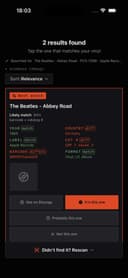
0Kura is a vinyl and CD collection management app designed for music collectors who want to identify, organize, and understand their physical music collections down to the exact pressing. Built for iPhone, Kura uses the device's camera to read information from record labels, barcodes, and runouts, helping collectors determine which specific edition or pressing they own. Rather than simply identifying an album or artist, the platform focuses on distinguishing individual pressings and showing the evidence behind each identification. One of Kura's central features is its pressing identification system. When a collector scans a record, the app examines details such as the catalogue number, label information, barcode, matrix, runout, country, year, and format. These details are compared to identify the specific pressing represented by the physical copy. Kura also explains how it reached its result by displaying the relevant evidence field by field. When the available information is not sufficient to confidently identify a pressing, the app is designed to acknowledge the uncertainty instead of presenting an unsupported result. Kura is also designed for use while shopping for records. At a record store or secondhand shop, collectors can point their iPhone camera at an album and quickly determine what it is and whether a copy of the same pressing is already in their personal collection. This can make browsing crates more practical, especially for collectors with large libraries who may not remember every album or edition they already own. The app provides tools for managing what happens after a record becomes part of the collection. Users can keep track of information associated with individual copies, including the price they paid, the condition of the record, and how many times they have played it. This creates a more detailed record of the physical collection and can help collectors understand which records they actually use and which ones remain untouched on their shelves. Kura also includes listening and discovery features. Collectors can log the records they play and rate them while listening. By keeping track of listening activity, the application can help users rediscover albums already sitting in their collection and identify records they have not played recently. This turns the collection from a static inventory into something that can also reflect the owner's listening habits. Another important aspect of Kura is its approach to collection value. Rather than automatically displaying the lowest asking price found for an album in any condition or edition, Kura emphasizes the distinction between asking prices and actual sold prices. The platform aims to provide value information only when it can support the figure with real sales data for the exact pressing. This approach is intended to give collectors a more meaningful understanding of what a particular copy may be worth. Kura is currently in beta and is available for iPhone through TestFlight by invitation. Users can join the beta by providing their email address and can provide feedback when the application incorrectly identifies a record. The app supports English, Japanese, German, French, and Spanish. Overall, Kura is built for serious vinyl and CD collectors who care about the details that distinguish one physical release from another. By combining camera-based scanning, exact pressing identification, evidence-based matching, collection tracking, listening history, and carefully considered value information, Kura provides a specialized way to catalog and interact with a physical music collection.
- 87
 0
0📱 Coaches and Personal Trainers: Simplify Your Business Today! Are you tired of managing clients, schedules, and payments? BULK can help you: - Effortless Session Scheduling: No more double bookings. - Instant Client Messaging: Keep all communication in one place. - Secure Payment Processing: Get paid on time, every time. - Content Integration: Easily share Google Docs, Slides, Notion, Zoom links, and more. All this from the convenience of your phone. Available on iOS and Android. Don't overcomplicate this process. Don't use systems with tons of useless features that just bog your progress! Save time, increase efficiency, and watch your business grow! 🎉 Start Your 14-Day FREE TRIAL Now! 🎉
- 88
 0
0NotesnChat is an all-in-one productivity and organization platform designed to help individuals manage their daily lives more efficiently. Combining note-taking, task management, reminders, document scanning, communication tools, and privacy features into a single mobile application, NotesnChat eliminates the need to switch between multiple apps and provides a unified workspace for both personal and professional use. Built for modern users who need to capture ideas quickly and stay organized throughout the day, NotesnChat offers a seamless experience across tasks, notes, and communication. Whether users are managing work projects, planning personal goals, organizing study materials, or simply keeping track of everyday responsibilities, the platform provides the tools needed to stay focused and productive. One of the platform’s standout features is its intelligent reminder system. Users can create reminders for tasks, events, appointments, deadlines, and important notes, ensuring that nothing important gets overlooked. These smart reminders help users maintain consistency, improve time management, and stay on top of their responsibilities without unnecessary stress. NotesnChat also includes a powerful note-taking environment that supports rich content creation. Users can create detailed notes containing text, images, audio recordings, and various formatting options, making it suitable for everything from quick thoughts and shopping lists to meeting notes, research materials, and long-term planning. The platform is designed to capture information quickly while keeping it organized and easy to access. Task management is another core component of the application. Users can create task lists, organize projects, track progress, and manage daily activities through a simple and intuitive interface. Whether handling personal to-do lists or coordinating larger workflows, NotesnChat helps users stay organized and maintain clarity on priorities. To further improve productivity, the platform offers Smart Organization capabilities that automatically categorize and organize notes, tasks, and conversations. This intelligent structure reduces clutter and allows users to find important information faster, helping them focus on their work instead of managing folders and files manually. NotesnChat also includes integrated communication features such as in-app messaging and voice calling. These tools allow users to communicate directly within the platform without switching to external applications, making collaboration faster and more convenient. Teams, colleagues, friends, and family members can share information, discuss tasks, and stay connected within a single environment. For users who regularly work with physical documents, the built-in File Scan feature enables quick document digitization. Users can scan receipts, contracts, study materials, forms, and other documents, converting them into clear and shareable digital files that can be stored alongside notes and tasks. Privacy and security are major priorities within the platform. The Ghost Lock feature provides advanced protection for sensitive notes, tasks, and personal information, giving users greater control over their private data. Combined with secure synchronization across devices, users can access their information anytime while maintaining confidence in its protection. NotesnChat serves a wide variety of users, including students, professionals, entrepreneurs, creators, teams, and anyone seeking a more organized lifestyle. Students can manage class notes and assignments, professionals can organize meetings and projects, entrepreneurs can track ideas and business plans, and creators can capture inspiration whenever it strikes. By bringing reminders, task management, note-taking, document scanning, communication, organization, and privacy features together into a single application, NotesnChat provides a complete productivity ecosystem that helps users work smarter, stay organized, and manage their lives with greater efficiency and control.
- 89
 0
0ChattyFit is your AI fitness coach that turns “What should I do today?” into a clear, realistic training plan. It designs complete programs around your life, guides you through every workout, and keeps you consistent with simple logging, history, and Apple Watch integration. ChattyFit learns your goals, schedule, equipment, injuries, and preferences, then builds a plan you can actually follow and stick with. WHAT CHATTYFIT HELPS YOU DO • Know exactly what workout to do today • Stop guessing how to train for your specific goal • Learn how to perform any exercise with videos, images and AI guidance • Fit training around a busy, unpredictable schedule • Stay consistent with on-wrist reminders and easy logging • Get clear answers whenever you’re confused or stuck YOUR AI COACH, ON DEMAND • Chat with an AI trainer about goals, progress, or form • Ask “What should I do today?” and get a complete session • Adjust workouts on the fly if you’re tired, sore, or short on time • Get safe, age- and experience-appropriate recommendations • Learn technique, variations, and substitutions for exercises you can actually do PERSONALIZED TRAINING PLANS • Structured plans for weight loss, muscle gain, strength, and general fitness • Adapts to your equipment: full gym, home setup, hotel, or bodyweight only • Takes injuries, limitations, and health conditions into account • Multi-week training phases with recommended weekly frequency • Automatically evolves as you complete workouts and build consistency • Quickly replace any exercise in a workout with an alternative
- 90
 0
0Our Mission Make professional video editing accessible to every content creator. • Speed matters more than feature count • Mobile-first is the future of editing • AI should automate tedious work, not replace creativity • Creators should focus on creating, not editing What We Built BlitzCut AI is the fastest AI video editor for social media content. Automatic Silence Removal AI removes all pauses instantly AI Captions 95%+ accuracy with viral styles Text-Based Editing Edit video by deleting sentences from transcription 2-Minute Workflow Import to export in under 2 minutes Mobile-First Built for iPhone, iPad, and Mac Why We Built This The Problem Traditional video editing is too slow for the creator economy. Manual silence removal takes 15-20 minutes. Manual caption styling takes 15-20 minutes. Daily posting becomes impossible. Our Solution Automate the tedious work with AI. Total editing time: 2 minutes per video. Daily posting becomes sustainable.
- 91
 0
0VibeLoop is an emotional journaling app. Each day, log one meaningful moment using emoji and a short note, then receive poetic reflections from your mystical AI companions. A daily ritual of presence, expression, and ambient emotional magic. VibeLoop is an emotional journaling experience that centers on simplicity and depth—capturing just one meaningful daily emotion through a single “vibe.” Instead of overwhelming prompts or relentless tracking, users log one moment with an emoji and a brief note, and then receive reflective, poetic responses from six distinct AI companions. With no accounts, offline capability, and a gentle focus on presence and emotional resonance, VibeLoop transforms journaling into a quiet, magical ritual—one vibe at a time.
- 92
 0
0Sober Tracker helps you stay on top of your sobriety, whatever brought you here. Whether you're in active recovery, taking a break, or just curious how life feels without booze in the way, the app meets you where you are. Track your sober streak day by day. See exactly how much money you've saved based on your old drinking habits. Log mood, sleep quality, energy, and training to watch the real changes stack up over weeks and months. Milestone badges mark the wins as they come. Slipped up? Restart in one tap, no shame screen, no streak guilt. Stay private by default with no community feeds and no public profile, or share progress with the people you trust. Built for anyone who suspects alcohol is the difference between them and the version of themselves they want to be. Available on iOS and Android. No ads, no account creation.
- 93
 0
0Transync AI – Seamless Dual-Screen Translation for Cross-Language Communication Powered by cutting-edge end-to-end speech AI models, Transync AI offers near-zero latency real-time interpretation. Support 60 languages, dual-language display, real-time voice playback, and AI-generated meeting summaries — helping users worldwide break language barriers and connect with ease. Key Features • Real-Time Interpretation: Speak in your native language with near-zero delay and bidirectional translation for efficient meetings. • Dual-Screen Display: View both original and translated text side by side for smooth and clear comprehension. • AI Meeting Summaries: Automatically extract key points and generate meeting notes with one tap. • 60 Languages Supported: Switch flexibly among Chinese, English, Japanese, Korean, Russian, French, German, Spanish, Italian, and Cantonese. • Real-Time Voice Playback: Translations are read aloud naturally, ideal for speeches, presentations, and live communication.
- 94
 0
0CiteTrue helps students, researchers, professors, reviewers, and librarians check whether citations are real and their metadata is accurate. Paste references, DOIs, or a bibliography to verify sources and flag mismatched details or potentially fabricated references, including those generated by AI. Use it to review a paper's bibliography, check AI-assisted research, or validate references before submission. CiteTrue also offers an MCP integration, CLI, Chrome extension, and Mac app for different workflows. Results provide evidence for review, not a final verdict; coverage can be limited for legal citations, non-English sources, books, and grey literature.
- 95
 0
0Stytch provides a suite of tools designed to simplify authentication, authorization, and security for web and mobile applications. If you're developing an app and need a way for users to log in—whether with passwords, passkeys, or entirely passwordless methods—Stytch offers APIs and SDKs that handle these complexities. Their focus is on making authentication seamless for both developers and end-users while ensuring high security standards. For businesses, particularly B2B SaaS companies, Stytch enables advanced features like multi-tenancy, role-based access control (RBAC), and single sign-on (SSO). They provide an embeddable admin portal, allowing enterprise customers to manage their own authentication configurations, organizational settings, and integrations with identity providers—without constant developer involvement. Stytch places a strong emphasis on scalability and flexibility. Their tools are designed to “just work” across a range of use cases, from simple consumer apps to complex enterprise platforms. Developers can choose how much of the authentication flow they want to control—using pre-built UI components for quick implementation or leveraging headless SDKs and backend APIs for a fully customized experience. Security and fraud prevention are also core to Stytch’s offering. They provide real-time bot detection, device-aware multi-factor authentication, and intelligent rate limiting to protect against credential stuffing and other forms of account abuse. Their infrastructure ensures that login codes and authentication requests are delivered reliably, even when SMS or email providers fail. Stytch supports a broad range of programming languages and frameworks, including Python, Node.js, Java, React, and iOS, making integration into existing tech stacks straightforward. Their platform is designed for developers who want to build secure, user-friendly authentication systems without reinventing the wheel.
- 96
 0
0Bargou One is an all-in-one collection of AI apps by Bargou. Bargou Chat – Search for information and chat with multiple AI LLMs. Adjust creativity levels and view past conversations. Bargou Studio – Generate images, music, and videos using OpenAI DALL·E, Google Gemini, Stability AI, and Meta Music Gen. Create up to 6 variations per prompt. Bargou Office – Proofread, rewrite, and summarize text or files in friendly, concise, formal, or casual styles. Summaries can be text, key points, tables, or lists. Bargou Speech – Play videos/audio in another language, read text aloud, or detect speech in real time from audio or mic. Translate and display speech in another language instantly. Bargou Translate – Translate text and files across 77 languages with OpenAI GPT, Google Gemini, Meta Llama, and DeepL.
- 97
 0
0Lunary is a personalised astrology platform that uses real astronomical data to help people understand themselves through their birth chart, not generic sun sign horoscopes. Unlike other astrology apps that rely on vague daily predictions, Lunary calculates planetary positions using Astronomy Engine, the same VSOP87 planetary theory used by professional observatories and NASA's Jet Propulsion Laboratory. Every insight is grounded in your full natal chart: all 10 planets, 12 houses (Placidus system), and the aspects between them. Core features include real-time transit tracking with severity tagging so you know which cosmic shifts actually matter for your chart, synastry analysis computing 36 planetary aspects between two charts, and a Cosmic Score pattern detection system that identifies 12 distinct archetypal patterns in your birth chart. Lunary also includes a 2,000+ article digital grimoire covering astrology, tarot, crystals, spells, numerology, runes, chakras, and more. All grimoire content is free and publicly accessible with no paywall or ads. The AI companion, Book of Shadows, provides personalised guidance based on your birth chart and current transits. It remembers your previous conversations and learns your patterns over time, offering increasingly relevant insights rather than generic responses. Additional features include tarot readings with multiple spread types, journaling with streak tracking, Moon Circle community gatherings timed to lunar phases, three native iOS widgets (Cosmic Dashboard, Moon Tracker, Daily Card), and push notifications for significant transits. Lunary operates on a freemium model. The free tier includes universal astrology features, the full grimoire, birth chart generation, and basic transit tracking. Lunary Pro unlocks the AI companion, advanced pattern detection, synastry, and premium tarot spreads. Built by solo founder Samantha Kellow as a Delaware C-Corp (Lunar Computing, Inc.), Lunary has grown from 100 search impressions per day in November 2025 to over 12,000 per day by February 2026, with 295 monthly active users and growing organic traffic from Google, ChatGPT, and social platforms.
- 98
 0
0Qamarero is a leading all-in-one restaurant management software designed specifically for the hospitality industry. Recognized as one of the top-rated solutions in 2026, it helps restaurants, bars, and hospitality businesses streamline their operations, reduce costs, and increase revenue through a fully integrated digital system. Built “by restaurateurs for restaurateurs,” Qamarero focuses on solving real-world challenges faced in daily service, offering a practical and efficient solution that adapts to businesses of all sizes. At its core, Qamarero functions as a powerful point-of-sale (POS) system that centralizes key operations such as order management, payments, and invoicing. Instead of relying on multiple disconnected tools, businesses can manage everything from a single platform. This unified approach improves efficiency, reduces errors, and speeds up service, allowing staff to focus more on customer experience rather than administrative tasks. One of the platform’s strongest advantages is its wide range of integrated features. Beyond the POS system, Qamarero includes tools such as digital menus, order management systems, kitchen display systems (KDS), analytics dashboards, and even artificial intelligence capabilities. These features work together seamlessly, enabling restaurants to optimize workflows, track performance, and make data-driven decisions. For example, analytics tools provide insights into sales trends, helping owners identify opportunities to increase profitability. Qamarero also places a strong emphasis on compliance and reliability. The software is certified to meet current fiscal regulations, including requirements related to digital invoicing standards. This ensures that businesses remain compliant with legal obligations while avoiding potential fines. In an industry where regulations are constantly evolving, having a system that stays up to date is a significant advantage. Ease of use is another key aspect of the platform. Qamarero is designed to be intuitive, minimizing the learning curve for staff and making implementation simple. Businesses can quickly adopt the system without needing extensive technical knowledge or complex setup processes. Additionally, the company offers human support 365 days a year, ensuring that help is always available when needed. The platform has already been adopted by thousands of users across multiple countries, handling millions of orders and transactions. Its strong reputation is reflected in high customer ratings and positive feedback from restaurant owners who highlight its efficiency, reliability, and impact on their business performance. Many users report increased revenue and improved operational control after implementing the system. Qamarero is suitable for a wide variety of hospitality businesses, from small cafes to large restaurant chains. Its flexibility allows it to adapt to different business models, whether focused on dine-in service, delivery, or hybrid operations. By digitizing processes such as ordering, payments, and staff management, it helps businesses stay competitive in an increasingly digital market. In addition to its core features, Qamarero provides educational resources through its blog, helping business owners stay informed about industry trends, regulations, and best practices. This adds extra value by supporting not only daily operations but also long-term business growth. Overall, Qamarero stands out as a comprehensive and modern solution for restaurant management. By combining powerful tools, regulatory compliance, and ease of use, it enables hospitality businesses to operate more efficiently, reduce complexity, and ultimately increase their profitability in a highly competitive industry.
- 99
 0
0Built from the ground up for mobile developers. Monitor network requests, logs, and events in real-time. Debug faster, ship with confidence. Start now and integrate the LogDog SDK within your Android or iOS application. FEATURES: 🌐 Intercept any HTTP(s) request from your app 🌐 Mock any HTTP(s) request (body, header, statusCode) - super useful for prototyping new routes 📡 Remote logging (even outside your local network, fully SSL-secured) 🔍 Search and filter through logs in real time 🧑💻 Sleek, modern UI — works right in your browser 🔗 Share sessions via link or export as JSON/CSV 📷 Take screenshots from your device 🪟 Debug window to inspect logs and network on-device - triggers by gesture or custom action 📱 Works for iOS and Android 🖥 Bonus: Live screen capture — perfect for remote debugging PERFECT FOR: - QA Teams exploring monitoring tools - Testing analytics becomes a breeze - Product Managers interested in analytics capabilities - Debug your app by providing mocked response and catch edge cases on the fly - Build your app before the backend is fully ready - Development Teams that require real time debugging for any type of build (xCode, TestFlight, AppStore builds)
- 100
 0
0Ego presents itself as a new generation of personal AI agent designed to deeply understand the user and transform simple thoughts into fully completed work. Unlike traditional tools that require constant input and supervision, ego operates more like a proactive partner that learns continuously from your behavior. It observes your conversations, browsing habits, and daily workflows to build a personalized understanding of how you think and work. This allows it to anticipate your needs and execute tasks with increasing accuracy over time. The core idea is simple but powerful: you share a thought, and ego delivers the result—finished, polished, and ready to use. One of the most compelling aspects of ego is its ability to function seamlessly across multiple environments. Whether you are working on your browser, desktop, or phone, the agent remains consistently available. It acts as a unified layer that carries your tasks, context, and memory everywhere you go. You can interact with it naturally by speaking, typing, or even referencing what is currently on your screen. With just a simple command or idea, ego immediately begins working, combining real-time context with what it already knows about you. This creates a fluid experience where ideas are captured and executed instantly, without breaking your workflow. Ego also stands out for its ability to handle multiple complex tasks simultaneously. Instead of completing tasks one by one, it can run them in parallel, significantly increasing productivity. For example, you can ask it to research competitors, prepare a presentation, and analyze sales data all at once. While you focus on other things—or even step away completely—ego continues working in the background, delivering completed files such as documents, spreadsheets, and slide decks directly to your computer. This always-on capability ensures that work progresses 24/7, even when you are not actively engaged. Another defining feature is how ego evolves over time. It does not just process commands; it learns from your past actions, corrections, and preferences. This means that recurring tasks become faster and more accurate. Eventually, simple instructions like “do the usual” are enough for ego to understand and execute complex workflows. Every interaction strengthens its understanding, turning your personal knowledge and habits into reusable skills that improve efficiency and consistency. In terms of capabilities, ego covers a wide range of professional and personal tasks. It can conduct deep research by gathering and verifying information from multiple sources, delivering structured reports with citations. It can build applications from simple descriptions, handling coding, testing, and deployment automatically. It integrates with your existing tools and platforms, pulling data from different sources and combining it into clear, actionable insights. Additionally, it can monitor changes across the web, track competitors, automate administrative tasks, and even assist with purchasing decisions by comparing options and making recommendations. Privacy and data control are also central to ego’s design. All user data is synchronized securely across devices using encrypted channels, ensuring that sensitive information remains protected. The data is used exclusively to complete your tasks and is not shared, sold, or used for external purposes such as training AI models. This emphasis on ownership and security reinforces trust, making ego not just a powerful assistant, but also a reliable one. Overall, ego represents a shift from reactive AI tools to proactive, autonomous agents. It bridges the gap between ideas and execution, allowing users to focus on creativity and decision-making while the system handles the heavy lifting. By combining deep personalization, continuous learning, and autonomous task execution, ego redefines what it means to work with artificial intelligence in a modern, connected environment.
Frequently asked questions
ChatGPT is an advanced conversational AI that excels in various tasks, including coding and generating recipes. Users appreciate its capabilities, especially for programming tasks, making it a popular choice despite occasional issues like hallucinations and outages. Many find its $20/month subscription worth the investment for its robust features.
Amazon Cognito is a user authentication service that integrates seamlessly with the AWS ecosystem. It offers a generous free tier for up to 50,000 monthly active users, with low costs for additional users. However, users have noted that its documentation can be confusing and the setup process may be challenging.
Runestone Text Editor is optimized for Apple Vision Pro and provides features like syntax highlighting, customizable themes, and tools for text editing. While it is free to use, it also offers premium features for those looking for enhanced functionality.
Complete HeartX is designed for medical students, health professionals, and anyone interested in anatomy. It offers a detailed and interactive 3D model of the human heart, allowing users to explore its anatomy and physiology. The app is priced at $49.99, reflecting its comprehensive educational value.
Otta is a unique job board that curates job listings based on user preferences, such as location, salary, and tech stack. This personalized approach saves time and ensures users receive high-quality job offers tailored to their profiles, enhancing the overall job search experience.
Musicat.fm connects to your Apple Music account to provide detailed listening history and statistics. It offers insights into favorite tracks and artists, and includes social features for a more engaging music experience. While some features are paid, the app is praised for its comprehensive stats and user-friendly interface.
Rewritebar is an AI-powered tool that enhances writing across any macOS application. It helps users correct grammar mistakes, change writing styles, and translate text, making it a versatile assistant for anyone looking to improve their writing quality.
ZenCall is an AI phone agent that can make and receive calls on your behalf. It is designed to streamline communication, providing an efficient and robust solution for users who want to manage their phone calls more effectively.
SaneBar allows users to manage their macOS menu bar by hiding unnecessary icons and keeping important ones visible. It offers features like keyboard navigation, hotkeys, and privacy controls, making it easier to maintain a clean and organized workspace.
ProcessSpy is a powerful application for monitoring system processes on macOS. It provides detailed insights into CPU usage, memory consumption, and allows for advanced filtering and searching of processes. This tool is particularly useful for developers and system administrators who need precise control and visibility over running applications.