Best Software for Professionals
The dependable stack that just gets work done.
The best software for working professionals — productivity, communication, documents, and workflow tools that hold up under a real workload, whatever your field.
- 126
 0
0Explore the future of development with tools that require little to no coding. Our directory simplifies the selection process by presenting platforms in a structured, easy-to-understand format. You’ll quickly see what each solution offers and how it fits your project needs. From simple automations to enterprise-level apps, the right tool is waiting for you. We help you move from exploration to execution effortlessly. Make smarter decisions backed by curated insights. Build more while doing less.
- 127
 0
0NotesnChat is an all-in-one productivity and organization platform designed to help individuals manage their daily lives more efficiently. Combining note-taking, task management, reminders, document scanning, communication tools, and privacy features into a single mobile application, NotesnChat eliminates the need to switch between multiple apps and provides a unified workspace for both personal and professional use. Built for modern users who need to capture ideas quickly and stay organized throughout the day, NotesnChat offers a seamless experience across tasks, notes, and communication. Whether users are managing work projects, planning personal goals, organizing study materials, or simply keeping track of everyday responsibilities, the platform provides the tools needed to stay focused and productive. One of the platform’s standout features is its intelligent reminder system. Users can create reminders for tasks, events, appointments, deadlines, and important notes, ensuring that nothing important gets overlooked. These smart reminders help users maintain consistency, improve time management, and stay on top of their responsibilities without unnecessary stress. NotesnChat also includes a powerful note-taking environment that supports rich content creation. Users can create detailed notes containing text, images, audio recordings, and various formatting options, making it suitable for everything from quick thoughts and shopping lists to meeting notes, research materials, and long-term planning. The platform is designed to capture information quickly while keeping it organized and easy to access. Task management is another core component of the application. Users can create task lists, organize projects, track progress, and manage daily activities through a simple and intuitive interface. Whether handling personal to-do lists or coordinating larger workflows, NotesnChat helps users stay organized and maintain clarity on priorities. To further improve productivity, the platform offers Smart Organization capabilities that automatically categorize and organize notes, tasks, and conversations. This intelligent structure reduces clutter and allows users to find important information faster, helping them focus on their work instead of managing folders and files manually. NotesnChat also includes integrated communication features such as in-app messaging and voice calling. These tools allow users to communicate directly within the platform without switching to external applications, making collaboration faster and more convenient. Teams, colleagues, friends, and family members can share information, discuss tasks, and stay connected within a single environment. For users who regularly work with physical documents, the built-in File Scan feature enables quick document digitization. Users can scan receipts, contracts, study materials, forms, and other documents, converting them into clear and shareable digital files that can be stored alongside notes and tasks. Privacy and security are major priorities within the platform. The Ghost Lock feature provides advanced protection for sensitive notes, tasks, and personal information, giving users greater control over their private data. Combined with secure synchronization across devices, users can access their information anytime while maintaining confidence in its protection. NotesnChat serves a wide variety of users, including students, professionals, entrepreneurs, creators, teams, and anyone seeking a more organized lifestyle. Students can manage class notes and assignments, professionals can organize meetings and projects, entrepreneurs can track ideas and business plans, and creators can capture inspiration whenever it strikes. By bringing reminders, task management, note-taking, document scanning, communication, organization, and privacy features together into a single application, NotesnChat provides a complete productivity ecosystem that helps users work smarter, stay organized, and manage their lives with greater efficiency and control.
- 128
 0
0Daily Tools is a comprehensive online platform that serves as a centralized directory for discovering, exploring, and promoting a wide range of digital tools, particularly in the SaaS and artificial intelligence ecosystem. The website is designed to connect creators, developers, and users by offering a space where innovative products can gain visibility while helping visitors quickly find solutions tailored to their needs. Its clean layout and simple navigation make it easy for users to browse through hundreds of tools without feeling overwhelmed. One of the defining features of Daily Tools is its extensive catalog. The platform hosts a large and constantly growing collection of software solutions, covering everything from productivity and marketing tools to entertainment and creative applications. Users can find tools like AI-powered assistants that summarize YouTube videos, generate images, or answer questions based on uploaded documents. At the same time, there are more specialized tools, such as field sales automation apps, chore tracking systems for kids, and even fun utilities like gamertag generators or meme-based interactive buttons. This diversity makes the platform appealing to a broad audience, including entrepreneurs, developers, marketers, and casual users. A particularly important aspect of Daily Tools is its strong focus on artificial intelligence. Many of the featured tools leverage AI to automate processes, enhance creativity, or improve efficiency. For example, there are advanced image and video generation tools capable of producing cinematic-quality content from simple text prompts, as well as platforms that provide real-time web personalization based on user behavior. This emphasis reflects current technological trends and positions Daily Tools as a hub for cutting-edge innovation. Users who want to stay ahead in the rapidly evolving tech landscape can rely on this platform to discover the latest advancements. The website also highlights selected products through its “Featured Tools” section. This curated area showcases tools that stand out due to their functionality, uniqueness, or popularity. By giving these tools extra visibility, Daily Tools helps users quickly identify high-quality options while also supporting creators who are launching new products. Additionally, the platform includes other discovery-focused sections such as tool directories, launch platforms, and curated collections, all designed to make exploration more efficient and engaging. Another key strength of Daily Tools is its accessibility for creators. The platform allows users to submit their own tools for free, making it an excellent promotional channel for startups, indie developers, and SaaS founders. This open submission system encourages innovation and ensures that the directory is constantly updated with fresh content. As a result, the platform spans hundreds of pages, offering a nearly endless stream of new tools to explore. This continuous growth keeps users coming back, as there is always something new to discover. Each tool listed on the site is accompanied by a short description that explains its purpose and main features. These concise summaries help users quickly evaluate whether a tool is relevant to their needs without having to visit external websites. This saves time and enhances the overall browsing experience. The platform’s structure is straightforward, allowing users to move seamlessly between different categories and discover tools based on their interests. In conclusion, Daily Tools is more than just a directory—it is a discovery engine and a promotional platform combined. It empowers creators by giving them visibility while providing users with easy access to innovative solutions. With its wide variety of tools, strong focus on AI, and user-friendly design, Daily Tools stands out as a valuable resource for anyone interested in technology, productivity, and digital creativity. Whether you are looking to improve your workflow, experiment with new technologies, or simply explore what’s trending in the digital world, Daily Tools offers a rich and constantly evolving ecosystem of possibilities.
- 129
 0
0For digital nomads and remote workers, the biggest source of travel anxiety isn’t the flight or the language barrier, it’s the workspace lottery. We have all been there: you book a "laptop-friendly" Airbnb, only to arrive and find a router from 2010 and a rigid wooden dining chair that guarantees back pain within an hour. Roampads was built to solve this dual problem permanently. We are a curated marketplace of mid-term rentals specifically designed for productivity and physical comfort, not just sleeping. Unlike generalist travel platforms that cater to short-term tourists, Roampads focuses exclusively on the needs of the modern professional who needs to work 8 hours a day without compromising their posture or their connection. The Roampads Standard: We don’t just list apartments; we certify home offices. Every listing on Roampads is vetted against a strict set of criteria that actually matters to remote workers: - Ergonomics First: A dining table is not a desk. We believe deep work requires professional support. Our "WFH Units" feature proper office chairs (often ergonomic with lumbar support) and dedicated desks with ample surface area. We filter out the "coffee table setups" so you can work pain-free. - Verified Internet Speeds: No more guessing. We display verified speed tests (Download/Upload) for every listing. If it’s not fast enough for Zoom calls and large file uploads, it’s not on Roampads. - Nomad-Friendly Leases: We specialize in the 1 to 3-month sweet spot. We bridge the gap between expensive nightly hotel rates and restrictive long-term yearly leases. Why Hosts Love Us: Roampads connects property owners with a higher caliber of guests. By upgrading their units with a monitor and a quality chair, hosts unlock "Passive Booking" power. Instead of managing turnover every two days with tourists, they secure stable, multi-month bookings with professionals who treat their home with respect. The Mission: Our goal is to map the world’s best "Nomad Hubs." From the beaches of Da Nang to the cafes of Canggu, we are building the ultimate inventory of homes where you can land, unpack, and be productive from minute one. Stop scrolling through thousands of generic listings hoping for a decent chair and a stable connection. Roampads is where your next chapter begins. Live anywhere, work everywhere—comfortably.
- 130
 0
0Serena is a mindful AI productivity workspace that helps you turn big goals into clear, doable tasks, then stay on track with smart planning, rescheduling, and summaries. Instead of juggling scattered tasks, notes, and calendar events across different tools, Serena brings everything into one calm, minimal interface. You can describe a goal, get an actionable plan, organize tasks and notes, see what needs attention, and adapt when your schedule changes. Serena is built for founders, freelancers, creators, students, and busy professionals who want clarity without clutter.
- 131
 0
0Most owners know reviews matter. Almost nobody has time to ask for them. A job wraps at 6pm on a Friday, you move to the next one, and the happiest customer you had all week never gets asked. Trophy Jar is review management software that does the asking, collection, and distribution for you, permanently. How it works Connect the software you already run your business on. Trophy Jar has 13+ native integrations covering field service and CRM (Jobber, Pipedrive, HubSpot, GoHighLevel, Clio, Zoom), invoicing and accounting (QuickBooks, Xero, FreshBooks) and payments (Stripe, Paddle, Lemon Squeezy, Dodo Payments). Most connect in one click, with no code and no developer. From then on it watches for the moment that matters. Job marked complete. Invoice paid. Deal won. Payment succeeded. That customer gets a review request right then, while they still remember why they were happy. Smart follow-ups chase anyone who meant to leave a review and forgot, and they stop the second the review lands. You stay in control Customize the request emails, buttons, colours and the exact information you collect. Set how often a given customer can be asked, or skip anyone who has already reviewed you. Share a custom form link to collect reviews from anyone at all, including customers who came in before you had Trophy Jar. Workflows to route based on rating. Then your reviews go to work Seven widgets, including a carousel, wall of love, badge and live feed, turn your best reviews into proof on your site, readable on any device. Your star ratings show up next to your name in search results, and your reviews get read by AI assistants, so ChatGPT, Claude, Google AI and the rest know what your customers say about you.
- 132
 0
0Make AI chatbots in minutes
- 133
 0
0Oneprofile syncs customer profiles and events across all the tools a company uses. Instead of each system having its own version of a customer, Oneprofile keeps everything in sync automatically between CRMs, analytics, support, marketing. When customer data changes anywhere, it’s reflected everywhere, instantly. No manual pipelines, no broken integrations. Just the right data in the right place.
- 134
 0
0SureThing is an autonomous AI agent that remembers who you are and works on your behalf 24/7. Unlike AI chatbots that wait for instructions, SureThing operates proactively: it monitors your inbox, drafts replies in your voice, manages your schedule, tracks ongoing projects, and takes action across connected apps while you're focused elsewhere. Its persistent memory sets it apart — SureThing remembers your preferences, your patterns, your contacts, and your goals across every session. It doesn't lose context, doesn't repeat mistakes, and adapts continuously to how you work. SureThing is built for reliability over demos. SOC 2 certified and Google CASA Tier 2 compliant, it is designed for users who need an agent they can actually trust with real work — not one that breaks the moment it leaves the slide deck. Early adopters include a technical director who contributed code to OpenClaw and calls SureThing "the Mac of AI agents," and solo founders executing full go-to-market launches alone.
- 135
 0
0Pullsy is an AI-powered inbox management platform designed to help modern professionals regain control of their email and daily communications. Built to integrate seamlessly with Gmail and Microsoft 365, Pullsy connects email, calendar events, and soon collaboration tools like Slack into a unified dashboard that organizes, prioritizes, and drafts responses intelligently. The result is a smarter inbox experience that reduces mental load, saves time, and improves productivity. At its core, Pullsy transforms a cluttered inbox into a structured workspace. Once connected, the platform automatically identifies important messages, filters out noise, and highlights priority conversations. Instead of manually scanning dozens—or hundreds—of emails, users see what truly requires attention. Pullsy claims to save users hours every week by streamlining email review and response workflows. One of Pullsy’s standout features is its AI-powered draft reply system. The platform analyzes incoming emails, understands context, and generates responses in the user’s own voice and tone. Users can choose from tone options such as Professional, Friendly, or Quick, and the AI adapts accordingly. Rather than producing generic replies, Pullsy detects action items, questions, scheduling needs, requested documents, and follow-ups. It then drafts a response that directly addresses those elements, offering clear next steps such as confirming a meeting, attaching files, or proposing alternative times. With one-click sending, users can review and respond instantly. Beyond drafting replies, Pullsy introduces “Ask Pullsy,” a conversational interface that allows users to chat with their inbox. Instead of searching manually, users can request summaries such as “What did I miss today?” or “Show important threads from Sarah.” Pullsy delivers context-aware summaries, surfaces attachments instantly, identifies relevant participants, and highlights urgent action items. This natural-language interaction transforms email from a passive archive into an intelligent assistant. The dashboard also provides a “Day at a Glance” overview. Users can see new messages, top tasks, and upcoming meetings in one centralized workspace. By combining email insights with calendar data, Pullsy ensures professionals are prepared for calls, aware of deadlines, and focused on high-impact work. Whether it’s reviewing contracts, confirming demos, or preparing for team standups, the platform keeps everything aligned. Security is a central pillar of Pullsy’s design. The platform is Google OAuth verified, has completed CASA security assessments, and is working toward SOC Type II compliance. It is GDPR compliant and implements end-to-end encryption to protect user data. These enterprise-grade safeguards make Pullsy suitable not only for individuals but also for teams and organizations handling sensitive information. Pullsy offers a 14-day free trial with no long-term commitment, allowing users to experience its features risk-free. Designed for business professionals, consultants, realtors, customer service teams, and anyone who relies heavily on email, Pullsy aims to create what it calls “Inbox Zen”—a state of clarity, focus, and control. By combining AI-driven drafting, intelligent prioritization, conversational search, and enterprise-level security, Pullsy reimagines email management for the modern professional. Instead of being overwhelmed by messages, users gain a proactive assistant that organizes their communication, drafts thoughtful replies, and helps them move through their day with confidence and efficiency.
- 136
 0
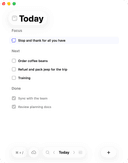
0Daily is a simple to-do list and daily planner designed for people who feel overwhelmed but still want to move forward. Instead of pushing you to do more, Daily gives you a quiet place to put things down, see what matters, and begin your day with clarity. When everything is in your head, it’s hard to focus. With Daily, you can unload tasks, reminders, and thoughts as they come — without needing to organize them right away. Then, when you're ready, you can look at everything with fresh eyes and choose what actually matters for today. Daily’s Today view shows only what needs your attention now, helping you return to a calm, grounded sense of focus. Anything that isn’t important anymore can be let go, and anything that still matters carries forward gently to the next day. Daily stays simple on purpose — just enough structure to support you, without creating complexity or pressure.
- 137
 0
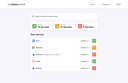
0Real-Time Status Monitoring Track the health of all your services with instant notifications and comprehensive dashboards. Live Dashboard View all your services at a glance with real-time status updates Instant Alerts Get notified immediately when your services experience issues Many Services Supported Track uptime for many services with more services added all the time
- 138
 0
0FixMyPDF is a free, privacy-first PDF toolkit offering over 75 professional PDF tools including compress, split, merge, convert, protect, and more. All file processing happens entirely on your device no uploads, no registration, and no tracking. FixMyPDF is designed for both personal and commercial use, supports all major browsers and devices, and has no file size or usage limits. Unlike other services, your files always stay private and secure as everything is handled in your browser, and we never see, store, or access your documents.
- 139
 0
0AIGC 160 is your dedicated portal to cutting-edge AI-generated content tools. From image and video generation to no-code app builders, voice tools, and creative automation—AIGC 160 highlights the most innovative platforms transforming how content is created. With a growing library of curated solutions across categories like marketing, design, productivity, and development, users can discover tools that supercharge creativity, streamline workflows, and unlock new possibilities. Whether you're a digital creator, business leader, or AI enthusiast, AIGC 160 helps you stay ahead of the curve—one powerful tool at a time.
- 140
 0
0Save Email as PDF is a Chrome extension that turns Gmail messages into PDF files in bulk. It works right inside Gmail: an Export button appears in the toolbar you already use, so there is no separate app to open, no file to import, and no sign-up. The free trial does not ask for a card. The workflow follows the way a mailbox is already organised. Filter by label, by search query, or by sender, tick the conversations that matter, and export hundreds of them in one click. Attachments can be saved alongside each PDF, so a thread and the invoice or contract attached to it stay together. Output is built to be filed, not just downloaded. Filenames come from a template you define out of sender, subject and date, which turns an export into something like 2026-01-15_Acme_Invoice.pdf instead of another folder of message.pdf. Page setup covers A4, Letter, Legal and custom sizes in portrait or landscape, which matters when the PDFs have to match a filing standard rather than merely look right on screen. Layout, fonts and inline images come through exactly as Gmail shows them, so quoted threads and signatures still read the way they did in the inbox. Where the conversion happens is the part most people check first. Every PDF is generated in your browser. The extension runs 100% locally, nothing is uploaded, and we never see a single email. For anyone who handles other people's correspondence that removes an awkward step: archiving a client's mail no longer means passing it through an outside converter. That is why it is used across legal, finance and accounting, real estate, HR and recruiting, healthcare and insurance, and by freelancers and agencies. Save Email as PDF is published on the Chrome Web Store, where it holds a 4.9-star rating and is trusted by more than 10,000 Gmail users. The free tier includes 30 conversions and lifetime upgrades. Unlimited export costs $4.99 a month, or $49.90 a year for anyone archiving on a regular schedule; both paid plans include priority support and can be cancelled at any time.
- 141
 0
0Orvo is a career intelligence platform for ambitious professionals who need better visibility, stronger stakeholder relationships, and sharper prep before high-stakes conversations. Unlike generic CRMs, Orvo is built for the relationships that drive your career — not a sales pipeline. Track key people, capture notes and voice memos, set follow-ups, and map your organisation visually with the Network Map. The AI Assistant draws on your relationship context to help you prep for executive meetings, navigate stakeholder politics, draft outreach, and plan your next move — without sounding like a generic chatbot. Features: People workspace · Network Map · Actions follow-through · Opportunities board · Insights dashboard · Context-aware AI Assistant. Built for managers, product managers, consultants, cross-functional leaders, and founders who treat relationships as a strategic asset.
- 142
 0
0Google Search Console lets you see your site's Google traffic and to help Google index your pages. You can view the number of search impressions, search clicks, keywords used, track links to your pages, check core web vitals, crawl stats etc. You can also manually request crawling of certain pages and upload site maps.
- 143
 0
0ToolDisk.com is a comprehensive, curated online directory designed to help users discover the best AI tools and SaaS solutions across various categories. It serves as a central hub for individuals, creators, and businesses seeking innovative software to enhance productivity, automate tasks, and foster growth.
- 144
 0
0CIOOffice is a modern cloud-based IT management and CIO workspace platform designed for CIOs, IT managers, and digital leaders. The platform centralizes IT strategy management, project portfolio management, budget control, software and vendor management, and performance analytics into one integrated system. With CIOOffice, organizations gain full transparency across their IT landscape, improve operational efficiency, reduce complexity, and enable data-driven decision-making. Real-time dashboards provide insights into IT performance, costs, risks, and strategic initiatives. CIOOffice supports digital transformation programs by standardizing IT governance processes, improving collaboration between business and IT teams, and enabling scalable IT operations. Built with enterprise security standards and GDPR compliance in mind, CIOOffice is ideal for enterprises and mid-sized companies looking to modernize their IT management.
- 145
 0
0А, чёрт, понял — cowork.ink это свой продукт, не форк OpenClaw. GoGogot — ваш open-source движок. Переписываю: Fast, lightweight AI agent platform — open-source alternative to OpenClaw for $20/mo OpenClaw is cool, but it's heavy, local-only, and eats through your API budget. We built something different. cowork.ink is a fast, lightweight AI agent that runs in the cloud. Real browser, real file system, real code execution — without the setup pain. Powered by our own open-source engine GoGogot, not a fork of anything. Why people pick us over OpenClaw: $20/mo, everything included. All top AI models (Claude, DeepSeek, Gemini) bundled in. No API keys to manage, no token bills, no cost surprises. OpenClaw on your own hardware? That's $1,600+ in month one. Lightweight and fast. No bloated desktop app eating your RAM. Your agent runs on an isolated cloud machine — your laptop stays clean. 60-second deploy. No Mac Mini, no Docker, no config files. Sign up, describe your task, done. Zero maintenance. We handle servers, updates, uptime, model routing. You handle your business. Full agent capabilities: real browser that searches, fills forms, extracts data. Works with any file — CSV, PDF, images, spreadsheets. Sends emails, schedules meetings, writes and runs code. Persistent memory across sessions. Cron-like scheduled tasks that run while you sleep. Built for teams, not just solo use. Admin panel with roles, container isolation, scales to 200 agents per node, 1-minute Kubernetes deployment. Enterprise security without enterprise complexity. 100% open-source. GoGogot is our engine — every line on GitHub. No telemetry, no black boxes. Self-host for free or let us run it for you. 6 ready-made roles: Customer Support, Personal Assistant, Content Writer, Data Analyst, DevOps Engineer, Bookkeeper — pre-configured and ready to go.
- 146
 0
0Open Source Software is a dynamic platform dedicated to providing open-source alternatives to well-known software projects. This initiative aims to foster a collaborative environment where users can explore, submit, and contribute to a comprehensive database of open-source solutions. Open Source alternatives to popular projects.
- 147
 0
0iMeett — Meetings On Autopilot,Data In Your Drive If you're a consultant, freelancer, or business owner, your day runs on meetings — client calls, discovery sessions, project check-ins, vendor negotiations. But the time you spend writing up notes, chasing action items, and trying to remember who said what is time you can't bill for. iMeett is an AI-powered meeting assistant that automatically transcribes, summarizes, and organizes your conversations, then saves everything directly back to your own Google Drive. No third-party servers storing your client discussions. No bots sitting in your calls. Just smart, private meeting intelligence delivered to you within minutes. Your Client Conversations Stay Private When you're handling sensitive client information, NDAs, or confidential business discussions, where your data lives matters. With iMeett, privacy isn't a feature we bolted on — it's how the product was built from the ground up. Your recordings live in your Google Drive. Transcripts and summaries are written back to your Google Drive. Audio is processed securely and never stored on our servers. Whether you're a consultant discussing proprietary strategy, a business owner negotiating a deal, or a freelancer handling client deliverables, iMeett keeps your data exactly where it belongs — with you. You stay compliant, and your clients stay confident. Smart Organization That Saves You Hours Every meeting is automatically tagged by AI with a concise, meaningful label — like "Client Onboarding" or "Q3 Budget Review" — making it effortless to find past conversations weeks or months later. You can customize tags, filter by client or project, and generate monthly recaps to track how engagements evolve over time. Need to prepare for a follow-up call? Pull up every meeting tagged under that client in seconds. With tailored persona modes for Sales, Consulting, Legal, Executive, and more, every summary is structured around what actually matters for your work — action items, deliverables, timelines, and who owns what.
- 148
 0
0DevIntern takes work from raw idea to merged pull request inside the tools your team already uses. @devintern/pm turns rough task descriptions, a paragraph of notes, a design, a bug report, into well-specced tickets your engineers can actually start from. @devintern/code picks those tickets up, implements them with your AI agent of choice, self-reviews its own diffs before a human sees them, and responds to reviewer comments on the resulting PR automatically. The problem. AI has made writing code fast, but everything around it (drafting the spec, opening the PR, replying to review nits, keeping the tracker in sync) still takes hours. That overhead is where the productivity gains evaporate. DevIntern compresses the whole cycle so the speed your AI tooling already gives you turns into shipped tickets, not just faster keystrokes. It also opens a path for non-technical teammates (PMs, designers, founders, support) to ship real code and features end-to-end, without waiting on engineering bandwidth. Who it's for. Engineering orgs that want their whole team to get measurably more effective without a multi-quarter platform migration. And individual contributors (engineers, PMs, founder-operators) who just want their own work to get done quicker, starting today, from their own laptop. Bring your own AI provider and keys. Runs locally for a single operator, or unattended on a server to drain the backlog 24/7. One-time perpetual licenses, not a subscription.
- 149
 0
0AI CX Stack is the most comprehensive directory of AI-powered products built for customer experience. It helps CX leaders, support managers, and operations teams discover and compare tools across categories like chatbots, helpdesk AI, voice AI, agent assist, knowledge base AI, sentiment analysis, quality assurance, self-service, email support AI, and multilingual support. Each listing includes pricing details, target audience, and category tags so teams can quickly shortlist the right solution. The directory is updated daily with new products, and a weekly newsletter reaches 1,200+ support professionals with curated picks. Product vendors can also submit their own tools for inclusion.
- 150
 0
0Reports.Camera is a professional camera reports application built for the film and television industry. It gives camera departments a modern, streamlined way to manage every aspect of their daily reporting - from logging individual takes to tracking equipment and generating production-ready reports. In any film production, the camera department is responsible for keeping detailed records of everything that happens on set. Every take, every roll of film, every lens change - it all needs to be documented accurately and shared with the rest of the production team. Traditionally, this has been done on paper or with clunky spreadsheets that are easy to lose and hard to share. Reports.Camera replaces that workflow with a purpose-built tool designed around how camera crews actually work. At its core, the app is organised around projects, which represent individual productions. Within each project, camera assistants can create and manage rolls, log slates and takes with all the relevant metadata, and keep track of their equipment inventory including film stock, digital magazines, lenses, and filters. The app supports both film and digital workflows. One of the key features is the ability to generate detailed PDF camera reports. At the end of each shoot day, the camera team needs to produce a report summarising everything that was shot - what rolls were used, how many takes were printed, what stock was consumed, and so on. Reports.Camera handles this automatically, pulling together all the data entered throughout the day into a clean, professional document that can be shared with producers, the lab, or post-production. The app is available on both desktop and mobile. The web application provides a full-featured interface for desktop users, while a native iOS app gives camera assistants the ability to log data directly on set from their phone or tablet. Both platforms sync in real time, so data entered on one device appears instantly on another. The iOS app also includes offline support, allowing crews to keep working even when they are on location without reliable internet - a common reality on film sets. Changes made offline are synced automatically once a connection is restored. For camera departments that use cloud storage, the app integrates with popular services, making it easy to upload and share reports directly from the app without extra steps. The app follows a straightforward pricing model with a free tier for basic use and a premium subscription
Frequently asked questions
AdBlock is a browser extension designed to eliminate distracting advertisements from your browsing experience. By blocking ads, it allows you to focus better on the content you want to see, making your online activities more enjoyable and less cluttered.
ChatGPT is highly regarded for its advanced conversational capabilities and versatility in various tasks, including coding and generating creative content. Users appreciate its ability to assist with programming tasks and its overall effectiveness, despite occasional issues like hallucinations and outages. The subscription fee of $20/month is often seen as worthwhile for the value it provides.
Block & Focus is a simple yet effective browser extension that allows you to block distracting websites for a specified period. You can customize which sites to whitelist or blacklist, helping you maintain focus and productivity during work hours.
Limit is a tool that helps you manage your time on distracting websites by allowing you to set daily limits on how long you can spend on each site. Once you reach your limit, the website is blocked, helping you avoid distractions and stay focused on your tasks.
Remote Index is a job board that provides a daily updated list of remote job opportunities across various fields. It is a valuable resource for professionals seeking flexible work arrangements and remote positions.
Remote OK is a popular job board that features a mix of engineering and non-engineering jobs. It offers a variety of filtering options, allowing users to search for jobs based on location, job type, salary, and benefits. New job postings are added daily, making it a dynamic resource for job seekers.
Momentum transforms your new tab page into a personalized dashboard that displays the time, weather, and a beautiful landscape photo. It includes productivity tools like a pomodoro timer, to-do lists, and focus time, making it not only visually appealing but also functional for enhancing productivity.
Wellfound, formerly known as Angel List Talent, focuses on startup jobs and offers extensive filtering options for job seekers. Users can save their searches and apply directly for jobs, making the job search process more efficient and tailored to their preferences.
Otta stands out by providing job recommendations that match your specific profile. Users set preferences such as location, salary, and role, and Otta curates job listings that fit these criteria, ensuring high-quality job offers that save time in the job search process.
Panem helps users manage their SaaS subscriptions by tracking spending and identifying unnecessary expenses. It connects to your bank account to analyze transactions, provides renewal reminders, and offers insights to help you make informed decisions about your subscriptions, ultimately saving you time and money.