Best Software for Professionals
The dependable stack that just gets work done.
The best software for working professionals — productivity, communication, documents, and workflow tools that hold up under a real workload, whatever your field.
- 101
 0
0Unite List brings the best AI and productivity tools together in one place—so you don’t have to waste time searching. Whether you're building, scaling, learning, or creating, Unite List helps you discover powerful apps to streamline your workflow, boost focus, and spark innovation. Browse a growing library of handpicked tools across 60+ categories including AI Assistants, Audio, Design, Marketing, Finance, Education, and more. Search by need, explore curated collections, or submit your own solution to get noticed. With a clean interface, clear summaries, and a mission to cut noise, Unite List is where creators, developers, and professionals find what really works. One list. Endless solutions.
- 102
 0
0Very Good Calendar Sync is a privacy-focused calendar synchronization application designed specifically for macOS users who need to manage multiple calendars without exposing sensitive personal information. The app helps users keep work, personal, and client calendars aligned automatically while maintaining complete control over their data. Unlike many cloud-based calendar synchronization services, Very Good Calendar Sync runs entirely on the user’s Mac and does not rely on external servers, third-party account linking, or data collection systems. The platform is built for professionals, freelancers, consultants, agencies, remote workers, and anyone managing multiple calendars across services like Google Calendar, Microsoft Outlook, Exchange, Apple iCloud, and CalDAV accounts. Its primary goal is to eliminate double bookings, scheduling conflicts, and the repetitive manual process of copying appointments between calendars. One of the app’s most important features is its privacy-first approach. Many competing calendar sync tools require users to connect their accounts through external services, giving third-party platforms access to sensitive schedule information. Very Good Calendar Sync avoids this entirely by using macOS Internet Accounts directly. This means the user’s Google, Microsoft, and Apple credentials remain securely managed by macOS itself rather than being shared with another company. The app acts only as a local synchronization tool running on the device. The software offers two different synchronization modes: cloning and redacting. In clone mode, calendar events are copied with full details, including titles, descriptions, and locations. In redact mode, the app hides sensitive event details and simply marks time blocks as “busy.” This allows users to share availability across calendars without revealing confidential information, private appointments, meeting topics, or personal activities. It is especially useful for consultants, freelancers, and employees who want colleagues or clients to see their availability without exposing personal details. Another major strength of Very Good Calendar Sync is its simplicity and lightweight design. The application lives quietly in the macOS menu bar and works automatically in the background. Once users configure their synchronization rules, the app continuously monitors calendar changes and keeps calendars aligned without additional manual work. There are no complicated dashboards, cloud portals, or external configuration systems involved. The app also provides advanced filtering options that allow users to control exactly what gets synchronized. Users can choose specific weekdays, weekends, or custom days for syncing. They can also apply time-range filters, such as syncing only work hours or business-related schedules. Each synchronization pair can have its own independent rules, making the system highly flexible for complex scheduling situations. Very Good Calendar Sync works directly with macOS Calendar.app, meaning users do not need to install additional calendar software or manually configure API integrations. If a calendar account already appears inside the native macOS Calendar application, it automatically works with the sync tool. This includes Google Calendar, Outlook, Exchange, iCloud, and other supported calendar providers. The platform strongly emphasizes the concept of “on-device synchronization.” Since all syncing occurs locally on the user’s Mac, no calendar data passes through external servers owned by the company. There are no analytics, no tracking systems, and no middleman infrastructure involved. This architecture improves privacy, reduces security risks, and gives users greater confidence that sensitive scheduling information remains under their control. Very Good Calendar Sync is particularly valuable for people managing multiple professional roles or client relationships. Freelancers can synchronize multiple client calendars, employees can avoid conflicts between work and personal schedules, and agencies can coordinate internal and external calendars more efficiently. The app is designed to make calendar availability accurate and reliable without adding complexity. The pricing model is straightforward and user-friendly. Users receive one free synchronization between two calendars, allowing them to test the platform without payment. Paid plans include monthly, annual, and lifetime options, all of which support unlimited synchronizations, all calendar providers, and usage across multiple Macs under a single user license. Overall, Very Good Calendar Sync is a lightweight, secure, and privacy-focused macOS application that simplifies calendar management while keeping user data fully local. By combining automated synchronization, detailed privacy controls, flexible filtering, and seamless macOS integration, the app provides a practical solution for anyone trying to manage multiple calendars without sacrificing security or personal privacy.
- 103
 0
0VersQ is a modern AI-powered document translation platform designed to make professional-grade translation faster, more affordable, and far more efficient than traditional methods. Built for individuals and businesses that regularly work with multilingual content, VersQ focuses on translating entire documents — not just text snippets — while preserving formatting, structure, and visual integrity. From PDFs and Word documents to EPUB files and spreadsheets, the platform supports a wide range of formats, ensuring users can work seamlessly across different types of content. One of the most distinctive features of VersQ is its flat-rate pricing model. Unlike many translation services that charge per character or per word, VersQ offers a subscription-based approach starting at a low monthly cost. This allows users to translate large volumes of content without worrying about escalating costs. Whether translating a short report or a 200-page document, the pricing remains predictable, making it especially appealing for professionals who need consistent and scalable translation solutions. At the core of VersQ’s performance is its multi-engine AI system. Users can choose from more than 50 advanced AI models, including high-end options like Claude Opus and GPT-4, as well as more budget-friendly alternatives. This flexibility allows users to select the most suitable model depending on the complexity, tone, or purpose of their document. By leveraging multiple AI engines, VersQ delivers accurate translations that maintain context, tone, and cultural nuances. Another key advantage is its ability to preserve formatting. Unlike many translation tools that output plain text, VersQ ensures that translated documents retain their original layout, including tables, images, headings, and design elements. This eliminates the need for manual reformatting, saving significant time and effort. The final result closely mirrors the original document, making it ready for immediate use. VersQ is also optimized for handling large and complex documents. Files with hundreds of pages are automatically divided into semantic sections, translated in parallel, and then reassembled with consistency across the entire document. This process ensures that terminology remains uniform throughout, which is especially important for technical, legal, or academic content. To further enhance accuracy and efficiency, VersQ includes built-in tools such as Translation Memory and Glossary management. These features allow users to store and reuse specific terms, phrases, and translations across multiple projects. Over time, this creates a personalized translation system that becomes more consistent and tailored to the user’s needs. A side-by-side editor also enables users to review and refine translations before finalizing them. The platform supports over 20 languages and is trusted by a growing community of professionals, including developers, researchers, and business owners. With high ratings in translation quality, ease of use, and value for money, VersQ has positioned itself as a reliable alternative to both expensive human translation agencies and traditional per-character AI services. Overall, VersQ stands out as a powerful and practical solution for document translation. By combining advanced AI technology, flexible pricing, and user-focused features, it simplifies a process that is often complex and costly. Whether you need to translate business reports, academic papers, or digital publications, VersQ provides a fast, accurate, and scalable way to handle multilingual content with confidence.
- 104
 0
0Launch Scroll is your gateway to tomorrow’s most effective SaaS and AI tools. Designed for makers, startups, and professionals alike, our platform curates high-impact software that helps you work smarter, move faster, and scale easier. With categorized listings across dozens of industries—like marketing, education, e-commerce, productivity, and more—Launch Scroll makes it easy to find solutions tailored to your goals. From cutting-edge AI assistants to niche productivity tools, every listing is handpicked for innovation and usability. Whether you're building your first product or optimizing a growing team, Launch Scroll connects you with tools that truly deliver. Have something to share? Submit your tool and get discovered by a global network of early adopters and decision-makers.
- 105
 0
0readywhen is an AI-powered productivity platform designed to help professionals automatically capture, organize, and complete work commitments made across their daily communication tools. Rather than functioning as a traditional task manager that depends on manual input, the platform continuously observes work conversations, meetings, emails, and documents to identify promises, action items, and responsibilities as they naturally occur. Once a commitment is detected, readywhen gathers the relevant context, prepares the appropriate follow-up work, and presents it for the user's approval before anything is sent or finalized. The platform is built around the idea that much of a leader's work is not contained within a single project management system. Important commitments are often made during Slack conversations, email threads, meeting discussions, document comments, customer calls, and collaborative planning sessions. readywhen connects with these existing tools and monitors them in the background, allowing it to recognize statements such as promises to send updates, prepare reports, approve requests, draft proposals, or follow up with customers. Instead of expecting users to remember every commitment themselves, the platform automatically turns these moments into actionable work. One of the platform's most distinctive features is its ability to move beyond simple task extraction. After identifying a commitment, readywhen retrieves supporting information from connected applications and prepares the next deliverable automatically. Depending on the situation, this may include drafting an email reply, generating a project brief, creating a meeting summary, preparing a customer proposal, assembling a board update, writing a team announcement, or producing another document related to the commitment. Users review the generated output, make any necessary edits, and approve it before it is delivered, ensuring they remain in complete control of all final decisions. The website demonstrates integrations with a variety of workplace applications commonly used by modern organizations. These include Gmail, Slack, Notion, Google Meet, Fathom, Granola, and other collaboration platforms where important business conversations take place. By combining information from these sources, readywhen builds a unified understanding of ongoing responsibilities without requiring users to manually copy information between systems or maintain separate task lists. The platform is particularly targeted toward founders, executives, managers, sales professionals, and business leaders who frequently make commitments throughout the day while juggling meetings, customer conversations, planning sessions, and internal communication. Instead of interrupting existing workflows, readywhen operates quietly in the background, allowing professionals to focus on strategic work while reducing the risk of forgotten follow-ups, missed deadlines, or overlooked responsibilities. Ease of adoption is another recurring theme throughout the website. The platform emphasizes a setup process that takes only a few minutes, requires little or no configuration, and introduces virtually no learning curve. There are no complex automation builders or custom workflows to maintain. Once connected to supported workplace applications, the system begins identifying commitments and preparing work automatically, allowing users to benefit from AI assistance without redesigning their existing processes. The website also places significant emphasis on maintaining user control. Although readywhen proactively captures commitments and prepares deliverables, it does not automatically send emails, publish updates, or complete actions without approval. Every draft remains under the user's supervision, ensuring that AI serves as an assistant rather than an autonomous decision-maker. This approval-first approach is presented as a way to increase productivity while preserving accuracy, accountability, and confidence.
- 106
 0
0An Exclusive list of the best Mac apps and tools. You can submit your Mac app or tool to get exposure to an engaged audience of Mac enthusiasts, developers, and professionals seeking new apps and tools to explore.
- 107
 0
0Power Up Tools is your daily productivity boost in digital form. Built for doers, makers, and curious minds, our platform curates practical, powerful AI and SaaS tools that help you get more done—faster. Whether you're launching, writing, designing, selling, or just exploring what’s possible, we connect you to solutions that save time, simplify tasks, and spark creativity. Browse by category or dive into our featured tools to uncover hidden gems and emerging favorites. Power Up Tools isn’t just about discovery—it’s about momentum. Submit your tool to reach an audience that values efficiency, innovation, and getting things done. Every click brings you closer to smarter workflows.
- 108
 0
0SubmitMatic Directory is a curated platform built to help founders, entrepreneurs, marketers, and digital professionals discover high-quality modern tools in one organized place. Instead of searching across countless websites and outdated software lists, users can explore a carefully selected collection of tools designed to improve productivity, accelerate growth, and simplify business operations. The platform is created for people who want to find the right solutions faster without wasting time on cluttered marketplaces or generic directories. At its core, SubmitMatic Directory functions as a specialized discovery hub for modern software. It features more than 97 tools across 26 categories, making it easier for users to browse solutions based on their exact needs. Categories include productivity and management, software, AI assistants, marketing, business and finance, education, customer support, and SEO. This category-based structure allows visitors to quickly navigate through the directory and identify tools that match their goals, whether they are looking to automate tasks, improve workflows, or scale a startup. The platform focuses on quality over volume. Every listing inside SubmitMatic Directory is presented with a clear description that explains what the product does, who it serves, and its pricing model. This gives users immediate insight into whether a tool is relevant before clicking deeper. Instead of overwhelming users with endless options, the directory highlights software that is modern, useful, and aligned with current digital business trends. This makes the experience more efficient for founders who need practical tools rather than endless browsing. SubmitMatic Directory also reflects the rise of AI-powered products and emerging SaaS platforms. Many of the featured tools include advanced artificial intelligence capabilities that help businesses automate repetitive work, generate content, analyze data, or improve customer interactions. By including innovative products alongside established categories, the directory stays relevant to a fast-changing software landscape where users constantly need better ways to work. A major strength of SubmitMatic Directory is its clean and accessible user experience. Visitors can search tools by name or description, explore by category, or browse featured listings directly from the homepage. The layout is simple and intuitive, helping users move through the directory quickly. Whether someone is searching for a PDF toolkit, an AI marketing assistant, a design platform, or a financial research tool, the directory makes discovery straightforward and efficient. Beyond being a discovery platform, SubmitMatic Directory also connects directly with the larger SubmitMatic ecosystem. For startup founders, the platform is part of a broader service that helps businesses submit their products to over 100 directories. This means companies can not only discover tools through the directory but also use SubmitMatic to increase their own visibility, strengthen backlink profiles, and improve domain authority across the web. The directory therefore serves both users looking for software and founders looking for exposure. The curated nature of SubmitMatic Directory makes it especially useful for startups and solo builders who often struggle to find trustworthy recommendations. Instead of relying on random search results, users gain access to a platform that organizes software by real business value. Each category is structured to help users understand what tools do best, making comparison easier and decision-making faster. Ultimately, SubmitMatic Directory is more than a list of tools. It is a modern software discovery platform designed for builders who want to work smarter and grow faster. By combining curated listings, category-based navigation, and a strong connection to startup promotion, SubmitMatic Directory helps users discover the right technology while supporting the growth of innovative digital products.
- 109
 0
0AuthenCIO is an AI-driven software discovery and evaluation platform designed to help businesses find the most suitable tools quickly and confidently. By analyzing a company’s needs, preferences, and workflows, AuthenCIO delivers a curated shortlist of software recommendations along with side-by-side comparisons, feature breakdowns, and expert insights. The platform significantly reduces time spent researching vendors, prevents costly poor-fit purchases, and empowers smarter decision-making for IT, operations, and leadership teams.
- 110
 0
0Endura is the first comprehensive digital estate planning platform specifically designed to assist individuals and families in securely managing, storing, and distributing their digital assets. In an era where our lives are increasingly tied to the digital world, Endura offers a sophisticated and modern solution for managing online accounts, documents, and electronic assets. This platform ensures that these important digital possessions are handled according to an individual's specific wishes after their passing, providing peace of mind and security. An individual can upload their digital assets, assign beneficiaries to those assets, and invite executors to carry out their wishes on the platform. Whether you're organizing your personal digital life or offering professional estate planning services, Endura empowers you to manage and protect digital legacies effectively. This makes it an essential tool in the modern age, where digital assets are as important as physical ones.
- 111
 0
0Acid Tools is a curated directory featuring the latest and most powerful AI and productivity tools across a wide range of categories, including content creation, SEO, business, marketing, design, development, and more. Whether you're a freelancer, startup founder, marketer, or tech enthusiast, Acid Tools helps you discover top-rated software that boosts efficiency and creativity. Easily browse through categories like AI assistants, image editing, chatbots, analytics, and productivity to find tools that match your goals. With fresh listings and featured recommendations, Acid Tools is your one-stop platform for staying ahead in the fast-evolving world of tech and automation.
- 112
 0
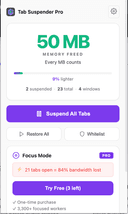
0Zovo is a privacy-first platform offering a growing collection of powerful browser extensions and online tools designed to improve productivity, development workflows, and everyday browsing. Built entirely by independent developer Michael Lip, Zovo represents a unique alternative to corporate-controlled software ecosystems. Instead of prioritizing data collection, advertising, or investor demands, Zovo focuses on delivering useful, efficient, and privacy-respecting tools shaped directly by user feedback. The platform currently provides more than 20 Chrome extensions and a suite of browser-based utilities that run locally on the user’s device. This local-first approach ensures that sensitive information never leaves the browser, reinforcing Zovo’s commitment to privacy and security. Users can access tools such as JSON Formatter Pro for formatting and validating data, Clipboard History Pro for storing and retrieving copied content, Tab Suspender Pro for optimizing memory usage, and Web Scraper Lite for extracting structured data from websites without writing code. These tools are available through the Chrome Web Store and are continuously improved based on community input. A defining feature of Zovo is its community-driven development model. Members can request new features, vote on upcoming tools, and gain early access to extensions before public release. This direct communication creates a transparent and collaborative environment where users actively shape the product roadmap. Unlike traditional software companies, users can contact the developer directly via email or Discord, ensuring fast responses and personalized support without automated systems or ticket queues. Zovo also offers online versions of many tools, allowing users to perform tasks instantly without installing extensions. These include color pickers, Base64 encoders, timestamp converters, password generators, and text utilities. All tools run entirely within the browser, providing fast performance and eliminating the need for external processing or data transfer. Michael Lip brings extensive experience to the platform, having spent over a decade building software for enterprise clients and earning more than $400,000 through freelance work on Upwork with a 100% success rate. His proven track record and hands-on development approach ensure consistent updates, reliable performance, and long-term support. Zovo operates on a simple and transparent pricing model, offering both monthly subscriptions and lifetime access options. Members receive full access to all existing extensions, future releases, and direct communication with the developer. This ensures that users not only benefit from current tools but also from continuous innovation and expansion. Overall, Zovo stands out as a modern, independent software platform built on transparency, user empowerment, and privacy. By combining powerful browser tools, community-driven development, and a privacy-first philosophy, Zovo delivers a streamlined and trustworthy solution for developers, writers, designers, researchers, and anyone seeking to enhance their browser experience without compromising control or personal data.
- 113
 0
0A directory of writer tools, including AI-generators, AI-detectors, and plagiarism scoring systems. Our curated collection highlights the most popular writing tools, ranked according to user satisfaction and effectiveness. We've categorized these tools into four main segments: AI Writing Assistants & Generators, Plagiarism Checkers & AI Detectors, Copywriting Tools & Content Generators, and Book Writing & Creative Writing Tools. Each section is designed to help you find the right stack for your specific writing and copywriting needs.
- 114
 0
0Ash List is a comprehensive directory of AI tools, SaaS platforms, and software designed to boost productivity, streamline workflows, and automate tasks. Whether you're a developer, entrepreneur, marketer, or creative, Ash List helps you discover the best tools tailored to your needs. Explore hundreds of categorized tools—from AI assistants and image generators to marketing, education, finance, and beyond. Stay ahead with curated featured tools, up-to-date listings, and real user data. If you’ve built a product, submit it to reach an active tech-savvy community, gain exposure, and track analytics on views and clicks. With an intuitive interface and growing database, Ash List makes it easy to find and compare cutting-edge solutions to supercharge your projects and business. Discover the future of software, all in one place.
- 115
 0
0SaneBar is a Mac app that gives you control over your menu bar again. If your menu bar is crowded, icons disappear behind the notch, or sensitive apps sit visible all day, SaneBar fixes that without turning your desktop into a project. You can hide icons, keep important ones visible, and bring hidden ones back instantly when you need them. The core experience is simple: click to reveal hidden icons, search for any menu bar app by name, and organize your layout with drag and drop. You can choose between a compact icon panel or a full second menu bar, depending on how you like to work. SaneBar also supports keyboard navigation, hotkeys, and automatic re-hide so your menu bar stays clean without extra effort. For people who want more control, Pro adds stronger privacy and automation tools. You can lock hidden icons behind Touch ID or your password, create profiles for different contexts like work or presentations, and set smart triggers based on things like app launches, Wi‑Fi, Focus Mode, battery state, or external displays. You can also group icons, assign per-icon hotkeys, customize appearance, adjust spacing, and automate actions with AppleScript and Shortcuts. SaneBar is built with a privacy-first approach. Your data stays on your device by default. There is no tracking-based business model, no subscription pressure, and no unnecessary cloud dependency. Network activity is limited to essentials like app updates, license checks, and anonymous product-health counts. It also makes switching easy. If you are coming from Bartender or Ice, SaneBar can import compatible layouts and settings so you do not have to start over. In short, SaneBar is for Mac users who want a cleaner menu bar, faster access to the icons they actually use, and stronger control over the ones they would rather keep hidden. It is simple enough to use in seconds, but powerful enough to become part of your everyday workflow.
- 116
 0
0GoReqly (https://goreqly.com) is a modern requirements management and workflow organization platform designed to help businesses, development teams, project managers, and organizations streamline the process of gathering, managing, and tracking requirements. In today’s competitive business environment, successful projects depend on clear communication, accurate documentation, and efficient collaboration. GoReqly provides a centralized digital solution that helps teams organize requirements, reduce misunderstandings, and maintain better control throughout the project lifecycle.
- 117
 0
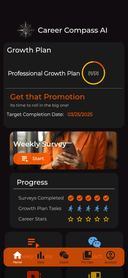
0Career Compass AI is your always-on career coach, built for ambitious early-career professionals. Whether you’re job hunting, aiming for a promotion, or managing workplace stress, our AI delivers personalized advice, growth plans, and practical advice you can use immediately. Features include a Career Development Plan builder, KPI tracking, weekly feedback in coaching emails, and on-demand messaging available 24/7. Unlike generic career apps, Career Compass AI adapts to your unique goals, skill set, and timeline—helping you act with clarity and confidence. Used by professionals across industries, Career Compass AI empowers you to grow faster, communicate better, and navigate challenges like a pro.
- 118
 0
0Appsy Tools is your go-to directory for discovering powerful AI and productivity tools across every category imaginable. From AI assistants and e-commerce optimizers to video editors and image generators, Appsy Tools helps users find exactly what they need to streamline work, boost creativity, and save time. With a clean interface, regularly updated listings, and categorized filters, users can explore tools for design, marketing, writing, analytics, and more. Whether you're a developer, entrepreneur, content creator, or student, Appsy Tools connects you with reliable, innovative solutions that enhance daily tasks and long-term goals. Featured and newest tools are highlighted, while sponsored picks offer even more visibility to standout products. Submit your own tool and join a growing network of creators and tech enthusiasts. Let Appsy Tools be your starting point for smarter, faster, and better digital productivity.
- 119
 0
0OmniCanvas is a visual note-taking and knowledge management platform designed to help individuals and teams transform scattered information into organized, actionable work. Instead of treating notes as static documents that are eventually forgotten, OmniCanvas follows a complete workflow centered around four stages: capture, clarify, act, and review. This approach helps users not only collect information from multiple sources but also identify decisions, assign next steps, preserve important context, and revisit their work when it matters most. The platform combines visual organization, AI-assisted analysis, and flexible note management into a single workspace that supports both creative thinking and practical execution. At the heart of OmniCanvas is an infinite visual canvas that allows users to organize information naturally rather than forcing ideas into traditional document structures. Users can freely combine typed notes, handwritten sketches, diagrams, sticky notes, images, PDFs, web clips, drawings, and connected objects within the same workspace. This flexible layout makes it easier to explore relationships between ideas, brainstorm concepts, manage research, and plan projects without being constrained by linear pages or rigid note hierarchies. One of the platform's standout capabilities is its meeting capture system. Instead of requiring third-party meeting bots to join video calls, OmniCanvas can record microphone and system audio directly while generating live transcripts. Meeting recordings remain connected to the rest of the workspace, allowing users to view transcripts alongside decisions, action items, open questions, supporting documents, and visual notes. AI-powered tools automatically generate summaries, identify key discussion points, extract action items, and answer questions about recorded conversations, making meetings significantly easier to review and reference later. OmniCanvas places a strong emphasis on turning information into action rather than simply storing notes. After capturing information, users are encouraged to clarify important decisions, confirm follow-up tasks, document unresolved questions, and write concise summaries that explain why each note matters. Built-in review workflows periodically resurface important notes, ensuring that projects, meeting outcomes, and research do not disappear into forgotten archives. This structured review process helps users close open loops, archive completed work, and maintain an organized knowledge base over time. The platform also offers powerful knowledge retrieval features designed for growing information libraries. Users can search both exact keywords and related concepts using semantic search, while organizing content through folders, tags, backlinks, graph views, Kanban boards, tables, and traditional note collections. Version history and synchronization ensure that changes are preserved across devices, making it easy to access both current and previous versions of important projects. OmniCanvas is built with flexibility and privacy in mind. The platform follows a local-first philosophy, allowing users to keep their notes on their own devices while optionally enabling cloud synchronization for convenience. For users with higher security requirements, end-to-end encryption can be enabled on selected folders, ensuring that even OmniCanvas cannot access protected content. Complete export capabilities further ensure that users retain ownership of their information without becoming locked into a proprietary ecosystem. Unlike many productivity applications that attempt to replace every other note-taking tool, OmniCanvas is designed to complement existing workflows. Users can continue taking quick handwritten notes in applications such as Apple Notes, GoodNotes, Preview, or even on paper, then import the relevant material into OmniCanvas for long-term organization, project management, and follow-through. This companion approach allows people to use whichever capture method feels most natural while maintaining a centralized system for important knowledge.
- 120
 0
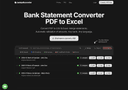
0Bank PDF Converter is the best way to convert bank statements from PDF to Excel (XLSX) and CSV formats. Built for accountants, bookkeepers, attorneys, and business owners who need reliable transaction data without time-consuming manual entry or delays waiting for clients to resend statements in a format you can use. Never let a statement slow you down again! AUTOMATIC VALIDATION Unlike basic PDF converters, Bank PDF Converter automatically verifies every transaction against the statement's opening and closing balances. This validation catches errors before they reach your spreadsheet—critical to avoid mistakes that put your reputation on the line. WORKS WITH ANY BANK No matter which bank issued the statement or what language it's in, Bank PDF Converter handles it. The custom AI-powered extraction adapts to different statement formats, currency conventions (whether 1,234.56 or 1.234,56), and both text-based and image-based or scanned PDFs. If a particular format isn't converting well, email us and we'll tune the system to handle it. SIDE-BY-SIDE COMPARISON Verify your converted data with confidence. The built-in comparison view displays your original PDF alongside the extracted transactions, letting you quickly spot-check accuracy before exporting. BATCH PROCESSING & MERGING Upload multiple statements at once and optionally merge them into a single file (CSV or Excel). For easy organization, each download is automatically named using the statement date, bank name, and account holder. CLEAN, CONSISTENT OUTPUT All transactions export in a standardized three-column format: Date, Description, and Amount. Debits appear as negative values; credits as positive. This normalized format imports cleanly into QuickBooks, Excel, Google Sheets, and most accounting software. ENTERPRISE-GRADE SECURITY Your financial documents deserve serious protection. All files are encrypted in transit and at rest using industry-standard protocols. Data is automatically deleted on a recurring interval—currently every 72h. FLEXIBLE PRICING Free tier to check it works for your needs. Discounts for annual subscriptions. TRUSTED BY PROFESSIONALS CPAs, tax preparers, forensic accountants, and attorneys rely on Bank PDF Converter for client work where accuracy is non-negotiable. Save hours of manual data entry and eliminate the risk of transcription errors. Try Bank PDF Converter free at bankpdfconverter.com
- 121
 0
0Owlbot offers a cutting-edge AI-powered chatbot service that seamlessly integrates with your data to provide instant responses for you, your customers, or your team. Deploying a tailor-made AI chatbot with Owlbot is straightforward, enhancing both customer service and the efficiency of data analysis with minimal effort. Our AI chatbot is capable of handling 90% of inquiries from customers, clients, or employees effortlessly (>90 languages supported). It can import data from a variety of sources, including documents, markdown files, and webpages, ensuring that you receive precise, immediate answers. Additionally, you can connect the chatbot to your internal tools to access private data in real-time and provide timely responses. You can choose from 12 different large language models (LLMs), such as Mistral, OpenAI, and Anthropic, to find the option that best fits your needs. Owlbot also captures the details of interested visitors, helping you compile a list of potential leads and expand your business opportunities.
- 122
 0
0documentorium is a no-nonsense document engine built for tradespeople. Electricians, plumbers, contractors, HVAC techs, roofers, and other service professionals use it to create professional business documents without starting from a blank page. Choose from 200+ guided templates across 26 trade categories — quotes, estimates, invoices, work orders, bids, contracts, service reports, inspection reports, proposals, warranties, change orders, and more. Each form has fields built specifically for your trade, not generic blanks. Fill out a guided form and get a clean, print-ready PDF in seconds. Every document is saved automatically and searchable by client, date, or form type. Edit any document and regenerate the PDF anytime. Fields auto-prefill from your past documents to save time on repeat work. No required fields. No bloated project management. No forced onboarding. Just open, fill, download. $99/year for unlimited access to all documents and forms. 30-day free trial, no credit card required.
- 123
 0
0SaaS Software is a directory of all software-as-a-service products. It includes regular, open source, and AI-bases SaaS. There is a ton of category-based filters such as billing, fashion & style, CMS, video etc. It's free to submit your own product.
- 124
 0
0QuickSigner is a modern electronic signature platform designed to help businesses, professionals, and teams sign, send, and manage documents online quickly and securely. The platform simplifies the traditionally slow process of collecting signatures by providing a streamlined digital workflow that allows agreements, contracts, and other important documents to be signed from anywhere and on any device. Whether users need to handle occasional paperwork or manage high volumes of business documents, QuickSigner offers an efficient and legally compliant solution. The platform supports both PDF and Word documents, making it easy for users to upload existing files and prepare them for signing. After uploading a document, users can add recipients and place signature fields, date fields, text inputs, stamps, and other required elements exactly where they are needed. Signers receive a secure link and can complete the signing process without creating an account or installing additional software. This frictionless experience helps organizations reduce delays and complete agreements faster. One of QuickSigner’s strongest advantages is its focus on simplicity without sacrificing functionality. Businesses can track the status of every document in real time, monitor signing progress, send reminders, and receive completed documents instantly once all parties have signed. This helps eliminate manual follow-ups and significantly improves operational efficiency. Security and compliance are central to the platform. QuickSigner utilizes AATL (Adobe Approved Trust List) electronic signatures and follows the PAdES standard for Advanced Electronic Signatures. The company is ISO/IEC 27001:2022 certified, demonstrating its commitment to information security, privacy protection, and cybersecurity best practices. The platform also complies with major electronic signature regulations, including eIDAS in the European Union, the ESIGN Act in the United States, and relevant legislation in the United Kingdom. This ensures that signed documents are legally recognized and enforceable across multiple jurisdictions. QuickSigner offers flexible pricing plans to accommodate different needs. The free plan is ideal for occasional users, while the Business and Professional plans provide higher document limits, additional signer capacity, templates, team collaboration features, API access, bulk sending capabilities, advanced document management tools, and priority support. Organizations with specialized requirements can also request customized enterprise solutions tailored to their workflow and compliance needs. For developers and software companies, QuickSigner includes API functionality that enables electronic signature workflows to be integrated directly into existing applications and business systems. This makes it possible to automate document processing, improve customer experiences, and reduce administrative overhead. Overall, QuickSigner is a powerful yet affordable e-signature solution that helps organizations accelerate agreement workflows, reduce paperwork, improve compliance, and create a more efficient document signing experience. By combining ease of use, legal validity, strong security standards, and scalable features, it provides businesses with a practical platform for managing electronic signatures in today's digital-first environment.
- 125
 0
0WA Reminders is a powerful and practical productivity tool designed to simplify communication through WhatsApp by allowing users to schedule messages and reminders in advance. Built for both individuals and businesses, this app eliminates the need to manually send messages at specific times, making it especially useful for professionals who rely on timely communication with clients, customers, or teams. Whether you are using regular WhatsApp or WhatsApp Business, WA Reminders integrates seamlessly into your workflow and helps ensure that no important message is ever forgotten. One of the core features of WA Reminders is its simple and familiar setup process. Users can connect their WhatsApp account by scanning a QR code, similar to how WhatsApp Web works. This makes onboarding fast and intuitive, even for those who are not particularly tech-savvy. Once connected, users gain access to a clean interface where they can begin scheduling messages immediately without complicated configurations. The platform offers two flexible ways to schedule messages. First, users can integrate with Google Calendar, allowing them to create reminders directly from calendar events. By simply adding a phone number in international format within the event title or description, the system automatically detects it and schedules a message accordingly. This feature is particularly valuable for professionals such as healthcare providers, consultants, or service-based businesses who already manage appointments through calendars. Alternatively, users can schedule messages directly within the WA Reminders app itself. In this case, the app automatically imports the full contact list from the user’s phone, saving time and reducing the risk of errors when entering contact details manually. Another key advantage of WA Reminders is that all messages are sent from the user’s own WhatsApp number. This ensures authenticity and trust, as recipients receive messages from a familiar contact rather than an unknown system. After the scheduled message is delivered, users can continue the conversation naturally within WhatsApp, maintaining a personal and direct communication experience. The app also includes several advanced features that enhance its usefulness. It supports recurring message scheduling, making it ideal for sending regular reminders such as appointment confirmations, payment notices, or follow-ups. Additionally, it synchronizes contacts automatically and works with tools like Calendly through Google Calendar integration, creating a connected ecosystem for managing schedules and communications. WA Reminders is especially appreciated by business owners and teams across different industries. Testimonials highlight how clinics, service providers, and companies use the tool to manage appointments, reduce missed payments, and improve overall organization. By centralizing scheduling and messaging, the app helps teams save time and focus on more important tasks. In terms of pricing, WA Reminders offers flexible plans tailored to different needs. From solo entrepreneurs to growing businesses, users can choose a plan based on the number of messages they need to send each month. Each plan includes essential features like contact syncing and calendar integration, with higher tiers allowing for greater message volume and scalability. Additionally, the platform provides a 14-day money-back guarantee, giving users the confidence to try the service risk-free. Overall, WA Reminders stands out as a reliable and efficient solution for anyone looking to automate WhatsApp communication. By combining ease of use, powerful scheduling capabilities, and seamless integration with existing tools, it helps users stay organized, improve communication, and save valuable time in their daily operations.
Frequently asked questions
AdBlock is a browser extension designed to eliminate distracting advertisements from your browsing experience. By blocking ads, it allows you to focus better on the content you want to see, making your online activities more enjoyable and less cluttered.
ChatGPT is highly regarded for its advanced conversational capabilities and versatility in various tasks, including coding and generating creative content. Users appreciate its ability to assist with programming tasks and its overall effectiveness, despite occasional issues like hallucinations and outages. The subscription fee of $20/month is often seen as worthwhile for the value it provides.
Block & Focus is a simple yet effective browser extension that allows you to block distracting websites for a specified period. You can customize which sites to whitelist or blacklist, helping you maintain focus and productivity during work hours.
Limit is a tool that helps you manage your time on distracting websites by allowing you to set daily limits on how long you can spend on each site. Once you reach your limit, the website is blocked, helping you avoid distractions and stay focused on your tasks.
Remote Index is a job board that provides a daily updated list of remote job opportunities across various fields. It is a valuable resource for professionals seeking flexible work arrangements and remote positions.
Remote OK is a popular job board that features a mix of engineering and non-engineering jobs. It offers a variety of filtering options, allowing users to search for jobs based on location, job type, salary, and benefits. New job postings are added daily, making it a dynamic resource for job seekers.
Momentum transforms your new tab page into a personalized dashboard that displays the time, weather, and a beautiful landscape photo. It includes productivity tools like a pomodoro timer, to-do lists, and focus time, making it not only visually appealing but also functional for enhancing productivity.
Wellfound, formerly known as Angel List Talent, focuses on startup jobs and offers extensive filtering options for job seekers. Users can save their searches and apply directly for jobs, making the job search process more efficient and tailored to their preferences.
Otta stands out by providing job recommendations that match your specific profile. Users set preferences such as location, salary, and role, and Otta curates job listings that fit these criteria, ensuring high-quality job offers that save time in the job search process.
Panem helps users manage their SaaS subscriptions by tracking spending and identifying unnecessary expenses. It connects to your bank account to analyze transactions, provides renewal reminders, and offers insights to help you make informed decisions about your subscriptions, ultimately saving you time and money.