Best Tools for Remote Workers
Your office is wherever the Wi-Fi is — gear up accordingly.
The best tools for remote workers — remote job boards, meeting helpers, and the apps that keep distributed work organized wherever you log in from.
- 51
 0
0SprintKit is a lightweight sprint and task management platform built for indie founders, small teams, and fast-moving projects. It helps you plan sprints, organize tasks, and track progress without the clutter and complexity of traditional project management tools. SprintKit focuses on clarity, speed, and usability—making it easy to see what needs to be done, what’s in progress, and what’s shipped. It’s ideal for teams that want just enough structure to stay focused and productive, without slowing down their workflow.
- 52
 0
0Refinder is an AI-powered search and assistant solution designed to empower companies and professionals. By seamlessly connecting personal and company applications, Refinder provides a unified search interface that uncovers data you didn’t even know was there. Leveraging advanced AI and Retrieval-Augmented Generation (RAG) technology, Refinder searches across your organization and deep within your content to deliver critical knowledge precisely when your employees need it. Refinder includes pre-built integrations for essential tools like Confluence, Jira, Notion, Google Drive, and Gmail, making it easy to implement and ready to use right out of the box. With Refinder, you’ll quickly and accurately find the information you need, enabling your team to make better-informed decisions in strategic planning and customer interactions. How can Refinder help you? - Optimize HR operations with AI-powered insights, centralizing essential employee information, performance reviews, and onboarding materials in one platform. - Equip your sales and marketing teams with real-time insights into customer needs, fostering more impactful engagement and customer connections. - Enhance your customer service with AI-driven insights that help agents resolve issues faster with relevant, real-time solutions. - Streamline processes from troubleshooting to product development, reducing bottlenecks and enabling quicker, data-driven decision-making. Refinder offers flexible plans to fit teams of any size—from startups to large enterprises—allowing you to scale seamlessly as your needs grow. Transform your company’s data into powerful insights with Refinder—your AI search engine and assistant for the modern enterprise.
- 53
 0
0GlobCall is a browser-based international calling platform for businesses and individuals. Call any phone number in 200+ countries from $0.02/min, straight from your browser. Local phone numbers in 100+ countries, shared team calling, pay as you go. The best Skype alternative built for global customer support, sales and outbound calling. Agentic AI voice agents coming to handle real international calls 24/7, in any language, any timezone.
- 54
 0
0OpenCulture is a Slack app that enables anonymous Q&A sessions within organizations, fostering open communication and psychological safety. It allows team members to ask questions without fear of judgment while providing moderators the tools to maintain productive discussions. Key Features - Anonymous Question Submission: Users can easily submit questions using the /ask_ama command, with complete anonymity guaranteed - even from moderators - AI-Powered Moderation: Automatic content filtering to screen out inappropriate content and maintain professional discussions - Human Moderation Queue: Designated moderators can review and approve questions before they're posted publicly - Similar Question Detection: AI identifies duplicate questions to prevent redundancy and save leadership time answering repeated queries - Run team-wise AMAs: Flexible controls to enable Q&A sessions in any channel with configurable moderators and designated responders - Privacy-First Design: Built with security and anonymity as core principles, ensuring psychological safety for all participants Benefits - Increased Employee Engagement: Employees who feel heard are 4.6x more likely to perform their best work - Better Retention: Reduces turnover by giving employees a voice to express concerns - Enhanced Team Communication: Creates psychological safety that Google research shows is crucial for successful teams - Actionable Insights: Helps leadership understand organizational challenges and sentiment - Time Efficiency: Smart duplicate detection prevents repetitive questions and saves leadership time
- 55
 0
0ZenCall is a browser-based international calling platform that lets you make high-quality voice calls to mobile phones and landlines worldwide—directly from your laptop or desktop. No apps, SIM cards, or subscriptions are required. With ZenCall, you pay only for what you use through transparent, per-minute pricing, making it ideal for individuals, remote workers, and small teams who need reliable global calling without long-term contracts. Calls start in seconds, work across countries, and are optimized for clarity and stability. ZenCall is designed for simplicity and control: instant access, clear call rates, and usage-based billing. Whether you’re contacting clients, customers, or family abroad, ZenCall offers an easy, cost-effective alternative to traditional international calling services.
- 56
 0
0JustPDF is a fast, lightweight, and privacy-focused platform that offers a complete suite of PDF tools directly in your browser. Unlike many traditional PDF services that require file uploads to external servers, JustPDF operates entirely on-device. This means your files never leave your computer, ensuring maximum privacy and security. The platform is designed for users who want quick, efficient document processing without compromising sensitive information or going through complicated sign-up processes. At its core, JustPDF emphasizes simplicity and speed. Users can perform essential tasks like compressing PDFs in just seconds by simply dragging and dropping their files into the interface. There is no need to create an account, and the platform offers free daily usage without adding watermarks to your files. This frictionless experience makes it ideal for both casual users and professionals who need reliable tools without unnecessary steps. Additionally, because everything runs locally in the browser, many features can even work offline, adding another layer of convenience. One of the strongest aspects of JustPDF is its wide range of tools. It goes far beyond simple compression by offering features such as merging multiple PDFs into one file, splitting documents into separate pages, and converting PDFs into editable formats like Word or Excel. Users can also convert images into PDFs, rotate documents, flatten files, and unlock protected PDFs. This versatility makes it a one-stop solution for handling almost any common PDF-related task. In addition to standard tools, JustPDF incorporates more advanced and modern features. For example, users can add electronic signatures to documents, making it useful for business and legal workflows. Another standout feature is the “Chat with PDF” functionality, which uses AI to allow users to ask questions about the content of a document. This transforms static files into interactive resources, making it easier to extract information quickly and efficiently. The platform also offers OCR (Optical Character Recognition) capabilities, allowing users to scan and convert images or non-editable PDFs into searchable and editable text. This is particularly useful for digitizing physical documents or working with scanned files. Combined with its conversion tools, this feature significantly expands the usability of documents that would otherwise be difficult to edit or analyze. JustPDF follows a freemium model, where users can access many tools for free with limited daily usage, while unlimited access is available through an affordable subscription. Despite this, the free version remains highly functional and does not impose intrusive limitations like watermarks, which are common in other services. This makes it an attractive option for users who need occasional PDF processing without committing to a paid plan. Overall, JustPDF stands out by combining speed, privacy, and functionality into a single, browser-based solution. It removes the common frustrations associated with PDF tools—such as slow uploads, privacy concerns, and complicated interfaces—and replaces them with a seamless, user-friendly experience. Whether for personal use, academic work, or professional tasks, JustPDF provides a reliable and secure way to manage and manipulate PDF documents efficiently.
- 57
 0
0aiME brings the power of open-source Large Language Models (LLMs) directly to your iPhone, iPad, or Android device. Designed to be your constant, private companion, aiME ensures you have access to a smart assistant regardless of your location, connectivity, or network status. It perfectly complements your daily workflow, stepping in when you need absolute privacy or find yourself off the grid. *Always Available, Zero Connectivity Required* Whether you are at 30,000 feet in Airplane Mode, exploring remote hiking trails, or traveling internationally without a data plan, aiME is ready to help. There is no Wi-Fi hunting, no roaming fees, and no dead zones. It’s on-device intelligence that travels with you everywhere, ensuring you can write, plan, and brainstorm without interruption. *Ironclad Privacy by Design* Some thoughts, drafts, and sensitive information are meant for your eyes only. Because aiME processes everything locally, your data never leaves your phone. We have eliminated the need for servers, which means zero risk of data leaks or corporate tracking. Every prompt and conversation is processed securely on your device, giving you total peace of mind. *Reliability When You Need It Most* When the unexpected happens—like severe storms, power outages, or natural disasters—aiME remains a dependable resource. It acts as a reliable tool for organizing information, problem-solving, and staying focused even when the local network goes down. *Fair & Transparent Pricing* We believe in straightforward pricing. aiME operates on a freemium model where the core features are free forever. If you want to take your experience to the next level, you can unlock our premium features with a single, one-time purchase. No monthly subscriptions, no paywalls on your basic chats, and no hidden fees. Core Features: Curated Model Library: Download and seamlessly switch between top open-source models optimized for mobile performance. Free-Forever Core: Enjoy unlimited offline AI chats without ever entering a credit card. One-Time Premium Unlock: Pay once for advanced capabilities—never worry about a recurring subscription. Limitless Versatility: Ideal for creative writing, private journaling, travel planning, offline research, and emergency preparedness. Download aiME today and experience the freedom of having a private, reliable AI assistant right in your pocket.
- 58
 0
0Very Good Calendar Sync is a privacy-focused calendar synchronization application designed specifically for macOS users who need to manage multiple calendars without exposing sensitive personal information. The app helps users keep work, personal, and client calendars aligned automatically while maintaining complete control over their data. Unlike many cloud-based calendar synchronization services, Very Good Calendar Sync runs entirely on the user’s Mac and does not rely on external servers, third-party account linking, or data collection systems. The platform is built for professionals, freelancers, consultants, agencies, remote workers, and anyone managing multiple calendars across services like Google Calendar, Microsoft Outlook, Exchange, Apple iCloud, and CalDAV accounts. Its primary goal is to eliminate double bookings, scheduling conflicts, and the repetitive manual process of copying appointments between calendars. One of the app’s most important features is its privacy-first approach. Many competing calendar sync tools require users to connect their accounts through external services, giving third-party platforms access to sensitive schedule information. Very Good Calendar Sync avoids this entirely by using macOS Internet Accounts directly. This means the user’s Google, Microsoft, and Apple credentials remain securely managed by macOS itself rather than being shared with another company. The app acts only as a local synchronization tool running on the device. The software offers two different synchronization modes: cloning and redacting. In clone mode, calendar events are copied with full details, including titles, descriptions, and locations. In redact mode, the app hides sensitive event details and simply marks time blocks as “busy.” This allows users to share availability across calendars without revealing confidential information, private appointments, meeting topics, or personal activities. It is especially useful for consultants, freelancers, and employees who want colleagues or clients to see their availability without exposing personal details. Another major strength of Very Good Calendar Sync is its simplicity and lightweight design. The application lives quietly in the macOS menu bar and works automatically in the background. Once users configure their synchronization rules, the app continuously monitors calendar changes and keeps calendars aligned without additional manual work. There are no complicated dashboards, cloud portals, or external configuration systems involved. The app also provides advanced filtering options that allow users to control exactly what gets synchronized. Users can choose specific weekdays, weekends, or custom days for syncing. They can also apply time-range filters, such as syncing only work hours or business-related schedules. Each synchronization pair can have its own independent rules, making the system highly flexible for complex scheduling situations. Very Good Calendar Sync works directly with macOS Calendar.app, meaning users do not need to install additional calendar software or manually configure API integrations. If a calendar account already appears inside the native macOS Calendar application, it automatically works with the sync tool. This includes Google Calendar, Outlook, Exchange, iCloud, and other supported calendar providers. The platform strongly emphasizes the concept of “on-device synchronization.” Since all syncing occurs locally on the user’s Mac, no calendar data passes through external servers owned by the company. There are no analytics, no tracking systems, and no middleman infrastructure involved. This architecture improves privacy, reduces security risks, and gives users greater confidence that sensitive scheduling information remains under their control. Very Good Calendar Sync is particularly valuable for people managing multiple professional roles or client relationships. Freelancers can synchronize multiple client calendars, employees can avoid conflicts between work and personal schedules, and agencies can coordinate internal and external calendars more efficiently. The app is designed to make calendar availability accurate and reliable without adding complexity. The pricing model is straightforward and user-friendly. Users receive one free synchronization between two calendars, allowing them to test the platform without payment. Paid plans include monthly, annual, and lifetime options, all of which support unlimited synchronizations, all calendar providers, and usage across multiple Macs under a single user license. Overall, Very Good Calendar Sync is a lightweight, secure, and privacy-focused macOS application that simplifies calendar management while keeping user data fully local. By combining automated synchronization, detailed privacy controls, flexible filtering, and seamless macOS integration, the app provides a practical solution for anyone trying to manage multiple calendars without sacrificing security or personal privacy.
- 59
 0
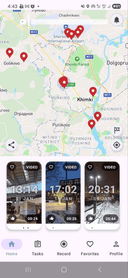
0🌍 See any place in the world — right now. Now & Here connects people who need real-time video with locals who can capture it instantly. 📹 Share public videos from your location or request custom videos from hotels, properties, events, or any place nearby. 💰 Complete video tasks and earn by helping others see reality. ✅ Perfect for travelers, real estate checks, and remote verification. 👉 Try it now on Google Play and explore the world live!
- 60
 0
0Retext is a macOS text expander that simplifies repetitive typing by using AI-driven shortcuts. Unlike traditional expanders, Retext doesn’t require memorizing shortcuts; it intelligently suggests them across any app or browser. Key features include a native macOS design, universal compatibility, and reliable functionality, ensuring it’s always available. By organizing snippets intuitively, Retext boosts productivity, providing users with a seamless typing experience. Whether for professional emails, coding, or customer support, Retext is the ultimate tool to streamline repetitive tasks.
- 61
 0
0Earth.fm is a kind of a digital retreat where you can immerse yourself in the sounds of nature. It’s designed to help people unwind, reconnect with the Earth, meditate, and focus. Key Features: - Nature Soundscapes: A curated collection of soothing nature recordings from around the globe. - Interactive Soundmap: Explore sounds from different regions using a world map. - Mobile App: Enjoy nature's sounds wherever you are. - Quiet Places: Discover and learn about tranquil locations worldwide. - Support for Recordings: Encourages new contributions through grants. Benefits: Earth.fm offers a natural way to reduce stress, enhance focus, and nurture a connection with the environment. Whether you’re looking to meditate, work, or relax, the platform’s serene soundscapes provide an easy escape from the busyness of daily life. Use Cases: Perfect for anyone needing a moment of calm, Earth.fm is ideal for background sounds during work or study, meditation sessions, or simply unwinding after a long day. It’s also a great resource for nature lovers who want to explore the sounds of different ecosystems around the world.
- 62
 0
0Scribbl is an AI meeting assistant that transforms conversations into searchable, shareable knowledge while you focus on what matters - the conversation. With smart summaries, instant video highlights, and seamless integrations, your meetings become actionable intelligence without the busy work. Key Features - Smart Transcription & Recording: Crystal-clear transcripts and video capture without intrusive bots or complicated setup - AI-Powered Summaries: Automatically extracts key topics, decisions, and action items from every conversation - Instant Navigation: Jump to any moment using AI-enhanced video search and topic breakdown - Team Intelligence: Automated sharing rules and collections ensure insights reach the right people - Business Tool Integration: Seamlessly syncs with HubSpot, Pipedrive, Slack, and Google Drive Benefits - Time Reclaimed: Stop taking manual notes and focus fully on your conversations - Perfect Memory: Never miss a detail with searchable transcripts and smart summaries - Effortless Documentation: Meeting insights automatically flow into your CRM and team tools - Enhanced Collaboration: Keep everyone aligned with intelligent sharing and organized collections - Client Success: Streamline follow-ups and ensure every client interaction is captured and actionable Use Case Use Scribbl to automatically capture, summarize, and distribute critical meeting insights across CRM and collaboration platforms. For example, A sales team uses Scribbl to automatically document client meetings, with notes flowing directly into HubSpot and key moments shared instantly with account managers. Team leads gain visibility through automated collections, while clients receive polished follow-ups faster - all without anyone taking manual notes.
- 63
 0
0BEON.tech is a talent platform that connects the top 1% of Latin American software engineers with remote, full-time roles at U.S. companies that meet Silicon Valley standards. Developers on the platform access long-term opportunities with competitive salaries, cutting-edge tech stacks, and AI-driven workflows. Recognized as the #1 Staff Augmentation provider by Clutch and a certified Great Place to Work for Millennials, BEON.tech helps top engineers grow their global careers—without leaving home.
- 64
 0
0JustOpenClaw delivers a fully-hosted, production-ready OpenClaw AI assistant with zero setup required. Your private, 24/7 intelligent agent understands and executes natural language commands to automate workflows, assist with coding, control browsers, manage smart home devices, and seamlessly integrate with hundreds of apps like Slack, Discord, and GitHub. We handle all backend complexity, security updates, and scaling, providing an end-to-end encrypted, fully private instance. This enables anyone to instantly and securely automate their entire digital life—no technical expertise needed—and unlock new levels of personal and team productivity.
- 65
 0
0Bitvoiper offers a cutting-edge online phone service that leverages Cloud VoIP technology to facilitate seamless communication. Users can make and receive calls directly from their browsers, making it an ideal solution for remote work and businesses seeking flexible communication options. The platform's unique username system acts as a proxy, allowing users to set up call forwarding to their phone numbers, ensuring they never miss important calls. Additionally, Bitvoiper supports Virtual numbers, providing users with the capability to forward calls to traditional phone lines. This flexibility is complemented by robust Call Center features, enabling businesses to manage their phone communications from anywhere in the world efficiently.The service is tailored for freelancers, customer communication, and community engagement, offering a versatile solution for various professional needs. Bitvoiper's innovative approach to online communication ensures that businesses can maintain high levels of connectivity and customer engagement without being tied to physical locations. With its user-friendly interface and comprehensive features, Bitvoiper is poised to become a leader in the online communication industry, providing reliable and efficient solutions for modern businesses.
- 66
 0
0Pauso is a bot that joins your Google Meet, Zoom, or Microsoft Teams calls and guides your team through a 5-minute meditation session. Just create a calendar event, add hello@pauso.com as a guest, and the bot shows up automatically. It shares a calming screen, plays guided audio, and leaves when the session ends. No app downloads. No individual accounts. No new tools to learn. Your team just joins a meeting they already know how to use. Teams use Pauso for daily morning resets, pre-meeting focus, post-lunch recharges, and end-of-week wind-downs. Research shows 5-minute group sessions reduce workplace stress by 38% and burnout by 36%. Free for up to 4 sessions per month - upgrade to unlock more.
- 67
 0
0Most SOP tools charge €30–50 a month whether you document once or fifty times. But nobody documents evenly — you document in bursts. A new hire starts. A system migrates. A colleague hands over their work and leaves in three weeks. MySOP.guru is a Chrome extension that records what you do. Click through the process once and it captures every step with screenshots, then exports a branded document in PDF, DOCX, HTML or PPTX. Your logo, your colours. You pay €5 per document. No subscription, no seats, no annual commitment. Bundles bring it down to €3.60 if you document more often. Built for anyone who documents occasionally: HR onboarding, finance close procedures, ops handovers, IT system changes, consultant deliverables.
- 68
 0
0Freeway is a free, privacy-first voice-to-text app for Mac that lets you turn speech into text anywhere you’re typing. Just press a hotkey, start talking, and Freeway transcribes your speech in real time. When you release the key, the text is automatically inserted exactly where your cursor is — in any app, any website, any text field. No switching windows, no copy-paste, no interruptions to your flow. Speaking is up to 4× faster than typing, which means ideas move from your mind to the screen at the speed they appear. Whether you’re writing emails, messages, notes, documents, or forms, Freeway removes friction and keeps you in motion.
- 69
 0
0FractionalQuest is an AI-powered platform that connects experienced executives with fractional, interim, and remote C-suite opportunities across the UK and beyond. Designed to eliminate traditional recruiter friction, it uses intelligent matching and voice-first search to pair candidates with roles that genuinely fit their skills, availability, and career goals. The platform focuses on transparency, lower hiring fees, and faster placements, offering companies direct access to a vetted network of senior leaders while helping executives discover relevant, high-quality opportunities in finance, technology, marketing, operations, and more.
- 70
 0
0NotesnChat is an all-in-one productivity and organization platform designed to help individuals manage their daily lives more efficiently. Combining note-taking, task management, reminders, document scanning, communication tools, and privacy features into a single mobile application, NotesnChat eliminates the need to switch between multiple apps and provides a unified workspace for both personal and professional use. Built for modern users who need to capture ideas quickly and stay organized throughout the day, NotesnChat offers a seamless experience across tasks, notes, and communication. Whether users are managing work projects, planning personal goals, organizing study materials, or simply keeping track of everyday responsibilities, the platform provides the tools needed to stay focused and productive. One of the platform’s standout features is its intelligent reminder system. Users can create reminders for tasks, events, appointments, deadlines, and important notes, ensuring that nothing important gets overlooked. These smart reminders help users maintain consistency, improve time management, and stay on top of their responsibilities without unnecessary stress. NotesnChat also includes a powerful note-taking environment that supports rich content creation. Users can create detailed notes containing text, images, audio recordings, and various formatting options, making it suitable for everything from quick thoughts and shopping lists to meeting notes, research materials, and long-term planning. The platform is designed to capture information quickly while keeping it organized and easy to access. Task management is another core component of the application. Users can create task lists, organize projects, track progress, and manage daily activities through a simple and intuitive interface. Whether handling personal to-do lists or coordinating larger workflows, NotesnChat helps users stay organized and maintain clarity on priorities. To further improve productivity, the platform offers Smart Organization capabilities that automatically categorize and organize notes, tasks, and conversations. This intelligent structure reduces clutter and allows users to find important information faster, helping them focus on their work instead of managing folders and files manually. NotesnChat also includes integrated communication features such as in-app messaging and voice calling. These tools allow users to communicate directly within the platform without switching to external applications, making collaboration faster and more convenient. Teams, colleagues, friends, and family members can share information, discuss tasks, and stay connected within a single environment. For users who regularly work with physical documents, the built-in File Scan feature enables quick document digitization. Users can scan receipts, contracts, study materials, forms, and other documents, converting them into clear and shareable digital files that can be stored alongside notes and tasks. Privacy and security are major priorities within the platform. The Ghost Lock feature provides advanced protection for sensitive notes, tasks, and personal information, giving users greater control over their private data. Combined with secure synchronization across devices, users can access their information anytime while maintaining confidence in its protection. NotesnChat serves a wide variety of users, including students, professionals, entrepreneurs, creators, teams, and anyone seeking a more organized lifestyle. Students can manage class notes and assignments, professionals can organize meetings and projects, entrepreneurs can track ideas and business plans, and creators can capture inspiration whenever it strikes. By bringing reminders, task management, note-taking, document scanning, communication, organization, and privacy features together into a single application, NotesnChat provides a complete productivity ecosystem that helps users work smarter, stay organized, and manage their lives with greater efficiency and control.
- 71
 0
0NovaVoice is Your Voice OS that lets you work at the speed of thought. Typing is slow. Switching apps breaks focus. Formatting wastes time. Speak at 200+ wpm, get context-aware text. Hit hotkey, ask anything without googling. Execute actions without switching apps (just with voice commands). NovaVoice remembers contacts, addresses, links. NovaVoice writes, answers, and acts across your desktop.
- 72
 0
0QuickSigner is a modern electronic signature platform designed to help businesses, professionals, and teams sign, send, and manage documents online quickly and securely. The platform simplifies the traditionally slow process of collecting signatures by providing a streamlined digital workflow that allows agreements, contracts, and other important documents to be signed from anywhere and on any device. Whether users need to handle occasional paperwork or manage high volumes of business documents, QuickSigner offers an efficient and legally compliant solution. The platform supports both PDF and Word documents, making it easy for users to upload existing files and prepare them for signing. After uploading a document, users can add recipients and place signature fields, date fields, text inputs, stamps, and other required elements exactly where they are needed. Signers receive a secure link and can complete the signing process without creating an account or installing additional software. This frictionless experience helps organizations reduce delays and complete agreements faster. One of QuickSigner’s strongest advantages is its focus on simplicity without sacrificing functionality. Businesses can track the status of every document in real time, monitor signing progress, send reminders, and receive completed documents instantly once all parties have signed. This helps eliminate manual follow-ups and significantly improves operational efficiency. Security and compliance are central to the platform. QuickSigner utilizes AATL (Adobe Approved Trust List) electronic signatures and follows the PAdES standard for Advanced Electronic Signatures. The company is ISO/IEC 27001:2022 certified, demonstrating its commitment to information security, privacy protection, and cybersecurity best practices. The platform also complies with major electronic signature regulations, including eIDAS in the European Union, the ESIGN Act in the United States, and relevant legislation in the United Kingdom. This ensures that signed documents are legally recognized and enforceable across multiple jurisdictions. QuickSigner offers flexible pricing plans to accommodate different needs. The free plan is ideal for occasional users, while the Business and Professional plans provide higher document limits, additional signer capacity, templates, team collaboration features, API access, bulk sending capabilities, advanced document management tools, and priority support. Organizations with specialized requirements can also request customized enterprise solutions tailored to their workflow and compliance needs. For developers and software companies, QuickSigner includes API functionality that enables electronic signature workflows to be integrated directly into existing applications and business systems. This makes it possible to automate document processing, improve customer experiences, and reduce administrative overhead. Overall, QuickSigner is a powerful yet affordable e-signature solution that helps organizations accelerate agreement workflows, reduce paperwork, improve compliance, and create a more efficient document signing experience. By combining ease of use, legal validity, strong security standards, and scalable features, it provides businesses with a practical platform for managing electronic signatures in today's digital-first environment.
- 73
 0
0RecordFlow is a cloud-based automation platform designed to solve one of the most common frustrations faced by Zoom users: managing and backing up cloud recordings. The service automatically transfers Zoom cloud recordings directly to Google Drive as soon as meetings are completed, eliminating the need for manual downloads, uploads, organization, and cleanup. Built for coaches, consultants, educators, businesses, and IT administrators, RecordFlow provides a reliable and secure way to archive important recordings while reducing administrative overhead and protecting valuable content. The platform addresses a significant limitation of Zoom’s cloud storage system. Many Zoom users quickly reach storage limits, especially organizations that record meetings, training sessions, coaching calls, webinars, or lectures on a regular basis. Once storage limits are reached, new recordings may be blocked, creating operational challenges and forcing users to spend time manually managing files. RecordFlow automates this entire process by continuously moving recordings from Zoom into Google Drive, ensuring that storage limitations do not interrupt business operations. One of the platform’s biggest advantages is its simplicity. Users only need to connect their Zoom account, select a Google Drive destination, and allow the system to handle the rest automatically. Once configured, every new cloud recording is detected and transferred to the chosen Google Drive folder within minutes of the meeting ending. Users receive email notifications containing direct links to their archived recordings, making it easy to access, organize, and share content whenever needed. RecordFlow supports both individual users and entire organizations. Individual professionals such as coaches, consultants, and online educators can automatically archive their own recordings without any ongoing effort. For larger teams, Zoom administrators can install the platform at the account level, choose a central Google Drive location, and manage recording backups for multiple team members. The system automatically creates separate folders for opted-in users, allowing organizations to maintain structure and control while simplifying file management across departments. Reliability is a major focus of the platform’s design. RecordFlow incorporates automatic retries, chunked file transfers, and recurring safety checks to ensure recordings are transferred successfully even when dealing with large files or temporary connection issues. Features such as smart deduplication prevent duplicate uploads by identifying recordings that have already been archived. This ensures efficient storage usage while reducing clutter and confusion within Google Drive. The platform supports every major file type generated by Zoom cloud recordings. Video recordings in MP4 format, audio files, transcripts, chat logs, and caption files are all automatically synchronized. This comprehensive approach ensures that organizations retain not only meeting recordings but also the supporting materials that provide additional context and value. Having transcripts and chat logs available alongside recordings is especially useful for training, documentation, compliance, and content repurposing purposes. Security and privacy are central components of RecordFlow’s architecture. Users authenticate through their existing Zoom and Google accounts, meaning the platform never has access to account passwords. All data transfers are encrypted both in transit and at rest, and recordings are transferred directly to the user's Google Drive environment. Importantly, RecordFlow states that recordings are not permanently stored on its own servers, reducing privacy concerns and helping organizations maintain greater control over sensitive information. The platform is particularly valuable for businesses that depend heavily on recorded content. Coaches can automatically deliver session recordings to clients, educators can preserve lectures for future access, business teams can maintain searchable archives of internal meetings, and IT departments can implement company-wide backup policies without requiring constant manual intervention. By removing repetitive file management tasks, teams can focus on more important work while ensuring that critical recordings remain accessible and protected. RecordFlow is currently offered free during its beta period, allowing both individual users and organizations to access the platform’s core functionality without cost. Users who join during the beta phase are promised access to special founding-member pricing when paid plans eventually launch. This makes it an attractive option for organizations looking to establish an automated archiving workflow before future pricing changes occur. Overall, RecordFlow is a specialized automation solution that simplifies Zoom recording management by creating a seamless connection between Zoom and Google Drive. Through automatic synchronization, enterprise-grade reliability, comprehensive file support, and strong security practices, the platform helps individuals and organizations eliminate manual workflows, reduce storage-related issues, and maintain secure backups of their most important meeting content.
- 74
 0
0meetergo is the most comprehensive meeting and engagement platform, replacing Calendly, Chili Piper, Doodle and more—cutting costs by up to 70%. Powered by calgent© AI, just CC calgent@meetergo.com on any email to auto-qualify leads, schedule only with the right prospects, update your CRM in real time, and send personalized follow-ups. meetergo includes video booking pages, unlimited events, multilingual support, custom availability, approval modes, payments, QR sharing, and built-in secure video calls. Teams get round robin, collective events, routing forms, team pages, SAML SSO, and resource booking. Added value includes digital business cards (NFC, QR, Wallet, branded profiles) and customer portals with calendars, reviews, and engagement tools. With automation, lead enrichment, CRM sync, workflows, and an API platform, meetergo unifies scheduling, intelligence, and growth—fully GDPR-compliant and EU-hosted.
- 75
 0
0Recall.ai is the API for meeting recording. Our API captures recordings, transcripts and metadata from meeting platforms like Zoom, Microsoft Teams, and Google Meet. Use Recall.ai’s Meeting Bot API to send meeting bots to calls, or the Desktop Recording SDK to build a desktop app that can record meetings. Recall.ai is recording infrastructure for thousands companies, helping companies build recording features in days instead of months.
Frequently asked questions
Some of the best job boards for remote work include Remote OK, which features a mix of engineering and non-engineering jobs with daily updates. Another great option is Wellfound, focusing on startup jobs with extensive filtering options. Otta is unique as it matches jobs to your profile, ensuring high-quality offers tailored to your preferences.
To avoid distractions while working remotely, tools like Limit and Block & Focus can help. Limit allows you to set time restrictions on distracting websites, while Block & Focus lets you block specific sites for a designated period. Both tools are effective in helping you maintain focus during work hours.
When choosing a remote job board, look for features such as filtering options by location, job type, and salary. Platforms like Wellfound and Himalayas offer extensive filtering capabilities, while Otta provides personalized job matches based on your profile. Additionally, consider boards that allow you to save searches and receive job alerts.
Using a job board focused on diversity, like PowerToFly, can connect you with companies committed to creating inclusive work environments. This can enhance your job search experience by aligning you with organizations that value diversity and inclusion, which can lead to a more fulfilling work environment.
To improve productivity while working remotely, consider using tools like Momentum, which provides a personalized dashboard with productivity features such as a pomodoro timer and to-do lists. Additionally, setting clear work hours and using website blockers can help maintain focus and reduce distractions.