Best Productivity Apps
This list showcases a variety of productivity apps designed to enhance efficiency and streamline tasks. These applications offer tools for time management, organization, and collaboration, catering to diverse needs in both personal and professional settings.
- 1
 1
1The Chore Tracker App for Kids That Makes Parenting Easier Transform daily chores into a rewarding routine with a kids chore app and family chore app designed to motivate children and simplify family life. Kikaroo is a simple kids chore app that motivates children with chores and exciting rewards. Kids earn points for completing chores and can redeem them for fun rewards. It’s a simple and effective family chore app that helps everyone stay organised.
- 2
 0
0NotesnChat is an all-in-one productivity and organization platform designed to help individuals manage their daily lives more efficiently. Combining note-taking, task management, reminders, document scanning, communication tools, and privacy features into a single mobile application, NotesnChat eliminates the need to switch between multiple apps and provides a unified workspace for both personal and professional use. Built for modern users who need to capture ideas quickly and stay organized throughout the day, NotesnChat offers a seamless experience across tasks, notes, and communication. Whether users are managing work projects, planning personal goals, organizing study materials, or simply keeping track of everyday responsibilities, the platform provides the tools needed to stay focused and productive. One of the platform’s standout features is its intelligent reminder system. Users can create reminders for tasks, events, appointments, deadlines, and important notes, ensuring that nothing important gets overlooked. These smart reminders help users maintain consistency, improve time management, and stay on top of their responsibilities without unnecessary stress. NotesnChat also includes a powerful note-taking environment that supports rich content creation. Users can create detailed notes containing text, images, audio recordings, and various formatting options, making it suitable for everything from quick thoughts and shopping lists to meeting notes, research materials, and long-term planning. The platform is designed to capture information quickly while keeping it organized and easy to access. Task management is another core component of the application. Users can create task lists, organize projects, track progress, and manage daily activities through a simple and intuitive interface. Whether handling personal to-do lists or coordinating larger workflows, NotesnChat helps users stay organized and maintain clarity on priorities. To further improve productivity, the platform offers Smart Organization capabilities that automatically categorize and organize notes, tasks, and conversations. This intelligent structure reduces clutter and allows users to find important information faster, helping them focus on their work instead of managing folders and files manually. NotesnChat also includes integrated communication features such as in-app messaging and voice calling. These tools allow users to communicate directly within the platform without switching to external applications, making collaboration faster and more convenient. Teams, colleagues, friends, and family members can share information, discuss tasks, and stay connected within a single environment. For users who regularly work with physical documents, the built-in File Scan feature enables quick document digitization. Users can scan receipts, contracts, study materials, forms, and other documents, converting them into clear and shareable digital files that can be stored alongside notes and tasks. Privacy and security are major priorities within the platform. The Ghost Lock feature provides advanced protection for sensitive notes, tasks, and personal information, giving users greater control over their private data. Combined with secure synchronization across devices, users can access their information anytime while maintaining confidence in its protection. NotesnChat serves a wide variety of users, including students, professionals, entrepreneurs, creators, teams, and anyone seeking a more organized lifestyle. Students can manage class notes and assignments, professionals can organize meetings and projects, entrepreneurs can track ideas and business plans, and creators can capture inspiration whenever it strikes. By bringing reminders, task management, note-taking, document scanning, communication, organization, and privacy features together into a single application, NotesnChat provides a complete productivity ecosystem that helps users work smarter, stay organized, and manage their lives with greater efficiency and control.
- 3
 0
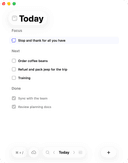
0Daily is a simple to-do list and daily planner designed for people who feel overwhelmed but still want to move forward. Instead of pushing you to do more, Daily gives you a quiet place to put things down, see what matters, and begin your day with clarity. When everything is in your head, it’s hard to focus. With Daily, you can unload tasks, reminders, and thoughts as they come — without needing to organize them right away. Then, when you're ready, you can look at everything with fresh eyes and choose what actually matters for today. Daily’s Today view shows only what needs your attention now, helping you return to a calm, grounded sense of focus. Anything that isn’t important anymore can be let go, and anything that still matters carries forward gently to the next day. Daily stays simple on purpose — just enough structure to support you, without creating complexity or pressure.
- 4
 0
0Minimalist UI focused on building good habits first. · Visual tracking, smart reminders, and neat home screen widgets keep you committed. Habits is a simple habit tracker for iOS to build better habits that last. Completely private with a pleasant, minimalist UI and handy tools, it helps create and track meaningful habits, and most importantly stay consistent. MINIMALIST UI Building habits shouldn't be complicated. Our free simple habit tracker is designed to help you focus on progress, not perfection, without the clutter. TOOLS TO BUILD GOOD HABITS From a habit checklist to a visual habit calendar, we provide the tools you need to transform your life. Habits gives you the structure to monitor your triggers and stay disciplined. HABITS APP FEATURES: · Habit Streak Tracker: Watch your habit streak grow as you complete tasks. Visual feedback keeps you accountable and motivated to never break the chain. · Beautiful Habit Calendar: Visualize your progress with an intuitive, color-coded heatmap. See your long-term consistency at a glance. · Smart Habit Reminder: Never forget a task again. Set a custom habit reminder for any time of day to stay on track. · Flexible Habit Counter: Track good habits and bad habits your way. Support for multiple completions per day and custom schedules (daily, weekly, or specific days). · Habits Widget: Access your simple goal tracker directly from your home screen for even faster logging. At the end of the day, Habits is just a simple habit tracker that works. Use it as a habit checklist for your morning routine or a habit breaker app to improve your wellness. It’s your choice.
- 5
 0
0Very Good Calendar Sync is a privacy-focused calendar synchronization application designed specifically for macOS users who need to manage multiple calendars without exposing sensitive personal information. The app helps users keep work, personal, and client calendars aligned automatically while maintaining complete control over their data. Unlike many cloud-based calendar synchronization services, Very Good Calendar Sync runs entirely on the user’s Mac and does not rely on external servers, third-party account linking, or data collection systems. The platform is built for professionals, freelancers, consultants, agencies, remote workers, and anyone managing multiple calendars across services like Google Calendar, Microsoft Outlook, Exchange, Apple iCloud, and CalDAV accounts. Its primary goal is to eliminate double bookings, scheduling conflicts, and the repetitive manual process of copying appointments between calendars. One of the app’s most important features is its privacy-first approach. Many competing calendar sync tools require users to connect their accounts through external services, giving third-party platforms access to sensitive schedule information. Very Good Calendar Sync avoids this entirely by using macOS Internet Accounts directly. This means the user’s Google, Microsoft, and Apple credentials remain securely managed by macOS itself rather than being shared with another company. The app acts only as a local synchronization tool running on the device. The software offers two different synchronization modes: cloning and redacting. In clone mode, calendar events are copied with full details, including titles, descriptions, and locations. In redact mode, the app hides sensitive event details and simply marks time blocks as “busy.” This allows users to share availability across calendars without revealing confidential information, private appointments, meeting topics, or personal activities. It is especially useful for consultants, freelancers, and employees who want colleagues or clients to see their availability without exposing personal details. Another major strength of Very Good Calendar Sync is its simplicity and lightweight design. The application lives quietly in the macOS menu bar and works automatically in the background. Once users configure their synchronization rules, the app continuously monitors calendar changes and keeps calendars aligned without additional manual work. There are no complicated dashboards, cloud portals, or external configuration systems involved. The app also provides advanced filtering options that allow users to control exactly what gets synchronized. Users can choose specific weekdays, weekends, or custom days for syncing. They can also apply time-range filters, such as syncing only work hours or business-related schedules. Each synchronization pair can have its own independent rules, making the system highly flexible for complex scheduling situations. Very Good Calendar Sync works directly with macOS Calendar.app, meaning users do not need to install additional calendar software or manually configure API integrations. If a calendar account already appears inside the native macOS Calendar application, it automatically works with the sync tool. This includes Google Calendar, Outlook, Exchange, iCloud, and other supported calendar providers. The platform strongly emphasizes the concept of “on-device synchronization.” Since all syncing occurs locally on the user’s Mac, no calendar data passes through external servers owned by the company. There are no analytics, no tracking systems, and no middleman infrastructure involved. This architecture improves privacy, reduces security risks, and gives users greater confidence that sensitive scheduling information remains under their control. Very Good Calendar Sync is particularly valuable for people managing multiple professional roles or client relationships. Freelancers can synchronize multiple client calendars, employees can avoid conflicts between work and personal schedules, and agencies can coordinate internal and external calendars more efficiently. The app is designed to make calendar availability accurate and reliable without adding complexity. The pricing model is straightforward and user-friendly. Users receive one free synchronization between two calendars, allowing them to test the platform without payment. Paid plans include monthly, annual, and lifetime options, all of which support unlimited synchronizations, all calendar providers, and usage across multiple Macs under a single user license. Overall, Very Good Calendar Sync is a lightweight, secure, and privacy-focused macOS application that simplifies calendar management while keeping user data fully local. By combining automated synchronization, detailed privacy controls, flexible filtering, and seamless macOS integration, the app provides a practical solution for anyone trying to manage multiple calendars without sacrificing security or personal privacy.
- 6
 0
0Caffeine Clock is a caffeine tracker that provides accurate tracking, translating into better decision making for your life. Log what you drink or eat, see how caffeine is absorbed and cleared over time, and plan your last cup so you can sleep soundly. ACCURATE TRACKING WITH ABSORPTION RATE CALCULATION Not just totals. Caffeine Clock models how quickly you absorb caffeine and how it declines (half-life), then estimates how much is in your system right now - and later in the day. You can even set how long you've drank that cappuccino - and it updates correctly. BEAUTIFUL, ACTIONABLE DASHBOARD A clean, atrractive graph on the dashboard shows your current level, projected decline, and how much caffeine you'll have at any time. Long press to scrub through the graph to show the correct values! At a glance, you’ll know if you’re in the clear or if another cup will push you past your comfort zone. SLEEP-AWARE INSIGHTS, WHEN THEY MATTER Set your target bedtime. If your projected level is calculated to be high when you go to sleep, Caffeine Clock lets you know early, before you even add a drink — so you can adjust your cut-off time and protect tonight’s sleep. HOW IT WORKS • Log a drink from the 200+ library or add a custom drink • The app models absorption and half-life to estimate your level over time. • See the live caffeine curve and countdown on the dashboard • Set a bedtime and get informed if you may still be “too caffeinated” by then
- 7
 0
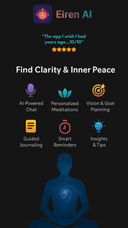
0AI-powered mindfulness + productivity app that turns visions into daily tasks, journaling & creates custom meditations for balanced growth. AI-powered mindfulness + productivity app that turns visions into daily tasks, journaling & creates custom meditations for balanced growth. AI-powered mindfulness + productivity app that turns visions into daily tasks, journaling & creates custom meditations for balanced growth.
- 8
 0
0Alarmble goes beyond simple alarm functionality by offering a range of features designed to help users manage their productivity and daily routines. It supports various alarm missions, personalized alarm styles, and sleep management features, helping users start their day more efficiently. In particular, Alarmble offers 19 alarm missions—the highest number among currently available mission alarm apps—and includes a personalized micro-vibration mode to further enhance the user experience. This feature wakes users with subtle vibrations that only they can perceive, enabling a gentler and more effective wake-up experience. (Due to internal iPhone policies, this feature is currently available only on Android.)
- 9
 0
0aiME brings the power of open-source Large Language Models (LLMs) directly to your iPhone, iPad, or Android device. Designed to be your constant, private companion, aiME ensures you have access to a smart assistant regardless of your location, connectivity, or network status. It perfectly complements your daily workflow, stepping in when you need absolute privacy or find yourself off the grid. *Always Available, Zero Connectivity Required* Whether you are at 30,000 feet in Airplane Mode, exploring remote hiking trails, or traveling internationally without a data plan, aiME is ready to help. There is no Wi-Fi hunting, no roaming fees, and no dead zones. It’s on-device intelligence that travels with you everywhere, ensuring you can write, plan, and brainstorm without interruption. *Ironclad Privacy by Design* Some thoughts, drafts, and sensitive information are meant for your eyes only. Because aiME processes everything locally, your data never leaves your phone. We have eliminated the need for servers, which means zero risk of data leaks or corporate tracking. Every prompt and conversation is processed securely on your device, giving you total peace of mind. *Reliability When You Need It Most* When the unexpected happens—like severe storms, power outages, or natural disasters—aiME remains a dependable resource. It acts as a reliable tool for organizing information, problem-solving, and staying focused even when the local network goes down. *Fair & Transparent Pricing* We believe in straightforward pricing. aiME operates on a freemium model where the core features are free forever. If you want to take your experience to the next level, you can unlock our premium features with a single, one-time purchase. No monthly subscriptions, no paywalls on your basic chats, and no hidden fees. Core Features: Curated Model Library: Download and seamlessly switch between top open-source models optimized for mobile performance. Free-Forever Core: Enjoy unlimited offline AI chats without ever entering a credit card. One-Time Premium Unlock: Pay once for advanced capabilities—never worry about a recurring subscription. Limitless Versatility: Ideal for creative writing, private journaling, travel planning, offline research, and emergency preparedness. Download aiME today and experience the freedom of having a private, reliable AI assistant right in your pocket.
- 10
 0
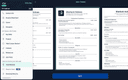
0A simple and free way to build a PDF resume for your job applications. Available on Android, iOS, and macOS. The app was developed by a former professional recruiter. It contains advice and examples for each section of the resume. There's also an AI Assistant to make sure your resume is concise and professional.
- 11
 0
0Time is a native macOS menu bar app built for people who work across time zones. The Problem If you've ever pinged a coworker at 3 AM their time, missed a meeting because you calculated the time wrong, or spent five minutes hunting for a Zoom link buried in an email thread, you know the pain. Working with a global team means constantly doing mental math, and existing solutions are either ugly widgets, bloated apps, or subscription traps. The Solution Time lives quietly in your menu bar and shows multiple time zones at a glance. Add unlimited zones, give them custom names like "Tokyo Office" or "Mom," and instantly see everyone's local time without opening anything. Key Features Time Scroller: Drag to preview what time it will be across all your zones up to 24 hours ahead. Perfect for finding that magical meeting slot when everyone is actually awake. Day & Night Awareness: Color-coded segments show daylight and nighttime across all zones. No more mental math to figure out if someone is sleeping. Smart Calendar Integration: See upcoming events directly in the popover, get warnings before meetings start, and join Zoom, Google Meet, Microsoft Teams, or Webex calls with a single click. No more digging through emails for links. Date Picker: Planning a meeting next week? Pick any future date and see how times align across all your zones. Airport Code Search: Search from 5,500+ airport codes to quickly find cities. Type "LAX" instead of scrolling through a list of Los Angeles options. DST Warnings: Get notified when daylight saving time changes are coming so you're never caught off guard. Why Time? Native SwiftUI means buttery smooth performance and minimal resource usage. Your calendar data stays on your device with zero tracking or data collection. It's a one-time purchase with no subscriptions, and you get lifetime updates. Time is actively developed and optimized for the latest macOS versions including Tahoe. Extensive customization options let you control 12/24-hour formats, fonts, colors, and alignment. Pricing One-time purchase starting at $24.99. No subscriptions. Free 30-day trial included. Built by a remote worker who got tired of doing time zone math at 6 AM.
- 12
 0
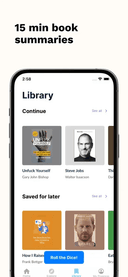
0Sumizeit is a micro-learning app that helps you learn faster without spending hours reading. It turns the world’s best nonfiction books into clear, structured summaries you can finish in just 5–10 minutes. Each summary breaks down big ideas into bite-sized lessons, making it easy to absorb key insights anytime, anywhere. Designed for busy minds (and especially great for people with ADHD), Sumizeit focuses on clarity, speed, and retention. Learn through short reads, audio options, and quick quizzes that reinforce what you’ve just learned. Topics range from personal finance, business, psychology, health, and productivity to science, history, and self-improvement. Whether you want to replace doom-scrolling with something meaningful, prepare for a conversation, or steadily build knowledge every day, Sumizeit makes learning feel effortless. No fluff, no filler just the core ideas that actually matter, delivered in a format that fits real life.
- 13
 0
0Trizzzi is a free modern tech news app built for speed, clarity, and visual learning. Instead of long articles and endless scrolling, Trizzzi delivers the most important tech stories in short, swipeable, and visualized cards—so you can understand what’s happening in tech in seconds. Each story is broken down into clear takeaways with visuals that explain the “what” and the “why,” helping you stay informed without the noise. From startups and AI to big tech moves and product launches, Trizzzi covers the stories that matter—fast. Designed for busy founders, developers, and tech-curious readers, Trizzzi turns staying up to date into a quick, engaging habit. Open the app, swipe through the latest updates, and move on with your day smarter than before. No clickbait. No fluff. Just tech news, made simple, visual, and easy to consume.
- 14
 0
0100% Offline, Private Local AI Chat for MacOS - 100% Offline - Try before you buy - 100+ local models for every use case - Chat with Image, PDF and docs - No Recurring Subscription (One time payment) 100% Offline, Private Local AI Chat for MacOS - 100% Offline - Try before you buy - 100+ local models for every use case - Chat with Image, PDF and docs - No Recurring Subscription (One time payment) 100% Offline, Private Local AI Chat for MacOS - 100% Offline - Try before you buy - 100+ local models for every use case - Chat with Image, PDF and docs - No Recurring Subscription (One time payment)
- 15
 0
0Most people have tried a planning app. Most quit within two weeks — not because the app was bad, but because the app sits unopened while life moves on. The plan and the follow-through have always been separated by a notification nobody opens. Hence WhatsApp and AI are the pillars Fhynix is built on. Build habits, routines, reminders with an AI planner and calendar you love. Fhynix closes that gap. You tell the AI your day — by text, voice, or photo of a timetable. It builds your schedule, places everything on a colour-coded calendar, and sends WhatsApp reminders 24 hours and 10 minutes before every event. Your plan arrives where you already check 80 times a day. No new habits to form. No new interface to learn. WHO IS IT FOR Anyone who is looking for a simple, color-coded, AI-powered interface to manage their day and life. The entrepreneur trying to manage tasks and reminders. The student trying to build a winning study schedule. The teacher juggling lesson plans. The lawyer who cannot miss a client call. The homemaker running a household like a small business. Anyone who has downloaded five planners and stopped using all of them. Fhynix is built for you - without the complexity and price tag of others. KEY FEATURES - Tell the AI your schedule by text, voice, or photo of a timetable - WhatsApp reminders 24 hours and 10 minutes before every event - Colour-coded calendar — work, fitness, family, study, self-care in one view - Two-way sync with Google Calendar, Apple Calendar, and Outlook - Shared family calendar so your whole household stays in sync - Habit tracker with streaks, community routines, and productivity insights - Apple Watch sync - Available on iOS, Android, and web WHY WHATSAPP The average person checks WhatsApp 80 times a day. Fhynix delivers your schedule where you already are — no new behaviour required, no extra app to open. You see it. You act. The plan survives contact with real life. Free 3-day trial.
- 16
 0
0Potentially is a private AI chat app built for people who want the power of multiple AI models without juggling multiple accounts, subscriptions, or apps. Instead of paying separately for tools like ChatGPT, Claude, Gemini, DeepSeek, Llama, and other AI models, Potentially gives users access to 100+ models in one simple experience. The app is designed for everyday AI use, whether you are writing content, brainstorming ideas, summarizing documents, researching topics, studying, comparing answers, creating social posts, drafting emails, or getting help with work and personal tasks. Users can ask questions, generate ideas, rewrite text, analyze information, and choose the AI model that works best for the task. One of Potentially’s biggest differences is privacy. Many AI tools require signups, track usage heavily, or store conversations. Potentially is designed around anonymous and private AI access, making it a strong option for people who want to use AI without attaching every prompt to their personal identity. This makes it useful for users who care about confidentiality, sensitive work, private research, personal questions, or simply having more control over how they use AI. Potentially also solves a common problem: not every AI model is good at the same thing. Some models are better for writing. Some are better for coding. Some are faster. Some are more creative. Some are better for research or reasoning. Instead of forcing users into one model, Potentially lets them explore and compare different models so they can get better results depending on what they need. The goal is to make AI easier, more flexible, and more affordable. Rather than subscribing to several AI platforms, users can use one app, one subscription, and credits when needed. This gives people more choice without the confusion of managing multiple tools. Potentially is ideal for students, creators, entrepreneurs, professionals, researchers, developers, marketers, and anyone who wants a smarter way to use AI. Whether someone needs quick answers, deep research, writing help, brainstorming, private conversations, or access to different models, Potentially brings everything together in one place. In simple terms, Potentially is a private, anonymous, multi-model AI assistant that lets users access 100+ AI models, compare results, and use the right AI for any task, all from one app.
- 17
 0
0Shadow OS is the first mobile app built entirely around decision-making. You type a question about something real you're dealing with and get one clear direction. Not five opinions. Not a pros-and-cons list. One answer you can act on. The framework draws on Carl Jung's concept of synchronicity, applied through 64 hexagrams — one of the oldest systems for understanding change and uncertainty. The app maps the specific situation you described and returns a direction, plus the psychological blind spot most likely to get in your way. It works across five life dimensions: Career, Love, Energy, Conflict, and Timing. Use it for major crossroads or daily decisions. Over time, it surfaces patterns in how you actually decide. Free on iOS and Android. One dimension is free forever. Premium unlocks all five, full reading history, and pattern analytics.
- 18
 0
0ChatXOS is the all-in-one AI chat app for iPhone. Instead of juggling separate subscriptions to ChatGPT ($20/mo), Claude ($20/mo), Gemini ($20/mo), and Grok ($30/mo), get access to all of them in one native iOS app for just $13/mo. The app includes 18+ AI models from OpenAI, Anthropic, Google, xAI, and DeepSeek. Use Claude 4.5 Opus for coding tasks, GPT-5.2 for general knowledge, Gemini 3.0 for research, Grok for real-time news, and DeepSeek for the cutting edge. Key features: - Switch models mid-conversation - Compare Mode: Run up to 4 models simultaneously and pick the best response - Chat organization with pinning and custom titles - Web search capabilities - Image/file attachments for vision models Built for mobile-first users who want the best AI for every task without subscription juggling.
- 19
 0
0ChatXOS is the all-in-one AI chat app for iPhone. Instead of juggling separate subscriptions to ChatGPT ($20/mo), Claude ($20/mo), Gemini ($20/mo), and Grok ($30/mo), get access to all of them in one native iOS app for just $13/mo. The app includes 18+ AI models from OpenAI, Anthropic, Google, xAI, and DeepSeek. Use Claude 4.5 Opus for coding tasks, GPT-5.2 for general knowledge, Gemini 3.0 for research, Grok for real-time news, and DeepSeek for the cutting edge. Key features: - Switch models mid-conversation - Compare Mode: Run up to 4 models simultaneously and pick the best response - Chat organization with pinning and custom titles - Web search capabilities - Image/file attachments for vision models Built for mobile-first users who want the best AI for every task without subscription juggling.
- 20
 0
0ChatXOS is the all-in-one AI chat app for iPhone. Instead of juggling separate subscriptions to ChatGPT ($20/mo), Claude ($20/mo), Gemini ($20/mo), and Grok ($30/mo), get access to all of them in one native iOS app for just $13/mo. The app includes 18+ AI models from OpenAI, Anthropic, Google, xAI, and DeepSeek. Use Claude 4.5 Opus for coding tasks, GPT-5.2 for general knowledge, Gemini 3.0 for research, Grok for real-time news, and DeepSeek for the cutting edge. Key features: - Switch models mid-conversation - Compare Mode: Run up to 4 models simultaneously and pick the best response - Chat organization with pinning and custom titles - Web search capabilities - Image/file attachments for vision models Built for mobile-first users who want the best AI for every task without subscription juggling.
- 21
 0
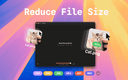
0TinyFast is a lightweight macOS app designed to quickly and efficiently compress your files — including PNG, JPEG, MP4, MOV, PDF, SVG, WebP, MP3, and GIF formats — all locally on your device. Just drag and drop your files in and out, and TinyFast takes care of the rest. It’s incredibly fast, completely private, and built with developers, designers, and creators in mind — professionals who value security, performance, and simplicity in their daily workflow.
- 22
 0
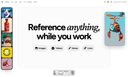
0Refbox is a floating reference app for creatives who want their inspiration visible while they work. Pin images, GIFs, videos & notes in always-on-top frames above your apps. No more window switching while you sketch, design, animate, or model. Add media from the web, your computer, or your clipboard into a floating, resizable sidebar. View references in Masonry Mode (Pinterest-style), drag individual items onto your desktop that you can resize and rearrange, or use a full-screen Gallery for second monitors. Add markdown-enabled notes for ideas, todos, or instructions without reaching for a separate app. Save clickable links as bookmarks to tutorials, articles, and other resources you need. Scrub through videos and GIFs with frame-by-frame playback. Create multiple collections of references and instantly swap between them. Refbox is the essential companion for creatives who need inspiration at their fingertips while they work.
- 23
 0
0MealJar solves one small, yet daily problem: What to eat. With MealJar meal planning takes under a minute a week. You see all your recipes in one place, so it's easy to fill in what you want to eat. Recipes can be easily imported from websites, socials, pdfs, photos with one tap. Everything is synced with all family members in real time, so everyone can help & buy groceries. Features: • Weekly meal planner with customizable meal types • Save Recipes: Organize Recipes with tags • Quick Recipe Import: add from links, videos, PDFs, photos, or manually • Grocery list with auto ingredient categorisation • Recipe search and filtering • Sync meal plan, recipes & grocery list with up to 10 people • Sync across your devices • Works offline MealJar is built to reduce the daily food mental burden & help families organize their recipes & meals.
- 24
 0
0We've all been there. You're standing in your garage, staring at a wall of boxes, trying to remember which one has the camping gear. Or you're at the hardware store, wondering if you already own a 10mm socket set buried somewhere in your basement. The mental inventory we try to keep of our belongings inevitably fails us, and we end up wasting hours searching or buying things we already own. Squared Away is an AI-powered home inventory app that solves this problem by making it effortless to catalog everything you own. The magic is in the simplicity: just snap a photo of an item, and the app's AI does the rest. It automatically identifies what you're looking at, suggests an accurate name, assigns the right category, and generates relevant tags—all in seconds. What used to require tedious manual data entry now happens with a single tap of your camera. The app mirrors how you actually store things in real life. You can organize items by location, room, shelf, and container, creating a digital map that matches your physical space. That box of holiday decorations in the attic? It's cataloged exactly where it sits: Home → Attic → Back Corner → Red Storage Bin. When you reorganize, just update the digital location and your inventory stays accurate. Squared Away also standardizes your photos automatically, adjusting lighting and backgrounds to create clean, consistent images. Your inventory ends up looking like a professional catalog rather than a chaotic camera roll. Once your belongings are cataloged, finding anything becomes instant. You can search using natural language—ask "where are my winter gloves?" and get an exact location, complete with a photo to confirm you've found the right item. No more digging through boxes or second-guessing yourself. The app works across iOS, Android, and web, syncing seamlessly so your inventory is always accessible whether you're at home, at a storage unit, or standing in a store trying to remember what you already have. Squared Away is built for anyone drowning in stuff: homeowners managing garages and basements, families sharing household items, collectors tracking valuable pieces, people preparing for a move, or anyone with a storage unit full of forgotten belongings. It's also useful for documenting items for insurance purposes, giving you a visual record of what you own and where it's kept.
- 25
 0
0Why is the Echometer retrospective tool better than alternatives like Parabol, Reetro, TeamRetro and Retrium? The Echometer Retrospective Board blends an intuitive, easy-to-use design with the most powerful features: It offers an (anonymous or shared) retrospective board with voting, built-in action item tracking, and collaborative whiteboards for flexible brainstorming and prioritization. You can also track team mood through regular survey-based happiness scores and monitor other agile KPIs - insights that IT managers and engineering leads value. Thousands of users love the generous free plan of the Echometer retrospective software app. What do users and customers of the online retrospective software app say about Echometer compared to other tools? Duane Hill, Scrum Master Coach: "Echometer is like combining Miro with a really smart Retro Board. It even provides you with metrics of your coaching impact, making it easy to spot trends in team development. Really love this tool - recommended to anyone who wants to make their retros more effective!" Lena Tölke, Agile Coach at Deutsche Bahn Vertrieb: "Thanks to the targeted questions in Echometer, we always come to new insights for our further development in retrospectives and can make them transparently measurable for all team members."
Frequently asked questions
Kikaroo is a top-rated app for managing family chores, specifically designed to motivate children. It transforms daily chores into a rewarding routine by allowing kids to earn points for completing tasks, which they can redeem for fun rewards. This app simplifies family life and helps everyone stay organized.
Echometer is a powerful retrospective tool that enhances team meetings by providing an intuitive board for voting and action item tracking. It allows for anonymous feedback and includes collaborative whiteboards for brainstorming. Users appreciate its ability to track team mood and agile KPIs, making retrospectives more effective and insightful.
Sumizeit is a micro-learning app that condenses nonfiction books into structured summaries that can be read in just 5–10 minutes. It is designed for busy individuals, especially those with ADHD, focusing on clarity and retention. The app offers short reads, audio options, and quizzes to reinforce learning, making it an efficient tool for acquiring knowledge on various topics.
Caffeine Clock is a unique app that tracks your caffeine intake and its absorption over time. It provides a visual dashboard showing your current caffeine level and projected decline, helping you make informed decisions about your consumption. The app also allows you to set a target bedtime and alerts you if your caffeine levels might interfere with your sleep.
TinyFast is a lightweight macOS app that quickly compresses various file types, including images and videos. It is designed for developers and creators who need a fast and private solution for file management. The drag-and-drop functionality makes it easy to use, ensuring that users can compress files efficiently without compromising on quality.
CV Engineer is a free app that simplifies the process of building a professional PDF resume. Developed by a former recruiter, it provides guidance and examples for each section of the resume. The app also features an AI Assistant to help ensure that your resume is concise and impactful, making it a valuable tool for job seekers.
Daily is designed for individuals who feel overwhelmed by tasks. It provides a simple platform to unload thoughts and tasks without immediate organization, allowing users to focus on what matters most each day. The app's Today view highlights only the tasks that need attention, promoting a calm and focused approach to daily planning.
Trizzzi is a modern tech news app that presents important stories in short, swipeable cards. It focuses on clarity and visual learning, breaking down complex news into easy-to-understand takeaways. This app is ideal for busy professionals who want to stay informed about the latest developments in technology without the noise of lengthy articles.
Eiren AI is an innovative app that combines mindfulness with productivity. It helps users turn their visions into actionable daily tasks, offers journaling features, and creates custom meditations for balanced growth. This app is designed to support users in achieving their personal and professional goals through mindfulness practices.
Refbox is a floating reference app tailored for creatives who need constant inspiration while working. It allows users to pin images, GIFs, videos, and notes in a resizable sidebar that stays on top of other applications. This feature eliminates the need for window switching, making it easier for creatives to access their references and stay focused on their projects.