Home
Auto list · updated automatically

Best AI Tools for Designers

From blank canvas to finished asset.

The best AI tools for designers — software for image generation, editing, mockups, icons, 3D, and visual assets that speeds up the creative workflow.

461Items
0Contributors
0Votes
  1. 426Kody Tools

    Kody Tools is a free, all-in-one platform featuring online developer utilities, code formatters, and digital converters built to streamline your daily workflow. Whether you need to format JSON, convert data formats, generate secure hashes, or clean up text, Kody Tools delivers lightning-fast, browser-based solutions. Designed for developers, designers, and digital creators, it eliminates repetitive friction so you can focus on building higher-quality projects.

    0
  2. 427polaroid-ai.org

    Create stunning Polaroid-style photos with our free AI Polaroid generator. Add vintage frames, film grain & nostalgic charm to any image. 100% free, no login, no watermark. Join the viral Polaroid AI trend - upload & transform photos in 3 seconds! Free Polaroid AI Generator - Transform Photos into Vintage Polaroid Style | Polaroid AI

    0
  3. 428Free Watermark Remover

    WatermarkZero is an online watermark remover tool that erases unwanted watermarks, text, or logos from your photos. Instead of just smudging or blurring the watermark, it intelligently rebuilds the background behind it. The result is a perfectly clean and natural photo, as if the watermark was never there.

    0
  4. 429Refbox

    Refbox is a floating reference app for creatives who want their inspiration visible while they work. Pin images, GIFs, videos & notes in always-on-top frames above your apps. No more window switching while you sketch, design, animate, or model. Add media from the web, your computer, or your clipboard into a floating, resizable sidebar. View references in Masonry Mode (Pinterest-style), drag individual items onto your desktop that you can resize and rearrange, or use a full-screen Gallery for second monitors. Add markdown-enabled notes for ideas, todos, or instructions without reaching for a separate app. Save clickable links as bookmarks to tutorials, articles, and other resources you need. Scrub through videos and GIFs with frame-by-frame playback. Create multiple collections of references and instantly swap between them. Refbox is the essential companion for creatives who need inspiration at their fingertips while they work.

    0
  5. 430Bulk Photo Editor

    Bulk Photo Editor is a free browser-based photo editing application designed to help users edit multiple images simultaneously without installing software or uploading files to external servers. Instead of modifying photographs one at a time, the platform allows users to import an entire collection of images, apply a consistent set of adjustments, and process every photo in a single workflow. This approach makes Bulk Photo Editor particularly valuable for photographers, online sellers, social media creators, designers, marketers, and anyone who regularly works with large batches of images that require identical edits. By combining batch processing with an intuitive browser interface, the platform significantly reduces the time and effort required for repetitive photo editing tasks. The primary purpose of Bulk Photo Editor is to automate common image editing operations across multiple photos. Users begin by importing a group of images into the application directly from their computer. Once the photos have been loaded, they can select the adjustments they want to apply and have those changes automatically performed on every selected image. Rather than repeating the same editing process dozens or hundreds of times, users can complete their work through a single streamlined operation, making the platform highly efficient for projects involving large photo collections. One of the platform's core features is its collection of color adjustment tools. Users can quickly improve the appearance of their images by moving simple sliders until they achieve the desired visual result. Instead of requiring advanced knowledge of professional editing software, the interface is designed to make color correction accessible to users of all experience levels. Whether the goal is to brighten photos, improve contrast, adjust exposure, enhance colors, or create a more consistent appearance across an entire collection of images, the platform allows these changes to be applied rapidly and uniformly to every imported photograph. Another major capability is batch cropping and resizing. Images can be cropped to remove unnecessary areas, resized to match specific dimensions, rotated into the correct orientation, or flipped horizontally or vertically. These operations are especially useful for preparing photographs for websites, e-commerce stores, social media platforms, presentations, digital marketing campaigns, or print projects where consistent image dimensions are required. Instead of manually editing each image individually, users can ensure that an entire gallery follows the same formatting standards with only a few clicks. The platform is particularly useful for maintaining visual consistency across large image collections. Businesses often need every product photo to share identical dimensions, photographers frequently prepare hundreds of images from the same event, and content creators regularly optimize groups of pictures for online publication. Bulk Photo Editor simplifies these repetitive workflows by allowing the same edits to be applied across every image simultaneously. This consistency helps create more professional-looking image galleries while reducing the possibility of human error during repetitive editing tasks. One of the most important aspects of Bulk Photo Editor is its privacy-focused design. Unlike many online editing services that require users to upload their images to remote servers for processing, this application performs all editing operations directly within the user's web browser. The photos never leave the user's device, ensuring that sensitive, personal, or confidential images remain completely private throughout the editing process. This browser-based architecture not only improves data security but also eliminates concerns about cloud storage, third-party access, or unnecessary file transfers. Because all image processing occurs locally, the platform also benefits from faster performance for many editing tasks. Users do not need to wait for large image collections to upload before beginning their work, making the editing process more responsive, particularly when working with high-resolution photographs. Since the application runs entirely in the browser, it can be accessed from different operating systems without requiring software installation or complicated setup procedures.

    0
  6. 431fontchanger.app

    FontChanger.app is a free, browser-based font conversion tool that allows users to instantly transform plain text into over 200 creative and decorative font styles. Designed for speed and simplicity, it requires no registration or installation—just type your text and see the results in real time. The platform is ideal for enhancing social media posts, usernames, bios, headlines, and short-form content across platforms like Instagram, TikTok, X, and messaging apps. With one-click copy support and broad Unicode compatibility, the generated fonts can be easily pasted wherever text is accepted. FontChanger.app makes it easy for anyone to create eye-catching, personalized text in seconds.

    0
  7. 432Backdrop

    Live wallpapers for your Mac desktop. Now Featuring Lock Screen Support. Backdrop 2.0 brings video wallpapers to both your Mac Desktop and your Lock Screen. Smooth 4K playback with low CPU use. Browse 1,000+ scenes, or craft your perfect wallpaper with the built-in editor. Multi-display support, community platform, free trial.

    0
  8. 433Unwatermark

    Unwatermark’s Image and Video Watermark Removal feature is a highly advanced tool that leverages powerful algorithms to deliver precise and efficient results. For images, the tool can detect and seamlessly erase watermarks from various locations and sizes, restoring the original quality of the image without leaving any traces or distortions. This ensures a clean, professional appearance, making it ideal for photographers, designers, and social media managers. For video content, the watermark removal process is just as efficient. Unwatermark can remove watermarks from videos frame by frame, ensuring smooth playback and high visual quality throughout. This capability is crucial for content creators, videographers, and marketing professionals who need unbranded, professional-grade videos without the hassle of manual editing. Whether for personal projects or professional use, the tool offers a fast, reliable solution for anyone needing to remove unwanted watermarks from visual content.

    0
  9. 434Cool PFP

    Cool PFP is the #1 platform to discover, browse, and download high-quality free PFPs (profile pictures) designed to upgrade your online presence. With a constantly growing collection of unique, stylish, and trending profile pictures, Cool PFP makes it easy to find the perfect look for your social media, gaming, or professional profiles and stand out wherever you post.

    0
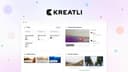
  10. 435Kreatli

    Kreatli is a comprehensive video collaboration and production management platform built specifically for creative teams that need to organize projects, review media, manage approvals, and deliver final assets from a single workspace. Instead of relying on multiple disconnected tools for file storage, project management, video review, communication, and client approvals, Kreatli centralizes the entire production workflow into one unified platform. Designed for advertising agencies, video production studios, animation teams, in-house creative departments, and content creators, the platform streamlines every stage of the creative process—from the initial project brief to the final delivery—while reducing the confusion that often comes from scattered conversations, duplicated files, and disconnected software. At the core of Kreatli is the concept of a centralized creative workspace. Every project includes its own dashboard where teams can organize tasks, upload media files, monitor activity, collaborate through project-specific chat, and manage project documentation in one location. Rather than searching across cloud storage services, messaging applications, and project management tools, users can access everything related to a project from a single interface. This centralized approach helps teams maintain better organization, improve visibility into project progress, and eliminate unnecessary context switching throughout production. One of the platform's standout features is its frame-accurate video review system. Instead of leaving general comments that force editors to guess where revisions should be made, reviewers can pin feedback directly to exact frames and timestamps within a video. Comments can also include visual annotations and drawings, allowing clients and team members to clearly indicate specific areas that require changes. This precision greatly reduces misunderstandings during revision cycles and enables editors to implement feedback more efficiently. By attaching every comment to the exact moment it references, Kreatli makes collaborative video reviews significantly more organized than traditional email-based feedback. Version management is another major strength of the platform. Creative projects frequently involve multiple revisions before reaching final approval, making it difficult to track changes across different file versions. Kreatli solves this problem by allowing users to compare multiple versions of videos side by side, automatically highlighting differences between revisions. Editors, producers, and clients can quickly evaluate improvements, verify requested changes, and provide additional feedback without manually opening several files or relying on confusing file naming conventions. This structured version comparison process helps accelerate approvals while maintaining a clear history of project evolution. Secure cloud storage plays a central role in Kreatli's workflow. Users can upload files as large as 10 GB through a drag-and-drop interface while monitoring upload progress in real time. All uploaded assets are stored using enterprise-grade encryption, providing protection for valuable creative materials throughout the production lifecycle. Videos, images, PDFs, design files, and other production assets remain organized inside dedicated project libraries where team members can easily locate approved files, revisions, and work-in-progress content whenever needed. Project management is integrated directly into the production process through customizable task boards organized by project stages. Teams can move tasks between phases such as briefing, production, client review, and delivery while assigning ownership, tracking contributors, and linking individual tasks to specific media assets. This visual workflow allows producers and project managers to monitor progress across multiple projects while ensuring that responsibilities remain clearly defined throughout the production cycle. Deliverable management provides additional structure by helping teams organize deadlines, ownership, approval status, and delivery schedules for every project output. Whether managing hero videos, social media edits, client presentation packages, or final delivery files, Kreatli keeps each deliverable associated with its due date, review status, assigned collaborators, and production timeline. This centralized tracking reduces the likelihood of missed deadlines while improving visibility into outstanding work across the entire production schedule.

    0
  11. 436Video to Frames Extractor

    Video to Frames is a browser-based FFmpeg WebAssembly utility that converts any MP4/MOV/AVI/WebM clip into high-quality PNG or JPG frames without uploading files. Set exact FPS or extract every frame, preview results in the browser, and download zipped image sets—ideal for creators, educators, QA teams, and analysts who need secure, instant frame captures on any device.

    0
  12. 437digia studio

    Digia.tech is a next-generation low-code platform that empowers brands to build and ship fully native mobile apps—without waiting for app updates or store approvals. Designed for speed, scale, and flexibility, Digia enables product and engineering teams to create rich mobile experiences that evolve in real-time. Its server-driven architecture lets you modify screens, flows, and content instantly—no rebuilds, no redeployments, no dependency on app releases.

    0
  13. 438Picknar YouTube Thumbnail Downloader

    A free online tool that allows users to extract and download YouTube video thumbnails in HD, 4K, and Max Resolution without login or watermark. YouTube Thumbnail Downloader is a browser-based tool that helps creators, marketers, and designers instantly download YouTube video and Shorts thumbnails in HD, 4K, and MaxRes quality. The tool works without login, watermark, or software installation and is fully secure using HTTPS.

    0
  14. 439Tangens Inc

    Animate your videos and add motion graphics with easy drag and drop actions. ShortMotion makes it easy to animate text, pictures, or videos. Just add an action into the timeline and you are all set. No complicated timelines or keyframes. This isn’t just another video editor — it’s motion graphics made simple. GOODBYE KEYFRAMES. HELLO ACTIONS. Take actions: use the pre-set animations that can easily be added, removed, or extended in your timeline. There are dozens of actions to choose from: move, spin, slide, wipe, mask etc. Want to change the duration or position? Just drag the action left or right. Fine-tune the feel with smooth timing options like ease, bounce, or linear transitions — all without using a single keyframe. START FAST WITH CUSTOMIZABLE TEMPLATES. No idea where to start? Pick from a collection of fun and ready-to-use templates. Swap out text, colors, media, and actions to make them your own. ADD MUSIC TO YOUR VIDEOS. Before wrapping up, bring it all together with music — choose tracks from your own library to add some character. EXPORT IN HD QUALITY — READY FOR ANY PLATFORM. Render your videos in 1080p at 60fps for smooth, crisp playback. Perfect for Instagram, TikTok, YouTube, Facebook, and beyond.

    0
  15. 440Krock.io

    Krock.io is a video review and creative collaboration platform built for agencies, production teams, marketers, and in-house creative departments. Instead of long email threads and scattered feedback, teams can review videos, images, PDFs, audio files, and storyboards in one centralized workspace. Leave frame-accurate comments, draw annotations directly on media, compare versions, organize projects with customizable workflows, and approve content faster. Invite unlimited reviewers without paying per reviewer, making collaboration with clients and stakeholders simple and cost-effective. Krock.io also includes online storyboarding, task management, project tracking, and integrations with Adobe Premiere Pro, After Effects, DaVinci Resolve, and Final Cut Pro, helping creative teams manage production from concept to final approval. Whether you're producing marketing videos, animations, social content, or e-learning materials, Krock.io keeps feedback organized and projects moving.

    0
  16. 441Cursive Generator

    Cursive Generator is a free browser tool. Type a name or any words and it turns them into cursive you can copy, or download as a PNG or SVG in a real open-licence font. It is designed for quick text styling in the browser, with simple controls for generating cursive lettering and saving the result for personal or creative projects. No payment is required.

    0
  17. 442FramerBite

    FramerBite offers 100+ free & premium Framer templates.

    0
  18. 443RGB to CMYK Converter

    Experience the ultimate professional RGB to CMYK converter: completely free, online, and guaranteed print-ready. Effortlessly utilize our built-in optimized settings or upload your own custom ICC profiles for complete color control. The integrated real-time preview instantly displays results, ensuring perfect color accuracy before you finalize any design for print.

    0
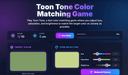
  19. 444ToonTone

    Toon Tone is a fast and simple online color matching game designed to test how accurately you can see and recreate colors. In each round, the game shows you a target color, and your goal is to match it as closely as possible by adjusting three sliders: hue, saturation, and brightness. The gameplay is easy to understand but surprisingly challenging. Small changes in hue or brightness can make a big difference, so every round becomes a quick test of your color perception and attention to detail. After submitting your guess, Toon Tone calculates your score based on how close your selected color is to the target color. Each game includes 10 rounds, making it short enough to play anytime while still giving you a clear score to improve. Toon Tone works directly in the browser, with no download or sign-up required. The interface is built for both desktop and mobile, so you can play on a computer, tablet, or phone. Toon Tone is great for casual players, designers, artists, students, and anyone who enjoys visual challenges. Whether you want a quick color game, a simple creativity break, or a fun way to train your eye, Toon Tone gives you an easy and addictive color matching experience.

    0
  20. 445The Brand Gap: How to Bridge the Distance Between Business Strategy and Design

    The Brand Gap is the first book to present a unified theory of brand-building. Whereas most books on branding are weighted toward either a strategic or creative approach, this book shows how both ways of thinking can unite to produce a “charismatic brand”―a brand that customers feel is essential to their lives. In an entertaining two-hour read you’ll learn: • the new definition of brand • the five essential disciplines of brand-building • how branding is changing the dynamics of competition • the three most powerful questions to ask about any brand • why collaboration is the key to brand-building • how design determines a customer’s experience • how to test brand concepts quickly and cheaply • the importance of managing brands from the inside • 220-word brand glossary

    0
  21. 446ogBlocks

    ogBlocks is a Premium Animated component library for building modern web apps and SaaS products It is Built with Next.js, Motion, Tailwind CSS, and TypeScript Currently, it has 70+ production-ready components beautifully handcrafted for real-world projects Developers can just copy, paste, and customize components directly into their application All Components are fully responsive across all screen sizes Clean, scalable, and developer-friendly code structure The components are practical for modern applications rather than flashy ones that degrade performance Fully customizable to match your own branding and design system Zero dependency and easier integration into existing projects Production-ready TypeScript support for a better developer experience Modern animations and interactions designed to make products feel premium Continuous updates with 10 new components added per month Lifetime access, including all future updates and additions MCP Server integration for installing components directly via AI chat like Claude, Codex, Opencode, etc Helps developers build faster with AI-assisted frontend workflows Includes a free 107-page ebook packed with HTML, CSS, and JavaScript tips Access to a private Discord community for support, networking, and discussions Ideal for indie hackers, freelancers, startups, vibe coders and frontend developers Designed to reduce development time while maintaining high-quality UI/UX Helps developers create visually polished applications without building everything from scratch Focused on improving both development speed and final product quality Perfect for SaaS apps, portfolios, dashboards, landing pages, and startup websites

    0
  22. 447Arc

    Arc isn't exactly a job board. It's more of tool where you create a profile and it matches you with companies offering remote jobs. You need to pass a vetting process to qualify but after that you get direct invitation to interviews. Their AI automatically matches you with the jobs that best fit your profile.

    0
  23. 448Earthboard

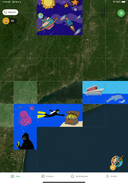
    Earthboard is the world's first location-based creative platform that transforms the globe into a collaborative ever evolving mural. Claim real-world geographic squares, create original artwork with in-app tools, and sustain your creations through community upvotes in a 100% human-generated art ecosystem.

    0
  24. 449Earthboard

    Earthboard is the world's first location-based creative platform that transforms the globe into a collaborative ever evolving mural. Claim real-world geographic squares, create original artwork with in-app tools, and sustain your creations through community upvotes in a 100% human-generated art ecosystem.

    0
  25. 450SimpleDraw

    SimpleDraw is a tool for creating precise, accurate scale drawings, for example to help with DIY projects or home renovations (or anything else for which a scale drawing would be useful!) It is free to use, with no login or registration required. With a focus on ease of use, SimpleDraw sticks with a small set of simple but powerful tools, which means it is as easy to use as pen and paper (but with a great deal more flexibility and precision).

    0
Good to know

Frequently asked questions