Best AI Tools for Developers
Ship more code, write less boilerplate.
The best AI tools for developers — coding assistants, agents, code review, testing, and deployment software that speeds up how you build and ship.
- 201
 0
0Context Data is an enterprise data infrastructure built to accelerate the development of data pipelines for Generative AI applications. The platform automates the process of setting up internal data processing and transformation flows using an easy-to-use connectivity framework where developers and enterprises can quickly connect to all of their internal data sources, embedding models and vector database targets without having to set up expensive infrastructure or engineers.
- 202
 0
0MCPize is a comprehensive platform designed for the rapidly growing ecosystem of Model Context Protocol (MCP) servers. It serves as both a marketplace and infrastructure provider, enabling developers to build, deploy, monetize, discover, and manage MCP servers from a single platform. By combining hosting, distribution, billing, quality assurance, and monetization tools, MCPize simplifies the process of creating AI-powered integrations while making them accessible to a broad range of AI clients and development environments. At the heart of MCPize is a large marketplace containing hundreds of MCP servers across numerous categories and use cases. Developers and organizations can browse a curated catalog of integrations that extend the capabilities of AI assistants and applications. These servers cover a wide variety of functions, including software development, marketing automation, web research, forecasting, diagram generation, payment processing, social media analysis, and many other specialized tasks. The marketplace allows users to quickly discover solutions that can enhance the functionality of their AI workflows without having to build every integration themselves. One of the platform’s primary goals is to eliminate the complexity typically associated with managing multiple AI integrations. Instead of requiring separate accounts, authentication methods, API keys, and billing systems for every service, MCPize provides a unified gateway. Users can access numerous MCP servers through a single account and a single API key, greatly reducing administrative overhead and simplifying integration management. This centralized approach makes it easier for developers and businesses to scale their AI infrastructure while maintaining visibility and control over usage. MCPize is designed to work seamlessly with a growing ecosystem of AI tools and development environments. The platform supports integration with popular AI clients and coding environments, allowing users to install and connect MCP servers quickly. By providing a consistent installation experience across multiple tools, MCPize helps developers adopt new capabilities without dealing with complicated setup processes or compatibility concerns. For server creators, MCPize offers a complete monetization framework. Developers can publish their MCP servers to the marketplace and earn revenue through subscription-based access. The platform provides a generous revenue-sharing model that allows creators to retain the majority of subscription earnings while MCPize handles infrastructure, billing, distribution, and customer management. This enables developers to focus on building valuable tools rather than managing operational challenges. Quality assurance is another major component of the platform. MCPize evaluates servers through a multi-dimensional auditing process that examines factors such as protocol compliance, security practices, reliability, performance, and operational quality. These evaluations help users identify trustworthy integrations and provide additional confidence when selecting servers for production use. Verified servers receive quality indicators that simplify decision-making for developers and organizations. The platform also includes powerful infrastructure and operational tools. Developers can deploy servers quickly using automated workflows, version management, rollback capabilities, and scalable hosting. Features such as usage monitoring, observability dashboards, latency tracking, quota controls, and cost management tools provide visibility into server performance and resource consumption. These capabilities help organizations maintain reliable AI operations while controlling expenses. In addition to serving human users, MCPize supports programmatic discovery through its marketplace infrastructure. AI agents and applications can search the marketplace automatically to locate relevant MCP servers for specific tasks. This creates opportunities for integrations to gain visibility and adoption beyond traditional marketplace browsing, potentially increasing usage and revenue for creators. Another significant advantage of MCPize is its consolidated billing system. Organizations using multiple MCP servers receive a unified invoice rather than having to manage separate subscriptions from numerous providers. This streamlines accounting processes and provides greater transparency regarding AI infrastructure costs. Overall, MCPize positions itself as more than a simple directory of MCP servers. It is a complete ecosystem that connects developers, businesses, AI applications, and service providers through a unified platform. By combining marketplace discovery, deployment infrastructure, monetization tools, security auditing, unified access management, and operational monitoring, MCPize enables organizations and developers to build, distribute, and consume AI-powered integrations more efficiently while accelerating adoption of the Model Context Protocol ecosystem.
- 203
 0
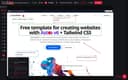
0Svelte 5 Boilerplate for building AI apps quickly
- 204
 0
0RedLinz is a web-based visual markup platform designed to improve communication between people and AI assistants by transforming visual annotations into structured, machine-readable prompts. Instead of spending time writing long explanations about interface changes, design revisions, bug reports, or content updates, users can simply upload a screenshot, highlight the exact areas that need attention, and export a detailed prompt that can be understood by leading AI models such as ChatGPT, Claude, Cursor, Perplexity, Grok, and many other AI-powered tools. The platform bridges the communication gap between visual thinking and text-based AI interactions, making it significantly easier to describe complex modifications with precision and clarity. Whether the task involves improving a user interface, fixing software bugs, editing marketing assets, or refining AI-generated images, RedLinz provides a faster and more reliable workflow that minimizes ambiguity while increasing the accuracy of AI-generated results. The platform is entirely browser-based, meaning users can start working immediately without downloading or installing any software. Images never leave the user's browser during the annotation process, providing an additional layer of privacy and security since all visual markup is performed locally on the client side. Users can upload screenshots, paste copied images directly into the application, or even begin with a blank canvas before adding annotations. Once the project is loaded, RedLinz offers a professional collection of markup tools including circles, arrows, rectangles, callout notes, highlights, numbered markers, checkmarks, deletion stamps, color replacement tools, image insertion, and several additional annotation symbols. Unlike traditional drawing applications that simply place graphics on top of an image, every annotation in RedLinz carries semantic meaning that is translated into structured instructions for AI systems. This allows AI assistants to understand not only where a change should happen but also what kind of modification is being requested. RedLinz supports a wide range of practical use cases across software development, product design, digital marketing, content creation, and creative workflows. Developers can create highly accurate bug reports by circling broken interface elements instead of writing lengthy descriptions that may be misunderstood. Designers can annotate Figma exports or staging websites to communicate design revisions with complete clarity. Product managers can specify sequential implementation steps using numbered markers, while marketers can highlight weak sections of landing pages and generate structured prompts requesting improved copywriting from AI assistants. The platform is also valuable for image generation workflows, allowing creators to revise AI-generated artwork by marking incorrect colors, misplaced objects, unwanted text, or anatomical mistakes and generating prompts that target only the selected modifications. These capabilities help eliminate unnecessary back-and-forth conversations while enabling both AI systems and human collaborators to understand requested changes immediately. One of RedLinz's most distinctive features is its semantic markup language, which assigns specific machine-readable meanings to every annotation tool. A circle instructs the AI to modify a particular element, an arrow indicates movement or positioning, rectangles define regions where changes should be applied, callout bubbles attach contextual notes, checkmarks preserve existing elements, deletion stamps remove objects, numbered markers establish execution order, strike-through tools eliminate text, color markers request color replacements, eyedroppers sample existing colors, erasers remove annotations, and image insertion tools specify where new visual assets should appear. By combining visual markup with structured coordinate data and contextual instructions, RedLinz generates prompts that are significantly more precise than manually written descriptions. This structured approach reduces misunderstandings, improves AI accuracy, and helps users achieve the desired result on the first attempt more consistently.
- 205
 0
0Promptly — Your Personal Prompt Engineer Promptly is an all-in-one prompt optimizer, manager, and conversation exporter that lives in your browser. Whether you're new to AI or a seasoned prompt engineer, it helps you write clear, well-structured prompts that get dramatically better results from the AI tools you already use. ⚡ One-click prompt optimizer. Instantly rewrite any prompt with a single click or keyboard shortcut (Ctrl+M / Cmd+M). Promptly turns rough input into a structured, context-rich prompt for sharper, more accurate answers. You can even highlight text on any website and optimize it as a prompt — not just inside chatbots. 💾 Prompt library & manager. Save your best prompts to a personal template library, pin your favorites for one-click reuse, and access everything from a clean side panel (save with Ctrl+S). Browse the free community library at promptly.fyi/library — hundreds of curated templates for writing, coding, marketing, and research that sync straight to your extension. 📤 Export & summarize conversations. Save, export, fork, and summarize your AI chats (Ctrl+E). Perfect for getting past context limits, archiving research sessions, building documentation, or picking up exactly where you left off. 🧩 Works inside your favorite AI tools: ChatGPT (OpenAI), Claude (Anthropic), Gemini (Google), DeepSeek, and Copilot (Microsoft). Why Promptly: three tools in one, a free template library, power-user keyboard shortcuts, lightweight and fast, and privacy-focused — your prompts stay yours. Install Promptly, pin it to your toolbar, and start getting better AI responses in seconds.
- 206
 0
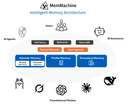
0MemMachine is an open-source memory layer that transforms AI agents and applications into intelligent, personalized assistants. Unlike traditional AI apps that start fresh each time, MemMachine enables applications to learn, store, and recall data from past sessions, enriching every interaction with context. Key Features: • Persistent Memory - Maintains memory across sessions, agents, and LLMs, building evolving user profiles • Multi-Platform Integration - Works with OpenAI, AWS Bedrock, Ollama, and more via MCP server capability • Flexible Deployment - Run locally, in the cloud, or install via pip with full data control • Open-Source - Comprehensive documentation, active community support
- 207
 0
0Most no-code builders treat APIs as an afterthought. Nobley doesn't. Import an OpenAPI spec or GraphQL schema and your client's backend becomes a fully typed, queryable data source in under 60 seconds — no manual wiring, no custom connectors. Then bind that live data directly to components, visually. On top of that, you get real app primitives: state management, event handlers, conditional rendering, and formulas. So you're building actual interactive web apps, not glorified landing pages. An AI agent helps you scaffold and build pages faster, so you spend less time on boilerplate and more time on the work that matters. And the pricing is built for how agencies actually work: €24/mo covers 5 client sites compared to Webflow's $14–23 per single site. Nobley is the only visual builder that combines serious API integration, real interactivity, AI assistance, and agency-friendly pricing in one product.
- 208
 0
0Most hosts deploy your frontend and hand you a link to someone else's database. Light Cloud deploys the whole app: a static site or container for the code, managed PostgreSQL for the data, provisioned in the same project with the connection string already injected. Connect a repo and Light Cloud reads it: framework, package manager, build command, output directory. React, Vue, Angular, Svelte, Next.js, Node, Python, Go, Java, Ruby, PHP, .NET. Override any of it. No Dockerfile? One is generated. Bring your own and it wins. Every branch gets a password protected preview URL, built the way production is, gone when the branch is. Idle previews cost nothing. You can also deploy without opening the dashboard from Claude via the MCP.
- 209
 0
0Datamata Studios is a data-driven platform built for developers, engineers, and modern professionals who want to make smarter decisions using real-world data instead of assumptions. Its core philosophy is simple but powerful: stop guessing and start using raw data to guide your code, career growth, and business strategies. By combining free tools, premium insights, and custom data solutions, Datamata creates a complete ecosystem for anyone working in tech or data-related fields. One of the platform’s strongest features is its collection of over 27 free developer utilities, all available instantly without requiring signup or payment. These tools are designed to solve everyday problems developers face, making workflows faster and more efficient. For example, users can clean up messy queries with the SQL Formatter, validate and structure API responses using the JSON Formatter, or debug patterns with the RegEx Tester. There are also practical converters like the URL Encoder, Unix Timestamp translator, and Base Converter, which simplify technical tasks that developers often need to perform quickly. The key advantage is accessibility—every tool works immediately, with no friction, making it easy to bookmark and share within teams. Beyond utilities, Datamata Studios offers a feature called Skill Trends, which provides live market intelligence based on thousands of job listings analyzed daily. This tool helps users understand which skills are currently in demand, which are rising, and which are becoming less relevant. By tracking fields like data engineering, AI, DevOps, and security, Skill Trends allows professionals to focus their learning on what actually matters in the job market. Instead of relying on outdated advice or guesswork, users can align their skill development with real hiring trends. For those who want deeper insights, Datamata Pro offers a suite of 10 premium tools designed to give users a competitive edge in their careers. These tools include salary benchmarking, which helps users understand their market value; skills intelligence, which identifies gaps and opportunities; and job matching, which recommends roles based on a user’s profile. Additional features like hiring velocity tracking and company analysis provide valuable context about which companies are growing and what they are looking for. The platform also includes an ATS resume builder that helps users create stronger resumes by incorporating real-time skill data and optimization suggestions. Another important aspect of Datamata Studios is its consulting service. The company offers custom solutions such as automated web scrapers, API integrations, and live dashboards. These services are tailored for businesses that need to collect, process, and visualize data efficiently. By automating data pipelines and presenting insights in clear dashboards, Datamata helps teams stay connected to their key metrics and make faster, data-informed decisions. Overall, Datamata Studios stands out as a versatile and practical platform for both individuals and teams. It combines free tools for immediate productivity, premium features for career advancement, and professional services for business growth. By focusing on real data and actionable insights, it empowers users to work smarter, stay competitive, and build more effective solutions in an increasingly data-driven world.
- 210
 0
0SpendLensAI is a privacy-first AI FinOps platform for teams building with OpenAI and Anthropic. It helps you understand exactly which projects, features, models, and workloads drive AI spend without proxying LLM traffic or requiring an application rewrite. Connect provider billing data for a fast financial view, then add lightweight workload-level telemetry only where deeper evidence is needed. SpendLensAI identifies model-rightsizing, caching, and prompt-efficiency opportunities, and its Compare Mode lets teams validate cost, speed, reliability, and quality with controlled tests before changing production.
- 211
 0
0For those seeking a reliable source of information about language models, List of LLMs provides a comprehensive and easy-to-use solution. The platform covers a wide range of AI models and presents information in a structured format. Detailed comparisons help users understand differences between providers and technologies. This enables better decision-making when evaluating AI tools and language model options.
- 212
 0
0Syntax highlighting for .gql, .graphql and .graphqls files. It also works with inline GraphQL in JavaScript, TypeScript, jsx, tsx, Vue, Svelte, PHP, ReasonML, Python, Markdown, Scala and Ruby.
- 213
 0
0**PDF to Markdown** is a cutting-edge AI-powered utility engineered to solve the most persistent challenges in document conversion. Unlike traditional rule-based tools that often scramble layouts or lose data, our advanced AI engine deeply understands document structure. It accurately reconstructs **complex tables**, converts **mathematical formulas** directly into LaTeX, and intelligently re-flows **multi-column text** into a readable linear format. Designed for specialized workflows, the platform features a streamlined "drag-and-drop" interface with instant local previews and a high-fidelity **side-by-side comparison view**, allowing users to verify conversions in real-time. The tool not only handles text but also extracts images into organized asset packages, ensuring a complete migration of content. Whether for academic research, technical documentation migration, or personal knowledge management, PDF to Markdown Expert delivers high-fidelity results that are ready for immediate use in tools like Obsidian, Notion, or GitBook.
- 214
 0
0Toolkit Index stands as a premier digital repository and structured software directory, meticulously designed to bridge the gap between innovative software developers and the professionals who need their solutions. In an era where the "SaaS-ification" of the economy has led to an overwhelming explosion of tools, Toolkit Index serves as a vital navigational compass. Unlike traditional search engines that often prioritize paid advertisements or SEO-heavy content, this platform provides a clean, neutral, and highly organized environment where software is evaluated based on its utility, category, and pricing structure. By indexing a vast array of SaaS tools, web applications, and digital products, the site empowers users to make strategic decisions without the friction of biased reviews or cluttered interfaces. The core philosophy behind Toolkit Index is the democratization of software discovery. The platform recognizes that the modern professional—whether a startup founder, a freelance creative, or a corporate executive—does not have the luxury of spending hours filtering through irrelevant search results. To address this, the directory utilizes a structured cataloging system that distills complex software ecosystems into digestible profiles. Each listing is crafted to provide immediate value, highlighting exactly what a tool does, the specific demographic it targets, and how its pricing model aligns with different budget constraints. This focus on clarity ensures that the path from identifying a problem to finding a software solution is as direct as possible. Versatility Across Software Verticals One of the most impressive features of Toolkit Index is its sheer breadth of coverage. The directory is not limited to a single niche; instead, it encompasses every major vertical within the software industry. From high-level business intelligence and data analytics platforms to granular development tools and API services, the index leaves no stone unturned. Marketing professionals can explore automation platforms and SEO tools, while project managers can discover the latest in workflow optimization and team collaboration software. Furthermore, as the industry shifts toward artificial intelligence, Toolkit Index has positioned itself as a leading source for discovering AI assistants, image generators, and machine learning platforms, ensuring its users remain at the cutting edge of technological advancement. Beyond mere categorization, Toolkit Index emphasizes the importance of "contextual discovery." The platform understands that software does not exist in a vacuum. A developer looking for a new IDE might also need specialized browser extensions or cloud infrastructure tools. By grouping tools into logically related categories—such as "Dev Tools," "No Code & Low Code," and "Boilerplates & Templates"—the directory allows for a lateral discovery process. This means users often find "hidden gem" applications that they weren't explicitly searching for but that perfectly complement their existing tech stack. This interconnected approach transforms the directory from a simple list into a holistic ecosystem for professional growth. Empowering Strategic Decision-Making Toolkit Index is specifically built for those who view software selection as a strategic investment rather than a peripheral task. For Product Managers, it serves as a powerful benchmarking tool to keep a pulse on competitive offerings and market trends. For CTOs and Engineering Managers, it provides a curated environment to evaluate the technical tools that will form the backbone of their company’s infrastructure. Even for independent freelancers, the index provides a way to build a "lean" stack of affordable or freemium tools that maximize productivity without draining financial resources. The inclusion of clear pricing labels—such as Free, Freemium, and Paid—is a testament to the platform's commitment to transparency and user-centric design. In conclusion, Toolkit Index is more than just a directory; it is an essential utility for the modern digital workforce. By maintaining a high standard of organization and a commitment to unbiased information, it facilitates a more efficient and effective software market. As the digital landscape continues to evolve and become more complex, resources like Toolkit Index will become increasingly critical in helping individuals and organizations filter out the noise and focus on the tools that truly drive innovation and success. Whether you are launching a new venture or optimizing an established workflow, the index provides the structural foundation necessary to navigate the world of SaaS with confidence and precision.
- 215
 0
0PrompTessor is an AI prompt analysis and optimization tool designed to help users unlock the full potential of AI. It provides smart prompt analysis, expert feedback, and prompt improvements to enhance AI outputs. The platform evaluates, improves, and optimizes AI prompts, offering actionable feedback and optimized suggestions to craft better prompts for various AI systems, including ChatGPT and LLMs.
- 216
 0
0PrompTessor is an AI prompt analysis and optimization tool designed to help users unlock the full potential of AI. It provides smart prompt analysis, expert feedback, and prompt improvements to enhance AI outputs. The platform evaluates, improves, and optimizes AI prompts, offering actionable feedback and optimized suggestions to craft better prompts for various AI systems, including ChatGPT and LLMs.
- 217
 0
0Writingmate is an AI web platform designed to help users and businesses solve tasks and automate workflows using the most popular text and text-to-image AI models. Writingmate AI chatbot helps users achieve the best possible results for their specific tasks by providing access to a diverse range of AI models. Key Features - More than 200 AI best models available from OpenAI, Anthropic, Meta AI, Google Gemini, Perplexity, Grok, and more. - AI model comparison mode. - Image Generation with OpenAI Image, Recraft V3, Stable Diffusion 3, and FLUX.pro. - Voice Input & Text-to-Speech. - Chat with Files. - Web Search with access to real-time web data. - AI Agents and assistants, pre-build and custom. - MCP Integrations. - AI coding with best code LLMs. Don't limit yourself to a single AI – get them all. Access the best Al models for writing, coding, learning, and content creation – all in one place. Solve your tasks more effectively.
- 218
 0
0TurboStarter is a battle‑tested starter kit for founders and teams who want to skip boilerplate and go straight to building features. It gives you a unified codebase for web, mobile and browser extensions, with opinionated integrations for auth, billing, multi‑tenancy/organizations, admin, SEO, internationalization, and a marketing site. Out of the box, you get a beautiful landing page, CLI tooling, 25+ ready‑to‑launch SaaS ideas, and a scalable architecture powered by Turborepo, Drizzle, and PostgreSQL. This makes it ideal for solo founders, agencies, and product teams who want to validate ideas fast, iterate with AI coding tools, and ship polished multi‑platform products without spending weeks on setup.
- 219
 0
0We know the feeling of shipping something great only to watch it disappear into the void. That’s why DevHunt gives developers the tools to promote their work in an authentic way. Share your app, tell your story, and connect with others who build like you do. Every upvote, every comment, and every feature highlight is a way to amplify your voice. The goal isn’t to sell — it’s to celebrate the people who make technology better. DevHunt values innovation, creativity, and community over algorithms. Join us and take your place in the spotlight where it belongs.
- 220
 0
0LLMWise is the fastest way to compare, blend, and evaluate leading AI models — all from a single interface. Instead of juggling multiple AI subscriptions and browser tabs, LLMWise lets you send one prompt and see how GPT-5.2, Claude Sonnet 4.5, Gemini 3 Flash, DeepSeek R1, Grok 3, and more respond side-by-side in real time. Most professionals already use AI daily but remain locked into a single provider with no way to know if they're getting the best output. LLMWise solves this with five powerful modes: Chat — Talk to any model instantly. Built-in smart routing automatically picks the best model for your query — code questions go to GPT, creative writing to Claude, translation to Gemini — so you always get optimal results without thinking about it. Compare — Send one prompt to 2-4 models simultaneously and see responses stream in side-by-side. Perfect for evaluating which model handles your specific use case best, whether that's drafting emails, analyzing data, or writing code. Blend — Combines outputs from multiple models into a single, superior response. Uses Mixture-of-Agents architecture to synthesize the best reasoning from each model. The result consistently outperforms any individual model. Judge — Pit models against each other in a blind evaluation judged by a third AI model. Get an objective verdict on which model produces better output for your exact prompt, complete with scoring and reasoning. Mesh — Intelligent failover routing that automatically retries with backup models if your primary choice fails or is overloaded. Circuit-breaker protection ensures you always get a response. LLMWise is built for professionals who need reliable AI output without the overhead of managing multiple subscriptions. Key features include:
- 221
 0
0Revamp is an AI-powered website redesign platform that enables users to transform any existing website into a modern, responsive design in approximately two minutes. Rather than requiring access to the original website files or content management system, the platform works by simply pasting a live website URL. Revamp then analyzes the site's structure, layout, and content before automatically generating a refreshed version that preserves the original information while presenting it with a significantly improved visual design. This approach makes website modernization dramatically faster than traditional redesign processes, eliminating weeks of design discussions, wireframes, revisions, and development work. The platform is built for a wide variety of users, including freelancers, web design agencies, digital marketing firms, SaaS companies, startups, and businesses that want to modernize outdated websites. Whether the original website was built with WordPress, Squarespace, Wix, Shopify, Webflow, Framer, a legacy content management system, or custom HTML, Revamp can analyze the live website directly from its URL. This broad compatibility allows users to redesign virtually any publicly accessible website without migrating platforms or rebuilding pages from scratch. The redesign process is intentionally simple and consists of only three steps. First, users paste the URL of any live website into the platform. This can be their own website, a competitor's website, or even a website they admire for inspiration. Next, Revamp's AI analyzes the existing page structure, navigation, typography, content hierarchy, and visual organization before generating a completely modernized version in roughly two minutes. Finally, users receive a live preview that can be shared with anyone, and paid subscribers can export the generated HTML, CSS, and JavaScript for deployment or further customization. One of Revamp's biggest advantages is that it focuses on redesign rather than rebuilding content. Instead of rewriting copy or changing important page information, the AI preserves the website's headings, metadata, and overall content structure while improving its visual presentation. This SEO-friendly approach helps maintain search engine relevance while providing a fresh, responsive design that performs well across desktop computers, tablets, and mobile devices. By preserving existing content, businesses can modernize their websites without worrying about losing valuable search engine optimization work that has been built over time. Every redesign generated by Revamp includes several practical features designed to simplify collaboration and deployment. Users receive shareable preview links that can be opened directly in a browser without requiring an account or login, making it easy to present concepts to clients, business partners, or internal teams. Paid plans additionally provide permanent preview URLs and complete code exports, allowing developers to download clean HTML, CSS, and JavaScript files that can be deployed immediately or integrated into existing workflows. Revamp places a strong emphasis on speed and efficiency. Traditional website redesign projects often involve weeks of planning, design revisions, client feedback, prototyping, and front-end development before a final version becomes available. Revamp compresses much of this initial creative process into only a few minutes through artificial intelligence. This rapid workflow enables businesses to evaluate multiple visual directions quickly, experiment with different redesign concepts, and validate ideas before investing significant development resources. The platform is especially valuable for agencies and freelance designers. Marketing agencies can generate professional redesign concepts during discovery calls, helping prospective clients immediately visualize what a modern version of their existing website could look like. This visual demonstration can strengthen sales presentations, improve proposal quality, and shorten the decision-making process. White-label plans further support agencies by allowing them to present redesigns under their own branding while serving multiple clients simultaneously.
- 222
 0
0Browsable is an AI-powered platform that transforms any website into a structured scraping API with minimal effort. Instead of manually building complex web scrapers, users can simply provide a target URL and let the system analyze the page automatically. The platform’s intelligent agent studies the structure of the website, identifies the relevant data, and generates a reliable API endpoint that returns clean and organized JSON output. This approach dramatically simplifies the process of collecting web data for developers, analysts, and businesses. The workflow is designed to be straightforward and efficient. Users begin by submitting a URL they want to extract information from. The AI agent then performs a detailed analysis of the webpage, navigating through its structure and determining the best way to capture useful data. Once the analysis is complete, Browsable generates a ready-to-use scraping API that can be integrated into applications or workflows. The result is a reusable endpoint that consistently returns structured information without requiring manual coding or complex setup. Browsable also provides a variety of prebuilt scraping APIs for common platforms and websites. These ready-made integrations allow users to immediately collect data from popular services such as e-commerce marketplaces, social media platforms, and content sites. By using these preconfigured APIs, developers can quickly gather structured information like product listings, user content, reviews, or search results. This saves significant development time and reduces the challenges associated with maintaining custom scrapers. For users without coding experience, the platform includes a dashboard that allows scraping tasks to be executed directly from the interface. Data collected from websites can easily be exported as CSV or JSON files, making it simple to analyze, store, or integrate into other tools. This makes Browsable accessible not only to developers but also to marketers, researchers, and data analysts who need web data but may not have programming skills. One of the most powerful aspects of Browsable is its advanced anti-bot protection system. Many websites frequently update their defenses to block automated scraping tools, which often causes traditional scrapers to break. Browsable handles these challenges automatically by managing proxies, browser fingerprinting, and intelligent retry logic. This ensures that data requests continue to work reliably even when websites implement aggressive blocking mechanisms. Overall, Browsable offers a modern solution for web data extraction by combining artificial intelligence with automated API generation. Its ability to turn any webpage into a structured data endpoint makes it a powerful tool for building data pipelines, powering applications, or conducting large-scale analysis. With its easy setup, flexible integrations, and strong reliability, the platform significantly simplifies the process of turning web content into usable data.
- 223
 0
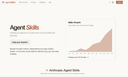
0What is AgentSkills AgentSkills is a platform that enables users to explore and utilize various AI-powered skills developed by the community, enhancing the capabilities of AI agents. Features of AgentSkills Community-Driven: Skills are built and shared by users, fostering collaboration and innovation. Categorized Search: Easily find skills based on use cases, industry leaders, or trending community skills. AI Search Functionality: Utilize AI to search for specific skills tailored to your needs. Skill Overview: Get a comprehensive overview of available skills and their functionalities. User-Friendly Interface: Navigate through a clean and intuitive interface designed for ease of use. Use Cases of AgentSkills Automating Document Processing: Streamline workflows by automating repetitive document tasks. Data Analysis: Leverage skills for efficient data processing and analysis. Creating Presentations: Use skills to generate professional presentations quickly. Building MCP Servers: Develop Model Context Protocol servers for enhanced AI interactions. Integrating APIs: Facilitate seamless API integrations for various applications.
- 224
 0
0Point GenieOS at your URL and it learns your brand. Brief it with a simple prompt, or run it via MCP from your Chat or IDE. It builds on-brand emails, social content and landing pages in minutes. Review, edit if you like, then launch directly to your audience from the platform. GenieOS then measures against your exact objectives and sharpens the next campaign automatically. Best For: Developers and AI Engineers: Set your objectives over MCP or API, and the loop runs on its own. Fast-Adopter Marketers: Scale your output without increasing headcount. Key Features: Brand Extraction Multi-Channel Generation Outcome-Based Analytics Continuous Learning Loop Human-in-the-Loop: Nothing goes live without approval. Developer Ecosystem: Native Model Context Protocol (MCP) server, REST API, and typed SDK access. Beta Pricing: First 100 signups get three months free on the Glow plan. Refer a friend and you both get 100 extra credits. Sign up for the beta at https://gogen.ie/genieos-directories
- 225
 0
0Most AI voice systems look the same on the surface: a single Text-to-Speech model hidden behind an API. Easy to use, hard to customize, and nearly impossible to scale efficiently. CAMB.AI took a different approach. Built by Apple, Carnegie Mellon AI researchers, MARS8 is the first TTS family designed for production reality -not lab demos. Instead of forcing one-size-fits-all tradeoffs, MARS8 offers 4 architectures optimized for real-world use cases: 1. MARS-Flash: Sub-150ms TTFB for real-time agents. 2. MARS-Pro: Balanced speed and fidelity for dubbing and media. 3. MARS-Instruct: Fine-grained, director-level control for film production. 4. MARS-Nano: Ultra-efficient, 50M parameter model for on-device performance. MARS8 also changes the economics of Voice AI, moving from a “pay-per-character” pricing model to a compute-first approach, where developers can deploy on their own infrastructure across AWS, Google Cloud, Modal, Baseten & 25 more GPU compute platforms. Start building now!
Frequently asked questions
The best AI tools for developers include Shipped.club, which helps you launch your startup quickly by providing essential features like authentication and payment processing. GitHub Copilot is another top tool, offering AI-generated code autocompletions that enhance coding efficiency. Prettier is a popular code formatter that ensures consistent code style. ChatGPT is highly regarded for its advanced conversational AI capabilities, making it useful for programming tasks. Other notable mentions are Vectorize.io for optimizing data retrieval and Indie Hacker Stacks for discovering indie products and their software stacks.
Shipped.club is designed to accelerate the startup launch process, allowing developers to ship their SaaS products in days rather than months. It provides a comprehensive suite of tools, including authentication, payment processing, landing page creation, and email drip campaigns, all of which streamline the development process.
GitHub Copilot is an AI-powered coding assistant that offers code autocompletions based on the context of what you're typing. It can suggest entire functions as you start typing, significantly speeding up the coding process and enhancing productivity for developers.
Prettier is an opinionated code formatter that enforces consistent formatting rules across your codebase. It helps maintain code quality by automatically formatting code on save, which reduces the time spent on manual formatting and ensures that all team members adhere to the same style guidelines.
ChatGPT is a versatile AI tool that developers can use for various tasks, including coding assistance, debugging, and generating code snippets. Its conversational capabilities make it easy to interact with, and many users find it invaluable for daily programming tasks, despite occasional inaccuracies.
Vectorize.io is a tool that helps developers turn unstructured data into optimized vector search indexes. This is particularly useful for applications that require retrieval-augmented generation, making it easier to manage and search through large datasets.
Indie Hacker Stacks is a directory that showcases indie products along with their software stacks. It serves as a valuable resource for new makers looking to discover tools used by others in the indie community, and it allows users to publish their own stacks for exposure.