Home

🌐Best Browser Extensions

This list showcases various browser extensions designed to enhance the online experience by improving productivity and managing distractions. These tools offer functionalities such as ad blocking, content filtering, and customization of web browsing, making them essential for users seeking a more streamlined internet experience.

Sort by
  1. 0
    Image for AdBlock

    This strictly speaking isn't a productivity extension but ads are way too distracting. This extension helps you purge them from your browser. Enjoy a calmer browsing experience!

  2. 0
    Image for Block & Focus

    This dead-simple extension allows you to block distracting websites for a period of time your specify. You get to decide which websites to whitelist and which ones to blacklist. Block & Focus comes with statistics, keyboard shortcuts, breaks, and a few other functionalities but is overall a really simple and effective tool.

  3. 0
    Image for Momentum

    Momentum replaces your default new tab screen with a beautiful, personalized dashboard. It shows you the time, current weather, and a beautiful landscape photo. It comes with simple productivity tools such as a pomodoro timer, to-do lists, focus time, link lists etc. Even if you don't use the productivity tools, it's just gorgeous to look at.

  4. 0
    Image for News Feed Eradicator

    News Feed Eradicator removes feeds from social media websites to help you use them more purposefully. Feeds are the most addictive parts of most website so this extension really helps you reduce mindless scrolling. News Feed Eradicator supports removing feeds from Facebook, Instagram, YouTube, Twitter/X, LinkedIn, Reddit, Hacker News, and GitHub. You get to pick which feeds to block and which to allow.

  5. 0
    Image for Link Hints

    Click with your keyboard. Have a bad touchpad? Trouble using a mouse? Love keyboard shortcuts? Link Hints is a browser extension that complements the built-in keyboard shortcuts with ones for clicking. Press Alt+J (Ctrl+J on macOS). This makes little yellow boxes with letters, called hints, appear next to links (and other clickable things). Type the letters to click the link. Alternatively, hold Shift and type a bit of the link text. The keyboard shortcuts and hints are fully customizable. Alt+J: Click links, buttons, etc. Alt+K: Open link in new tab. Alt+L: Open link in new tab and switch to it. Alt+Shift+J: Click many things. Alt+Shift+K: Open many links. Alt+Shift+L: Select element.

  6. 0
    Image for GoFullPage

    GoFullPage is a simple extension for taking full-page screenshots of websites. It handles all the scrolling and at the end allows you to export the website to png, jpg, or pdf.

  7. 0
    Image for Pause

    pause.do is a privacy-first browser extension that interrupts the moments when attention slips into autopilot, endless scrolling, tab overload, and even AI prompts. Instead of blocking websites, it creates small, intentional pauses that help you think first and decide what to do next. With pause types like Think First, Scroll Pause, Session Nudge, Focus Limit, and Tab Overload, pause.do helps you stay in control of your attention online.

  8. 0
    Image for Page Printer | Reader Mode, Print, and Save as PDF

    Convert any webpage into a print-friendly format, enjoy a built-in Reader Mode for distraction-free browsing, and save webpages as PDFs for easy access.

  9. 0
    Image for AI Content Shield

    AI Content Shield is a browser extension designed to give users full control over their online experience by filtering out artificial intelligence–generated content across the web. As AI-generated media becomes increasingly common on platforms like YouTube, social networks, and search engines, this tool focuses on helping users prioritize authentic, human-created content. It works quietly in the background, much like a traditional ad blocker, but instead of removing ads, it targets AI-generated videos, posts, summaries, and other automated content. One of the core features of AI Content Shield is its ability to hide AI-generated videos and content across major platforms. On YouTube, for example, it can block AI-created videos, shorts, and even AI-generated voiceovers (with advanced features), allowing users to enjoy a cleaner and more genuine content feed. It also helps remove AI-generated summaries and “AI Overviews” from search engines like Google, Bing, and DuckDuckGo, giving users access to more traditional search results instead of automated responses. The extension is not limited to just video platforms. It supports a wide range of social media and content platforms, including TikTok, X (formerly Twitter), Instagram, Facebook, Reddit, Pinterest, LinkedIn, and Threads. By filtering AI-generated posts, images, and features across these platforms, it helps users reduce noise and avoid content they may find repetitive, misleading, or low-quality. This broad compatibility makes it a versatile tool for anyone who spends significant time browsing different sites. AI Content Shield also offers customization options, which are a major part of its appeal. Users can adjust settings based on their preferences, choosing exactly what types of AI content they want to block or allow. For example, they can create keyword filters to hide specific topics, block certain YouTube channels, or even schedule when the filtering should be active. This level of control ensures that the browsing experience can be tailored to individual needs, whether someone wants minimal filtering or a fully AI-free environment. Another important feature is its focus on privacy and performance. The extension operates locally on the user’s device, meaning it does not rely on external servers to process data. This approach enhances privacy, as browsing activity remains on the device, and also improves speed and reliability. Users can enjoy content filtering without worrying about their data being tracked or shared. In addition to basic features, AI Content Shield includes advanced options for users who want deeper control. These may include filtering AI-generated emails in Gmail, hiding AI summaries on e-commerce sites like Amazon and eBay, and blocking AI-related articles on major news platforms. There are also features to hide AI-generated artists on music platforms, helping users focus on human-created music. Overall, AI Content Shield is designed for users who want a more curated and authentic internet experience. By reducing the presence of AI-generated content, it allows people to focus on what they consider more meaningful, reliable, or original. As AI continues to shape online content, tools like this provide an alternative way to browse the web—one that emphasizes control, privacy, and personal preference.

  10. 0
    Image for Quickfix AI

    Quickfix AI is a browser extension that writes replies for you using AI. Click once and get a perfect reply. No typing needed. It works on every website. Gmail, LinkedIn, Reddit, Slack, Zendesk, customer support tools, social media, and more. One extension for all your replies. Using it is simple. Install the extension, click the Quickfix AI button on any text box, and AI generates a reply instantly. The AI reads the context from the page, so responses are always relevant to the conversation. Quickfix AI supports every language. It's optimized for English but works with all languages worldwide. Unlike ChatGPT or other AI assistants, Quickfix AI works directly on every website. No copy-pasting between tabs. No switching windows. Just click and get your reply. Save hours every week and reply faster to support tickets, customer inquiries, emails, social media comments, and everyday chats.

  11. 0
    Image for Sourcicle

    Sourcicle combines real-world sourcing expertise with AI that works alongside you - not instead of you. Built by sourcers, it helps you find contact details, automate personalized outreach, and generate client-ready reports. All without tab-switching, scraping risks, or bloated pricing. What you get: • All-in-one browser extension that avoids risky LinkedIn scraping • Industry-leading personal email finder • Personalized email sequencing designed specifically for sourcers • AI-powered analytics and instant client-ready reporting • AI-assisted sourcing to surface candidates faster So you can focus on people, not tools.

  12. 0
    Image for Browsilla

    Browsilla is a streamlined Chrome extension, converting each new tab into a tranquil, efficiency-driven environment. Rather than confronting news feeds, advertisements, or interruptions, you'll encounter only essentials: your pending tasks, convenient links, saved bookmarks, current weather, and an uncluttered search interface. All operations are executed directly within your browser – eliminating the need for accounts, monitoring, or superfluous intricacies. Browsilla caters specifically to creators, entrepreneurs, and specialists seeking an uncomplicated and rapid launch page to maintain their concentration. Implement it once, and every subsequent new tab becomes an intentional, productive interval.

  13. 0
    Image for Zovo

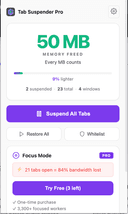
    Zovo is a privacy-first platform offering a growing collection of powerful browser extensions and online tools designed to improve productivity, development workflows, and everyday browsing. Built entirely by independent developer Michael Lip, Zovo represents a unique alternative to corporate-controlled software ecosystems. Instead of prioritizing data collection, advertising, or investor demands, Zovo focuses on delivering useful, efficient, and privacy-respecting tools shaped directly by user feedback. The platform currently provides more than 20 Chrome extensions and a suite of browser-based utilities that run locally on the user’s device. This local-first approach ensures that sensitive information never leaves the browser, reinforcing Zovo’s commitment to privacy and security. Users can access tools such as JSON Formatter Pro for formatting and validating data, Clipboard History Pro for storing and retrieving copied content, Tab Suspender Pro for optimizing memory usage, and Web Scraper Lite for extracting structured data from websites without writing code. These tools are available through the Chrome Web Store and are continuously improved based on community input. A defining feature of Zovo is its community-driven development model. Members can request new features, vote on upcoming tools, and gain early access to extensions before public release. This direct communication creates a transparent and collaborative environment where users actively shape the product roadmap. Unlike traditional software companies, users can contact the developer directly via email or Discord, ensuring fast responses and personalized support without automated systems or ticket queues. Zovo also offers online versions of many tools, allowing users to perform tasks instantly without installing extensions. These include color pickers, Base64 encoders, timestamp converters, password generators, and text utilities. All tools run entirely within the browser, providing fast performance and eliminating the need for external processing or data transfer. Michael Lip brings extensive experience to the platform, having spent over a decade building software for enterprise clients and earning more than $400,000 through freelance work on Upwork with a 100% success rate. His proven track record and hands-on development approach ensure consistent updates, reliable performance, and long-term support. Zovo operates on a simple and transparent pricing model, offering both monthly subscriptions and lifetime access options. Members receive full access to all existing extensions, future releases, and direct communication with the developer. This ensures that users not only benefit from current tools but also from continuous innovation and expansion. Overall, Zovo stands out as a modern, independent software platform built on transparency, user empowerment, and privacy. By combining powerful browser tools, community-driven development, and a privacy-first philosophy, Zovo delivers a streamlined and trustworthy solution for developers, writers, designers, researchers, and anyone seeking to enhance their browser experience without compromising control or personal data.

  14. 0
    Image for Sprout Video Downloader

    SproutVideo Downloader is a browser extension built for users who need offline access to business videos, training content, and embedded media served through SproutVideo. It detects supported direct-file and streaming playback flows, surfaces available quality options when present, and exports the final result as MP4 for later playback. Save supported SproutVideo videos from embeds and direct pages Handle direct MP4 and supported HLS-backed workflows Export MP4 files for easier offline viewing and review Keep a browser-first workflow for business and training content Avoid manual stream extraction from embedded players

Frequently Asked Questions

Related Lists

  1. 0
    Image for News Feed Eradicator

    News Feed Eradicator removes feeds from social media websites to help you use them more purposefully. Feeds are the most addictive parts of most website so this extension really helps you reduce mindless scrolling. News Feed Eradicator supports removing feeds from Facebook, Instagram, YouTube, Twitter/X, LinkedIn, Reddit, Hacker News, and GitHub. You get to pick which feeds to block and which to allow.

  2. 0
    Image for Block & Focus

    This dead-simple extension allows you to block distracting websites for a period of time your specify. You get to decide which websites to whitelist and which ones to blacklist. Block & Focus comes with statistics, keyboard shortcuts, breaks, and a few other functionalities but is overall a really simple and effective tool.

  3. 0
    Image for DotENV

    This simple extension provides syntax highlighting for .env files.

  4. 0
    Image for Link Hints

    Click with your keyboard. Have a bad touchpad? Trouble using a mouse? Love keyboard shortcuts? Link Hints is a browser extension that complements the built-in keyboard shortcuts with ones for clicking. Press Alt+J (Ctrl+J on macOS). This makes little yellow boxes with letters, called hints, appear next to links (and other clickable things). Type the letters to click the link. Alternatively, hold Shift and type a bit of the link text. The keyboard shortcuts and hints are fully customizable. Alt+J: Click links, buttons, etc. Alt+K: Open link in new tab. Alt+L: Open link in new tab and switch to it. Alt+Shift+J: Click many things. Alt+Shift+K: Open many links. Alt+Shift+L: Select element.

  5. 0
    Image for GoFullPage

    GoFullPage is a simple extension for taking full-page screenshots of websites. It handles all the scrolling and at the end allows you to export the website to png, jpg, or pdf.

  1. 0
    Image for News Feed Eradicator

    News Feed Eradicator removes feeds from social media websites to help you use them more purposefully. Feeds are the most addictive parts of most website so this extension really helps you reduce mindless scrolling. News Feed Eradicator supports removing feeds from Facebook, Instagram, YouTube, Twitter/X, LinkedIn, Reddit, Hacker News, and GitHub. You get to pick which feeds to block and which to allow.

  2. 0
    Image for Block & Focus

    This dead-simple extension allows you to block distracting websites for a period of time your specify. You get to decide which websites to whitelist and which ones to blacklist. Block & Focus comes with statistics, keyboard shortcuts, breaks, and a few other functionalities but is overall a really simple and effective tool.

  3. 0
    Image for Limit

    Limit allows you to put time limits on distracting websites. You get to choose how many minutes a day you're allowed to spend on each. After that, the website is blocked. It's a simple and effective tool for avoiding distractions and rabbit holes.

  4. 0
    Image for Momentum

    Momentum replaces your default new tab screen with a beautiful, personalized dashboard. It shows you the time, current weather, and a beautiful landscape photo. It comes with simple productivity tools such as a pomodoro timer, to-do lists, focus time, link lists etc. Even if you don't use the productivity tools, it's just gorgeous to look at.

  5. 0
    Image for Link Hints

    Click with your keyboard. Have a bad touchpad? Trouble using a mouse? Love keyboard shortcuts? Link Hints is a browser extension that complements the built-in keyboard shortcuts with ones for clicking. Press Alt+J (Ctrl+J on macOS). This makes little yellow boxes with letters, called hints, appear next to links (and other clickable things). Type the letters to click the link. Alternatively, hold Shift and type a bit of the link text. The keyboard shortcuts and hints are fully customizable. Alt+J: Click links, buttons, etc. Alt+K: Open link in new tab. Alt+L: Open link in new tab and switch to it. Alt+Shift+J: Click many things. Alt+Shift+K: Open many links. Alt+Shift+L: Select element.

  1. 0
    Image for AdBlock

    This strictly speaking isn't a productivity extension but ads are way too distracting. This extension helps you purge them from your browser. Enjoy a calmer browsing experience!

  1. 0
    Image for TemplateCat

    What is this? A little cat that helps you pick professionally designed templates. Just joking! It means "templates by categories". When doing web design for clients (eg. a dentist website), I often need to compare templates across different website builders. Jumping between platforms was really annoying, so I made this tool. Where are the templates from Framer Webflow Squarespace (Will add Figma Sites and Readymag later, I guess 10k+ templates in the future) What are the features? High quality templates - I only choose from website builder products where they hire professional designers. Browse by categories/features/styles - eg. find "portfolio" or "minimalist" templates On-page preview + device switching - directly see desktop/tablet/mobile effects Website builder pricing listed - easy to compare costs (Coming soon: pricing range filters, merge similar tags) Simply put: saves time jumping between different platforms to find templates.

  2. 0
    Image for Colorify AI - Free AI Coloring Page generator

    Colorify AI is a completely free online coloring page generator. Whether it is text or photos, they can be instantly turned into excellent coloring pages. Our AI coloring page generator is rich in functions and easy to operate. Whether it is children's enlightenment, parent-child interaction, or adult relaxation, it can provide a relaxing and enjoyable creative experience.

  3. 0
    Image for UndercoverGPT

    UndercoverGPT is an innovative online tool designed to provide users with discreet and uninterrupted access to ChatGPT, even in environments where access to AI tools is restricted or blocked, such as schools, universities, or corporate workplaces. By using stealth technology and secure access methods, UndercoverGPT allows students, professionals, and curious users to continue benefiting from the powerful capabilities of ChatGPT—such as writing assistance, coding help, brainstorming, studying, and more—without triggering administrative blocks or firewalls. The platform positions itself as a solution for those who value productivity and creativity, but find themselves in digitally controlled environments. With an emphasis on privacy and usability, UndercoverGPT empowers users to stay connected to AI-powered tools no matter where they are.

  4. 0
    Image for AI Coloring Pages Generator

    I'm excited to share AI Coloring Pages Generator with you all! As a parent myself, I noticed how hard it was to find fresh, engaging coloring pages that my kids actually wanted to color. So I built this AI-powered tool that lets anyone create custom coloring pages in seconds - just describe what you want and watch the magic happen! Whether it's "unicorn princess," "summer theme," or "cute kittens," the AI generates beautiful, printable coloring pages that are perfect for kids and adults alike. The best part? It's completely free to use! I've already seen families, teachers, and even therapists using it to create personalized activities. There's something special about seeing a child's face light up when they get to color exactly what they imagined. Would love to hear what you think and what kind of coloring pages you'd create! 🎨

  5. 0
    Image for ReMake Face AI

    RemakeFace.ai is a simple and fast browser-based AI face-swap tool. Just upload a photo and the system automatically generates a realistic face swap within seconds — no app downloads or account required. It’s perfect for quick edits, creative projects, and anyone who wants high-quality face-swap results with minimal effort.

  1. 0
    Image for News Feed Eradicator

    News Feed Eradicator removes feeds from social media websites to help you use them more purposefully. Feeds are the most addictive parts of most website so this extension really helps you reduce mindless scrolling. News Feed Eradicator supports removing feeds from Facebook, Instagram, YouTube, Twitter/X, LinkedIn, Reddit, Hacker News, and GitHub. You get to pick which feeds to block and which to allow.

  2. 0
    Image for BlackTwist

    Build and monetize your audience on Threads

  3. 0
    Image for Make It Quick

    Make It Quick simplifies video creation, turning your words into fully edited, high-quality videos in minutes. Key Features 1. Automatically generates short videos (30 to 60 seconds) 2. Automatically generates long videos (60 to 120 seconds) 3. Auto-generates script 4. Full Editorial Access 5. 4K resolution Benefits 1. Saving time 2. Proven viral video style Use Case Here are several use cases for Make It Quick, showcasing how the platform can be used across different industries and for various needs: 1. Content Marketing Use Case: A small business wants to promote their latest product on social media. How It Helps: - Generate a script highlighting the product’s benefits and unique features. - Create an engaging video with AI visuals (e.g., product in action, lifestyle imagery) and voice narration. - Share the video directly to platforms like TikTok, Instagram, or YouTube Shorts. 2. Educational Content Use Case: An educator or tutor wants to create short, informative videos for their students. How It Helps: - Enter a topic like “The Solar System” and generate a script explaining it concisely. - Use AI to generate visuals of planets, space, and astronomical phenomena. - Add narration to explain concepts, making the content engaging and accessible. 3. Social Media Influencers Use Case: A lifestyle influencer wants to consistently post creative content to grow their audience. How It Helps: - Quickly create videos on trending topics or personalized messages to followers. - Use multi-language support to expand their reach to international audiences. - Customize visuals and scripts to align with their personal brand.

  4. 0
    Image for Trendly.so

    Trendly is an advanced analytics platform that centralizes your short-form content metrics from TikTok, Instagram Reels, and YouTube Shorts. It helps creators optimize their content strategy by offering competitor insights, analyzing engagement through its unique Virality Factor.

  5. 0
    Image for IG Follower Export Tool - IGExporter

    IG follower export tool helps users export Instagram users with just one click, it is available online and requires no login or Instagram account, ensuring there are no risks of bans or restrictions. Simply enter the Instagram profile URL to instantly download detailed information such as email, phone, bio, and category directly. This tool streamlines the process of gathering follower data without compromising account security or privacy. Efficient and user-friendly, the tool is designed to provide quick access to essential contact information, making it ideal for marketers, researchers, and social media managers who need to analyze or reach out to Instagram audiences without unnecessary delays. With just a few clicks, you can obtain comprehensive data from any public Instagram profile, significantly cutting down the time usually spent on manual data collection. This capability makes it an invaluable resource for professionals looking to enhance their social media strategies and engagement efficiently.

  1. 0
    Image for Limit

    Limit allows you to put time limits on distracting websites. You get to choose how many minutes a day you're allowed to spend on each. After that, the website is blocked. It's a simple and effective tool for avoiding distractions and rabbit holes.

  2. 0
    Image for Block & Focus

    This dead-simple extension allows you to block distracting websites for a period of time your specify. You get to decide which websites to whitelist and which ones to blacklist. Block & Focus comes with statistics, keyboard shortcuts, breaks, and a few other functionalities but is overall a really simple and effective tool.

  1. 0
    Image for Shipped.club

    Launch your startup in days, not months. Shipped.club saves you time, by providing all you need to ship your SaaS product in a fraction of the time.

  2. 0
    Image for Schedles

    Schedles is an all-in-one social media management platform designed specifically for content creators looking to amplify their online presence. Packed with cutting-edge features such as advanced post scheduling, AI-driven content generation, and seamless cross-platform publishing to Threads, Instagram, TikTok, and LinkedIn, Schedles simplifies your workflow, freeing you up to focus on what you do best—creating captivating content. Our user-friendly interface allows you to effortlessly plan and manage your content calendar, ensuring that you never miss an opportunity to engage your audience. With our AI-powered tools, you can quickly generate innovative ideas and optimize your posts for maximum visibility and interaction, helping you achieve significant growth across all your social media channels. Whether you're a solo creator or part of a collaborative team, Schedles is engineered to enhance your productivity and fine-tune your social media strategy, empowering you to connect with your audience more effectively. Begin your journey toward a more organized, impactful, and successful online presence with Schedles today!

  3. 0
    Image for Grammarsen

    Grammarsen is a desktop app that automatically corrects your selected text using chatgpt, helping you stay focused. No more copy pasting and switching tabs. Simply select some text, press a hotkey, and see the old text gets replaced with the corrected version. Grammarsen saves time for students, writers, marketers, english learners, and anyone who types a lot.

  4. 0
    Image for Retext

    Retext is a macOS text expander that simplifies repetitive typing by using AI-driven shortcuts. Unlike traditional expanders, Retext doesn’t require memorizing shortcuts; it intelligently suggests them across any app or browser. Key features include a native macOS design, universal compatibility, and reliable functionality, ensuring it’s always available. By organizing snippets intuitively, Retext boosts productivity, providing users with a seamless typing experience. Whether for professional emails, coding, or customer support, Retext is the ultimate tool to streamline repetitive tasks.

  5. 0
    Image for Certifast

    Tired of manually creating each certificate and wasting hours on repetitive tasks? Certifast is here to simplify your life! Designed for anyone who needs to generate certificates quickly and efficiently, Certifast is your go-to solution. Here's what makes Certifast stand out: - Bulk Creation in Seconds: Generate thousands of certificates at once, saving you time and effort. - Easy Customization: Personalize each certificate with names, grades, or unique numbers effortlessly. - User-Friendly Interface: No design skills needed—navigate through Certifast with ease and choose from a variety of templates. - High-Quality Results: Every certificate is produced in high resolution, perfect for printing or digital use. - Seamless Data Integration: Import data from CSV files to automatically fill in certificate details and reduce errors. - Versatile Application: Ideal for schools, businesses, events, and more, Certifast adapts to any setting where certificates are needed. Certifast is more than just a certificate maker—it's a time-saving tool designed to enhance your productivity. Say goodbye to manual certificate creation and hello to the simplicity of Certifast. Try Certifast today with our free trial and see how easy certificate creation can be!

  1. 0
    Image for ZenCall

    AI phone agent to receive and make phone calls for you

  2. 0
    Image for Zenor AI

    Zenor AI is a multimodal shopping assistant for Shopify that lets customers shop and get support via text, voice, or photo. It understands product queries, recommends items from your catalog, handles FAQs like shipping, returns, and order status, and assists with cart actions and checkout all inside the chat. Virtual try-on is coming soon. Zenor supports 32+ languages, installs in under 5 minutes, and requires no coding. By giving shoppers a faster and smarter way to find products and get answers, it reduces support load while boosting conversions, average order value, and customer satisfaction.

  1. 0
    Image for AdBlock

    This strictly speaking isn't a productivity extension but ads are way too distracting. This extension helps you purge them from your browser. Enjoy a calmer browsing experience!

  2. 0
    Image for Codemento

    Best tool for saving code notes and finding answers to code problems

  3. 0
    Image for News Feed Eradicator

    News Feed Eradicator removes feeds from social media websites to help you use them more purposefully. Feeds are the most addictive parts of most website so this extension really helps you reduce mindless scrolling. News Feed Eradicator supports removing feeds from Facebook, Instagram, YouTube, Twitter/X, LinkedIn, Reddit, Hacker News, and GitHub. You get to pick which feeds to block and which to allow.

  4. 0
    Image for Chat Thing
  5. 0
    Image for Link Hints

    Click with your keyboard. Have a bad touchpad? Trouble using a mouse? Love keyboard shortcuts? Link Hints is a browser extension that complements the built-in keyboard shortcuts with ones for clicking. Press Alt+J (Ctrl+J on macOS). This makes little yellow boxes with letters, called hints, appear next to links (and other clickable things). Type the letters to click the link. Alternatively, hold Shift and type a bit of the link text. The keyboard shortcuts and hints are fully customizable. Alt+J: Click links, buttons, etc. Alt+K: Open link in new tab. Alt+L: Open link in new tab and switch to it. Alt+Shift+J: Click many things. Alt+Shift+K: Open many links. Alt+Shift+L: Select element.

  1. 0
    Image for GitHub Copilot

    AI-generated code autocompletions. Start typing and Copilot will generate code suggestions based on your input. Very often when you start typing the name of your function, it just autocompletes the entire function for you. It's hard to overstate how great this extension is. Does anyone even code without Copilot anymore?

  2. 0
    Image for Prettier

    Prettier is an opinionated code formatter that enforces strict formatting rules to keep your code consistent. This extension allows you to run prettier on save, which is really handy.

  3. 0
    Image for Codemento

    Best tool for saving code notes and finding answers to code problems

  4. 0
    Image for DotENV

    This simple extension provides syntax highlighting for .env files.

  5. 0
    Image for AppMole

    AppMole is an all-in-one platform featuring a wide range of AI-driven tools and resources tailored for creators, influencers, and developers. It offers various web apps, marketing tools, and design apps, all aimed at streamlining workflows and enhancing productivity. Users can stay updated with the latest AI applications, reviews, and trending software.

feedback