🎨Best AI Design Tools
This list showcases AI design tools that enhance the creative process through innovative technology. These tools leverage artificial intelligence to streamline design workflows, improve efficiency, and inspire creativity in various design projects.
- 0

Turn prompts into wearables. Write your idea, spin it in 3D, tweak it, and we’ll print it edge to edge, front, back, and sleeves. Full-print tees, made to order. You prompt it, we ship it. Why it’s different • Full-print coverage (not just a small chest logo) • Instant 3D preview you can spin and zoom • AI editing to refine every detail • 3D-aware generation that understands global aesthetics • We print every pixel and ship it to you From idea to garment in minutes. You can now wear your imagination!
- 0

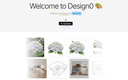
Design0 is an AI-powered design tool that turns text into images, provides smart image editing, and has a built-in asset library. It simplifies complex workflows, helping you bring your creative ideas to life with ease.Design0 is an AI-powered design tool that turns text into images, provides smart image editing, and has a built-in asset library. It simplifies complex workflows, helping you bring your creative ideas to life with ease.
- 0

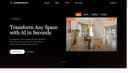
Interior Deco AI puts professional interior design at your fingertips. With just a few clicks, transform empty spaces into beautifully furnished rooms or refresh existing interiors with new decor and styles. Imagine seeing your living room in Scandinavian minimalist style, then switching to industrial chic or cozy farmhouse—all in seconds. Our powerful AI preserves your room's unique structure while applying designer-quality furnishings and decor. Real estate agents can instantly stage listings to attract buyers and increase property values. Homeowners can explore renovation ideas without the guesswork. Interior designers can quickly create concept visuals for clients. You can even remove all furniture from existing rooms, enhance image quality, or create engaging animations that bring your spaces to life. The possibilities are endless! No design experience needed—just upload your photo and watch as Interior Deco AI transforms your space into something extraordinary.
- 0

Cheat code to studio-grade landing. Create landing pages so good no one believes they’re AI-made — fast, credible, on-brand, and fully in your control. First AI-Native design editor. Change any part of your landing with AI or by hand — you stay in control of the work. Generation: Your perfect landing, ready in seconds. Type a thought, drop a brief, or paste a product — get an on-brand landing tuned to your category and audience. Brand Consistency: Set your type, colors, spacing, and voice once, then keep every new page aligned with your brand without manual restyling. Easy publish: Publish to your domain in seconds with speed, accessibility, and rollback baked in. SEO: Clean semantic HTML, fast load times, sitemaps, schema, and social previews so your landings are ready to rank and share from day one. Remix: Paste any URL to get a 1:1 landing you can legally remix — keep the flow, swap the story. For whom: Designers, marketers, agencies, founders — anyone who wants to build faster, save budget, and ship landing pages that convert.
- 0

Generate AI designs, documents, presentations, social posts, whiteboard, charts and more for free, powered by all one AI Editor. Generate AI designs, documents, presentations, social posts, whiteboard, charts and more for free, powered by all one AI Editor. Generate AI designs, documents, presentations, social posts, whiteboard, charts and more for free, powered by all one AI Editor.
- 0

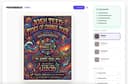
EventFlyer.AI is an automated graphic design tool to take event URLs and create print/social media ready flyers in seconds. How it works: Enter your event URL (works with any event publishing website), choose your design styles (pop art, minimalist, techno, rock concert corporate, etc), and in in about 30 seconds your unique poster will pop out. What sets us apart: Unlike generic template tools, Event Flyer AI features "Intelligent Social Remixing." Once your main design is ready, our AI reflows the elements perfectly for Instagram Stories (9:16), square posts (1:1), and website banners (16:9)—maintaining 100% brand consistency across every platform with zero manual effort. Key Features: - 20+ unique AI themes curated by designers. - Automatic resizing for all social formats. Perfect for: Bar owners, club promoters, non-profits, community organizers, and anyone hosting an event who wants a professional edge without the professional price tag. Design less, promote more.
- 0

GlowUp UI is a design tool that instantly generates beautiful UI redesign variants from any screenshot. Built for vibe coders, the growing wave of non-technical builders using AI tools like Lovable, Cursor, Bolt, and v0 to ship real products, GlowUp UI bridges the gap between functional and polished. Most vibe-coded projects work, but they don't look great. Generic templates, inconsistent spacing, default component styles. The UI tells users "this was built fast," not "this was built well." GlowUp UI fixes that in seconds. Upload a screenshot of any interface, and the tool generates multiple redesign variants with improved layout, typography, colour, and visual hierarchy. No design skills required. No Figma. No back-and-forth with AI prompts trying to describe what "better" looks like. The workflow is simple. Take a screenshot of the UI you want to improve, whether it's a landing page, dashboard, settings panel, or signup flow. Upload it to GlowUp UI, choose your preferred style direction, and hit generate. Within moments, you'll receive several distinct redesign options, each offering a different visual interpretation of your original layout. Pick the one that fits, grab the code, and drop it straight into your project. GlowUp UI is purpose-built for the tools vibe coders already use. The generated output is clean, component-based code ready to paste into Lovable, Cursor, Bolt, v0, or any modern frontend workflow. There's no context-switching, no design handoff, and no translation layer between what you see and what you ship. What you pick is what you get. Beyond one-off redesigns, GlowUp UI maintains a growing template gallery. A curated library of high-quality UI patterns across common application types. Browse cards, modals, dashboards, forms, and more, each available as a starting point or source of inspiration for your next build. Filter by category, style, or component type to find exactly what you need. Pricing is flexible and straightforward. Choose a monthly plan for regular generation credits, or grab a one-off pack if you just need a quick burst of redesigns for a specific project. No complex tiers, no hidden fees. Just pick what fits how you build. Whether you're a solo founder shipping an MVP, a creator building a SaaS side project, or an agency prototyping client work,
- 0

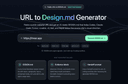
URL to Design.md: Generate AI-ready DESIGN.md briefs from public webpages URL to Design.md helps AI-assisted frontend builders turn a public website URL into a structured Markdown design context package. Instead of asking Codex, Claude Code, Cursor, Lovable, v0, Bolt, or Replit to follow a vague screenshot prompt, paste a public page and get a DESIGN.md that describes visual direction, layout hierarchy, colors, typography, spacing, components, interaction notes, evidence labels, and agent handoff prompts. One URL, Agent-Ready Design Context 1. Public URL to DESIGN.md — Extract visible structure, CTA hierarchy, visual signals, and page patterns into a reusable Markdown brief. 2. Design Tokens and Components — Summarize colors, type scale, spacing, radius, shadows, buttons, cards, forms, navigation, hero blocks, and footer patterns. 3. Evidence Labels — Mark conclusions as detected, inferred, or needs review so builders know what came from page evidence and what requires judgment. 4. Agent Handoff Prompts — Copy prompts for Codex, Claude Code, Cursor, Lovable, v0, and generic AI coding workflows. 5. Responsible Boundaries — Works with public webpages only and focuses on design context, not private pages, proprietary asset copying, editable Figma layers, or pixel-perfect cloning.
Frequently Asked Questions
One of the top AI design tools is Holover, which allows users to turn their creative prompts into wearable designs. With Holover, you can write your idea, visualize it in 3D, and have it printed on a full-coverage garment. This tool stands out for its instant 3D preview feature, AI editing capabilities, and the ability to generate designs that consider global aesthetics. It enables users to go from concept to garment in just minutes, making it a unique option for those looking to wear their imagination.
Holover enhances the design process by allowing users to create custom wearables from their ideas quickly. The tool provides an instant 3D preview, enabling users to spin and zoom in on their designs. Additionally, it offers AI editing features that help refine every detail of the garment. This streamlined workflow not only improves efficiency but also inspires creativity, making it easier for designers to bring their visions to life.
Holover is different from other design tools because it specializes in full-print coverage garments, allowing for designs that extend beyond just a small logo. Its unique features include 3D-aware generation that understands global aesthetics, instant 3D previews, and the ability to print every pixel of the design. This combination of capabilities makes Holover a standout choice for those looking to create personalized and visually striking wearables.