Best Timeline Creation Tools
This list includes various timeline creation tools designed to help users visually organize events and information chronologically. These tools cater to different needs, from personal projects to professional presentations, making it easier to illustrate complex narratives and historical developments.
Frequently asked questions
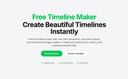
One of the top timeline creation tools is the AI Timeline Maker. This tool utilizes AI technology to help users create visually appealing and informative timelines quickly. It allows for easy customization and collaboration, making it suitable for various purposes such as project management, education, and personal storytelling. Users can generate timelines from text or imported documents, and export them in multiple formats like PNG, PDF, and PowerPoint.
AI Timeline Maker operates by allowing users to describe their desired timeline in natural language, which the AI then uses to automatically structure a chronological timeline. Users can also import documents such as PDFs or Word files, from which the tool extracts dates and events to create editable timeline segments. This makes it easy to visualize complex narratives and historical developments.
Yes, AI Timeline Maker supports real-time collaboration, allowing multiple users to work on the same timeline simultaneously. This feature is particularly useful for teams working on projects or presentations, as it enables seamless communication and editing without the need to switch platforms.
Timelines created with AI Timeline Maker can be exported in various formats, including PNG, PDF, PowerPoint, Word, and Excel. This versatility makes it easy to share timelines for presentations, reports, or personal use.
Common use cases for timeline creation tools include project management, where users can plan milestones and track progress; education and history, for visualizing events in chronological order; personal storytelling, to capture memories and achievements; and company roadmaps, to showcase product evolution or company history.