Best Privacy-Focused Apps
This list showcases privacy-focused apps designed to prioritize user data protection and enhance online security. These applications offer features that empower users to maintain control over their personal information while navigating the digital landscape.
- 1
 0
0Meme Library is a lightweight and privacy-focused application designed specifically for people who save large numbers of memes, reaction images, screenshots, and internet content. Instead of letting memes disappear into an overcrowded camera roll or endless folders, the app provides a dedicated space where users can organize, search, store, and quickly retrieve their favorite content whenever they need it. The platform focuses on solving a surprisingly common problem: finding the right meme at the exact moment you want to share it. One of the app’s most powerful features is its ability to search for text directly inside images. Using automatic text recognition technology, Meme Library scans imported memes and extracts visible text from screenshots, captions, reaction images, and other visual content. This means users can simply type a phrase they remember from a meme and instantly locate it, even if they saved it months ago. The feature eliminates the need for manual tagging or complicated folder systems, making meme retrieval significantly faster and more efficient. The app is designed to work seamlessly with content from multiple platforms. Users can save memes directly from social media apps, web browsers, image galleries, Reddit posts, Instagram content, screenshots, and mobile share sheets. Instead of spreading content across different apps and folders, everything can be stored in a centralized meme collection that remains easy to browse and search. Another important feature is backup and restore functionality. Meme collections often represent years of saved internet culture, reaction images, jokes, and personal favorites. Meme Library helps protect that collection by allowing users to create backups and restore their content when switching devices or recovering from data loss. This ensures that valuable meme archives are not permanently lost due to phone upgrades, accidental deletions, or hardware failures. Privacy is a major focus of the platform. Unlike many social media-driven applications, Meme Library is built around personal storage rather than public sharing. Users are not required to participate in social feeds, public profiles, or engagement systems. The app emphasizes local storage and personal ownership, allowing users to manage their collections without unnecessary tracking, forced sharing, or intrusive social features. According to the platform, memes remain on the user’s device, helping maintain control over personal content and browsing habits. The application also prioritizes speed and simplicity. Its design philosophy centers around providing a clean, focused experience without unnecessary complexity. There are no distracting advertisements, bloated interfaces, or excessive features unrelated to meme organization. Instead, the app concentrates on helping users save content quickly, search efficiently, and share memes whenever needed. This streamlined approach makes it particularly attractive to users who regularly collect internet content and want a dedicated tool built specifically for that purpose. Recent updates have expanded functionality with features such as tagging systems, improved tutorials, clipboard support, Reddit sharing integrations, bug fixes, and enhanced import capabilities. These improvements continue to refine the user experience while maintaining the app’s core goal of making meme management effortless. Overall, Meme Library serves as a dedicated digital vault for meme enthusiasts, content collectors, and internet users who want a smarter way to organize their growing collections. By combining text recognition, fast search capabilities, secure backups, privacy-focused storage, and cross-platform saving tools, the app transforms chaotic meme archives into a searchable and organized personal library that is always ready when the perfect reaction image is needed.
- 2
 0
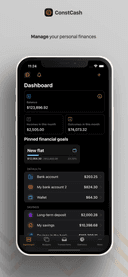
0ConstCash is a privacy-oriented personal budget management application. The app was made by an independent developer who knows that your personal finance information should be protected. Get your finances under control In our daily financial management, we need a tool that will help us control our financial habits in a simple and intuitive way. If you are looking for such a solution, this application is for you! Explore the app's features: - Manage your transactions, incomes, expenses and transfers, - Recurring payments – get reminders for scheduled transactions, - Create budgets tailored to your needs, for all categories as well as savings and investment accounts, - Check statistics and advanced reports – track the progress of your wealth, the ratio of income to expenses, trends and period summaries, - Create and achieve financial goals – be confident that your finances are going in the right direction, - Use transaction templates to streamline adding new expenses.
- 3
 0
0aiME brings the power of open-source Large Language Models (LLMs) directly to your iPhone, iPad, or Android device. Designed to be your constant, private companion, aiME ensures you have access to a smart assistant regardless of your location, connectivity, or network status. It perfectly complements your daily workflow, stepping in when you need absolute privacy or find yourself off the grid. *Always Available, Zero Connectivity Required* Whether you are at 30,000 feet in Airplane Mode, exploring remote hiking trails, or traveling internationally without a data plan, aiME is ready to help. There is no Wi-Fi hunting, no roaming fees, and no dead zones. It’s on-device intelligence that travels with you everywhere, ensuring you can write, plan, and brainstorm without interruption. *Ironclad Privacy by Design* Some thoughts, drafts, and sensitive information are meant for your eyes only. Because aiME processes everything locally, your data never leaves your phone. We have eliminated the need for servers, which means zero risk of data leaks or corporate tracking. Every prompt and conversation is processed securely on your device, giving you total peace of mind. *Reliability When You Need It Most* When the unexpected happens—like severe storms, power outages, or natural disasters—aiME remains a dependable resource. It acts as a reliable tool for organizing information, problem-solving, and staying focused even when the local network goes down. *Fair & Transparent Pricing* We believe in straightforward pricing. aiME operates on a freemium model where the core features are free forever. If you want to take your experience to the next level, you can unlock our premium features with a single, one-time purchase. No monthly subscriptions, no paywalls on your basic chats, and no hidden fees. Core Features: Curated Model Library: Download and seamlessly switch between top open-source models optimized for mobile performance. Free-Forever Core: Enjoy unlimited offline AI chats without ever entering a credit card. One-Time Premium Unlock: Pay once for advanced capabilities—never worry about a recurring subscription. Limitless Versatility: Ideal for creative writing, private journaling, travel planning, offline research, and emergency preparedness. Download aiME today and experience the freedom of having a private, reliable AI assistant right in your pocket.
- 4
 0
0Very Good Calendar Sync is a privacy-focused calendar synchronization application designed specifically for macOS users who need to manage multiple calendars without exposing sensitive personal information. The app helps users keep work, personal, and client calendars aligned automatically while maintaining complete control over their data. Unlike many cloud-based calendar synchronization services, Very Good Calendar Sync runs entirely on the user’s Mac and does not rely on external servers, third-party account linking, or data collection systems. The platform is built for professionals, freelancers, consultants, agencies, remote workers, and anyone managing multiple calendars across services like Google Calendar, Microsoft Outlook, Exchange, Apple iCloud, and CalDAV accounts. Its primary goal is to eliminate double bookings, scheduling conflicts, and the repetitive manual process of copying appointments between calendars. One of the app’s most important features is its privacy-first approach. Many competing calendar sync tools require users to connect their accounts through external services, giving third-party platforms access to sensitive schedule information. Very Good Calendar Sync avoids this entirely by using macOS Internet Accounts directly. This means the user’s Google, Microsoft, and Apple credentials remain securely managed by macOS itself rather than being shared with another company. The app acts only as a local synchronization tool running on the device. The software offers two different synchronization modes: cloning and redacting. In clone mode, calendar events are copied with full details, including titles, descriptions, and locations. In redact mode, the app hides sensitive event details and simply marks time blocks as “busy.” This allows users to share availability across calendars without revealing confidential information, private appointments, meeting topics, or personal activities. It is especially useful for consultants, freelancers, and employees who want colleagues or clients to see their availability without exposing personal details. Another major strength of Very Good Calendar Sync is its simplicity and lightweight design. The application lives quietly in the macOS menu bar and works automatically in the background. Once users configure their synchronization rules, the app continuously monitors calendar changes and keeps calendars aligned without additional manual work. There are no complicated dashboards, cloud portals, or external configuration systems involved. The app also provides advanced filtering options that allow users to control exactly what gets synchronized. Users can choose specific weekdays, weekends, or custom days for syncing. They can also apply time-range filters, such as syncing only work hours or business-related schedules. Each synchronization pair can have its own independent rules, making the system highly flexible for complex scheduling situations. Very Good Calendar Sync works directly with macOS Calendar.app, meaning users do not need to install additional calendar software or manually configure API integrations. If a calendar account already appears inside the native macOS Calendar application, it automatically works with the sync tool. This includes Google Calendar, Outlook, Exchange, iCloud, and other supported calendar providers. The platform strongly emphasizes the concept of “on-device synchronization.” Since all syncing occurs locally on the user’s Mac, no calendar data passes through external servers owned by the company. There are no analytics, no tracking systems, and no middleman infrastructure involved. This architecture improves privacy, reduces security risks, and gives users greater confidence that sensitive scheduling information remains under their control. Very Good Calendar Sync is particularly valuable for people managing multiple professional roles or client relationships. Freelancers can synchronize multiple client calendars, employees can avoid conflicts between work and personal schedules, and agencies can coordinate internal and external calendars more efficiently. The app is designed to make calendar availability accurate and reliable without adding complexity. The pricing model is straightforward and user-friendly. Users receive one free synchronization between two calendars, allowing them to test the platform without payment. Paid plans include monthly, annual, and lifetime options, all of which support unlimited synchronizations, all calendar providers, and usage across multiple Macs under a single user license. Overall, Very Good Calendar Sync is a lightweight, secure, and privacy-focused macOS application that simplifies calendar management while keeping user data fully local. By combining automated synchronization, detailed privacy controls, flexible filtering, and seamless macOS integration, the app provides a practical solution for anyone trying to manage multiple calendars without sacrificing security or personal privacy.
- 5
 0
0CheckPoint is an automated emergency communication system. Set a check-in deadline, attach encrypted files, messages, vocal messages, and credentials to an emergency package, and choose who gets alerted if you miss it. Alerts are sent via email, SMS, and WhatsApp (soon). Built for solo travelers, night workers, protesters, families, and anyone in high-risk situations. Unlike GPS tracking apps, CheckPoint is privacy-first: no location sharing, no surveillance. Just proactive check-ins with end-to-end encrypted context. Features include recurring and heartbeat protocols, multi-level escalation chains, encrypted file storage, and cross-platform access. Free tier available with paid plans starting at $9.99/month for advanced protocols, SMS alerts, and encrypted storage.
- 6
 0
0Potentially is a private AI chat app built for people who want the power of multiple AI models without juggling multiple accounts, subscriptions, or apps. Instead of paying separately for tools like ChatGPT, Claude, Gemini, DeepSeek, Llama, and other AI models, Potentially gives users access to 100+ models in one simple experience. The app is designed for everyday AI use, whether you are writing content, brainstorming ideas, summarizing documents, researching topics, studying, comparing answers, creating social posts, drafting emails, or getting help with work and personal tasks. Users can ask questions, generate ideas, rewrite text, analyze information, and choose the AI model that works best for the task. One of Potentially’s biggest differences is privacy. Many AI tools require signups, track usage heavily, or store conversations. Potentially is designed around anonymous and private AI access, making it a strong option for people who want to use AI without attaching every prompt to their personal identity. This makes it useful for users who care about confidentiality, sensitive work, private research, personal questions, or simply having more control over how they use AI. Potentially also solves a common problem: not every AI model is good at the same thing. Some models are better for writing. Some are better for coding. Some are faster. Some are more creative. Some are better for research or reasoning. Instead of forcing users into one model, Potentially lets them explore and compare different models so they can get better results depending on what they need. The goal is to make AI easier, more flexible, and more affordable. Rather than subscribing to several AI platforms, users can use one app, one subscription, and credits when needed. This gives people more choice without the confusion of managing multiple tools. Potentially is ideal for students, creators, entrepreneurs, professionals, researchers, developers, marketers, and anyone who wants a smarter way to use AI. Whether someone needs quick answers, deep research, writing help, brainstorming, private conversations, or access to different models, Potentially brings everything together in one place. In simple terms, Potentially is a private, anonymous, multi-model AI assistant that lets users access 100+ AI models, compare results, and use the right AI for any task, all from one app.
- 7
 0
0GrapeVine Social is a location-based social network where users connect through shared interests, not followers. Posts are automatically tied to your current area, letting you discover local conversations, businesses, and events nearby — all while keeping your information private and algorithm-free.
- 8
 0
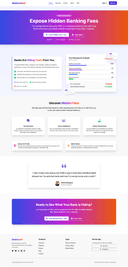
0Banknaked shows the true cost of your banking. Connect your bank account via secure Open Banking and get a clean breakdown of monthly charges, transaction fees, and those mysterious "misc" costs your bank quietly collects. We are privacy-first: read-only access, no money movement, encrypted processing, and data you can delete. In minutes you will see total fees, explanations in plain language, and an annualised projection of what those charges add up to. We also suggest cheaper account options based on your actual usage, so you can switch, negotiate, or just stop paying for features you don't need. Start free; upgrade when you are ready to go deeper. It's your money - see where it really goes.
Frequently asked questions
Banknaked is a privacy-focused app that helps users understand the true cost of their banking by providing a clear breakdown of monthly charges, transaction fees, and other costs. It connects to your bank account via secure Open Banking, ensuring read-only access without any money movement. The app prioritizes user privacy by offering encrypted processing and the ability to delete your data. With Banknaked, users can see total fees in plain language and receive suggestions for cheaper account options based on their actual usage, empowering them to make informed financial decisions.
Using privacy-focused apps helps protect your personal information and enhances your online security. These applications are designed to prioritize user data protection, allowing you to maintain control over your information while navigating the digital landscape. By choosing apps that respect your privacy, you can reduce the risk of data breaches and unauthorized access to your sensitive information.
When selecting a privacy-focused app, look for features such as end-to-end encryption, read-only access to your data, transparent data handling practices, and the ability to delete your information. Additionally, consider apps that provide clear explanations of their privacy policies and offer user-friendly interfaces to help you easily manage your data.