Home
Auto list · updated automatically

Best Study Apps

2Items
0Contributors
0Votes
Sort by
  1. 1Australian Citizenship Tests

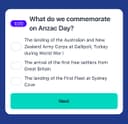
    The Australian Citizenship Tests app is a tool that helps you get ready for the Australian citizenship test. It’s made to be simple and easy to use, giving you practice questions, full-length tests, and helpful study materials. The questions are based on official resources, so you’ll get a good idea of what the real test is like. You can use the app on your phone or laptop, and there’s no limit to how many practice tests you can take. The app tracks your progress, so you’ll know which topics you need to work on. There’s also a demo with audio explanations if you prefer listening while studying. The app was created by Jogi, an independent developer who originally built it to help his wife prepare for her test. He noticed there weren’t many good resources available, so he decided to make one that’s clear, useful, and easy for anyone to use. Many people have found the app helpful. Users from different countries—like Sweden, Iran, Vietnam, Brazil, and Pakistan—say it made studying less stressful and boosted their confidence. Over 3,000 people are currently using it, and the platform has recorded thousands of answered questions and practice tests taken. There’s a 7-day free trial, and if you’re not happy with it, there’s a money-back guarantee. To qualify for that, you’ll need to complete all the practice tests in the app. The prices are in US dollars, and your personal information is kept secure. If you want, you can also check out their blog for study tips, test-day advice, and information about Australian history and culture.

    0
  2. 2StudyMessenger

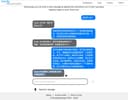
    StudyMessenger is a free, AI-powered platform, created by an 8th Grader (now 9th Grader) at the Canadian International School in Singapore (GO HUSKIES!). Studying any language is hard, but when nobody at home spoke Simplified Chinese, they developed StudyMessenger as a desktop app to help practice text and voice conversations. After their exams, they spent weekends and holidays porting the app onto the web for everyone to use. All the coding and clever functionality is done by them, with their Dad helping on bits of text for the Privacy Policy and Terms of Use. The bugs that made it past testing are down to Dad. What is this? StudyMessenger allows you to chat with an AI-powered character in a range of different scenarios, such as a conversation with a favorite uncle. After a fixed number of interactions, the conversation ends, and the user’s inputs are assessed, assigned a score, and suggestions for improvement are given. A dashboard and archive of your previous conversations are kept for you to review your progress. How much does it cost? It’s free, bankrolled by Mum and Dad. There might be a nominal subscription in the future if we pick up a lot more users than expected, but whatever happens, if you sign up before that, you’ll have free access to the platform for the rest of your time at school. This isn't a commercial project, so we won’t bombard you with ads or spam. Is my data private? If you have a Teacher account, you’ll use your Google login details to access the site. We won’t store your password, but we will store your name, email address, and avatar picture. The system can’t be completely anonymous because an adult needs to agree to the site’s Terms and Conditions and Privacy Policy. If you have a Student account, we’ve gone out of our way not to need nor store any of your personal information. Your account is created by your Teacher (or parent or caregiver). They’ll generate and pass you your login details and might log in as you from time to time to check your progress. If you use voice in conversations with the AI, we don’t store the voice recordings nor share them with third parties. They only stay on our server for the few seconds it takes for the AI to respond and are then deleted. We don’t use cookies for web analytics, so we only see anonymized data about overall visitor behaviour. You won’t encounter annoying cookie consent pop-ups either. Is StudyMessenger safe?

    0
Good to know

Frequently asked questions