One of the top expense-sharing apps is BonSplit. BonSplit is designed to simplify managing shared finances among friends, family, or flatmates. It features AI receipt scanning technology that allows users to photograph receipts, automatically categorize purchases, and split costs accurately. This app is particularly useful for shared living situations, as it helps users divide grocery bills, utilities, and other expenses without confusion. BonSplit also offers a free forever plan with unlimited manual entries, making it accessible for occasional users.
BonSplit works by allowing users to scan receipts or upload purchase information, which the app then processes using AI technology. It categorizes each item on the receipt and assigns costs to the appropriate individuals, making it easy to track who owes what. The app also provides tools for creating synchronized shopping lists, managing recurring payments, and gaining insights into spending patterns, all while ensuring user privacy and data security.
BonSplit stands out due to its AI-powered receipt recognition, which accurately extracts product details from receipts, and its detailed spending categorization that goes beyond generic labels. It also includes collaborative tools for household management, such as a synchronized shopping list and a receipt archive. Additionally, BonSplit prioritizes user privacy by avoiding ads and tracking, and it offers a unique pricing model with one-time purchase options for receipt scans.
Yes, BonSplit is highly suitable for families and roommates. It allows users to fairly divide shared expenses like groceries and utilities, coordinate shopping lists, and settle balances easily at the end of the month. Its features are designed to eliminate the hassle of manual calculations and lengthy discussions about who owes what, making it an efficient tool for managing shared finances.
BonSplit offers a free forever plan that includes unlimited manual entries and a limited number of free receipt scans. Instead of a monthly subscription, users can purchase one-time receipt scan packs that never expire, making it a cost-effective solution for both occasional users and those with more frequent expense-sharing needs.
This list includes expense-sharing apps designed to simplify the process of managing shared costs among friends, family, or groups. These applications provide tools for tracking expenses, splitting bills, and ensuring everyone contributes fairly, making financial interactions more transparent and efficient.
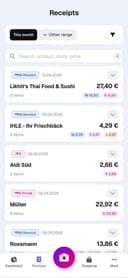
BonSplit is a modern household budgeting and expense-sharing platform designed to make managing shared finances effortless, transparent, and fair. Built as a web app with no installation required, it allows couples, families, and flatmates to scan receipts, automatically categorize purchases, and split costs accurately down to each line item. Unlike traditional budgeting apps that only track total expenses, BonSplit focuses on real-world household spending by recognizing individual products on receipts and assigning them to the right person. One of BonSplit’s standout features is its AI receipt scanning technology. Users can simply photograph a receipt, upload a PDF, or paste a screenshot from online shopping platforms such as Amazon. The AI then extracts every product, price, and category automatically. This eliminates manual typing and spreadsheet management, saving users significant time while reducing mistakes. Even difficult receipts, such as faded thermal paper or slightly crooked phone photos, can be recognized accurately. The platform is especially useful for shared living situations. Couples can fairly divide grocery bills, utilities, and holiday expenses without awkward calculations. Families can coordinate shopping lists across devices and avoid buying duplicate items. Flatmates can separate shared expenses from personal purchases and settle balances at the end of the month without endless WhatsApp discussions or Excel sheets. BonSplit calculates who owes whom automatically, making monthly settlements simple and conflict-free. Another major advantage is BonSplit’s smart categorization system. Instead of grouping everything under generic labels like “groceries,” the app assigns purchases to more than 28 detailed categories. Bread becomes bakery, yogurt becomes dairy, chocolate becomes sweets, and subscriptions, rent, insurance, and internet bills are tracked separately. This gives users a much clearer understanding of where their money actually goes and helps them identify spending patterns over time. BonSplit also includes practical tools beyond receipt scanning. Users get a synchronized shopping list app, recurring payment templates for rent or subscriptions, a receipt archive, CSV and PDF exports, and spending insights through a clean dashboard. Upcoming features such as a pantry list and food diary show that the platform aims to become a complete household organization hub rather than just an expense tracker. Privacy and simplicity are central to BonSplit’s philosophy. The service explicitly states that it uses no ads, no tracking, and no cookie-based surveillance. It is GDPR-compliant and positions itself as a user-focused product rather than an investor-driven data platform. The founder emphasizes that BonSplit was created as a tool he wanted to use personally every day, which gives the product a more independent and privacy-conscious identity. The pricing model is refreshingly different from most SaaS budgeting apps. BonSplit offers a free forever plan with unlimited manual entries and a few free receipt scans to start. Instead of charging a monthly subscription, users purchase one-time receipt scan packs that never expire. This makes the service affordable for occasional users while still supporting heavier usage for large households or active flatshares. Overall, BonSplit is an excellent solution for anyone who wants a cleaner, fairer, and more automated way to manage shared expenses. Its combination of AI-powered receipt recognition, detailed spending categorization, collaborative household tools, and privacy-first design makes it stand out in the crowded budgeting app market. Whether you are living with a partner, managing a family budget, or sharing an apartment with roommates, BonSplit turns the messy process of splitting expenses into something fast, transparent, and stress-free.

Don't let your budget be wasted on unnecessary SaaS subscriptions - Panem is here to help you take control. Our cutting-edge solution streamlines your spending, ensuring you're not throwing money at services that drain your financial resources. We know that juggling multiple SaaS subscriptions can be overwhelming, especially when you're manually tracking them to avoid overspending and missing out on savings. Panem simplifies this process by securely connecting to your bank account using leading banking APIs. Our AI-powered algorithms classify your transactions, analyzing your spending habits to pinpoint redundant or underused subscriptions. With our insights, you can make informed decisions about your SaaS investments, ensuring every dollar spent adds value to your business. We go beyond merely identifying unnecessary expenses. Panem also sends timely reminders to cancel subscriptions before they renew, preventing unwanted charges. This automation saves you time and money, allowing you to concentrate on what truly matters for your business. We're confident in the value we offer. If your savings don't cover the cost of Panem, we'll give you three additional months free. This guarantee reflects our commitment to your financial health and our confidence in our service's effectiveness. Panem provides a comprehensive dashboard that gives you a clear view of all your SaaS spending. Our user-friendly interface tracks active subscriptions, upcoming renewals, and total costs, helping you stay on top of your finances and make data-driven decisions about which services to keep or cut. Our intelligent forecasting tool predicts future SaaS costs based on your current spending patterns, allowing you to budget more effectively and avoid unexpected expenses. Additionally, we offer personalized recommendations for alternative SaaS solutions that better fit your needs and budget, ensuring you get the best value without compromising quality.

Find your tithe amount with our free online tithe calculator. Whether you need a monthly tithe calculator, tithe percentage calculator, or LDS tithing calculator, we help you calculate tithe accurately. Learn more about what tithing means, how to tithe correctly, and biblical tithing principles. Free to use, no registration required.

Ternwheel gives artists, managers, and crews a single platform to plan, budget, and run tours profitably. It connects logistics, communication, and payments so teams stay aligned in real time. With built-in tools for budgeting, settlements, and expense tracking, Ternwheel removes the chaos of spreadsheets and endless messages. It’s the smarter, faster way to manage live entertainment operations from start to finish.

BudgetSheet is a powerful Google Sheets add-on that lets you automatically import live bank transactions directly into your spreadsheets. It eliminates manual CSV exports and copy-paste workflows, giving you full control over budgeting, expense tracking, and financial automation inside Google Sheets. BudgetSheet securely connects to over 10,000 financial institutions worldwide using Plaid, supporting checking, savings, credit cards, investments, loans, and more. Transactions can be fetched on demand or fully automated with nightly auto-sync. Your data stays in your own spreadsheet—BudgetSheet does not store transaction history. Built on PCI and SOC-compliant AWS infrastructure, it provides a secure, flexible alternative to rigid budgeting apps like Mint. Try it free for 15 days and budget your way with complete transparency and customization.

CalcFi is a comprehensive financial platform built to simplify and clarify everyday money decisions through accurate, data-driven calculators. It positions itself as a single destination where users can explore the math behind personal finance topics such as income, taxes, mortgages, debt, investing, and retirement. With over 300 free calculators available, CalcFi aims to remove guesswork and provide clear, reliable answers to financial questions that people face daily. One of the defining features of CalcFi is its commitment to transparency and accuracy. All calculations are based on real, up-to-date data sourced from trusted U.S. institutions such as the Federal Reserve, IRS, U.S. Treasury, Social Security Administration, and Bureau of Labor Statistics. This means users are not just receiving rough estimates, but results grounded in official economic data. Additionally, the platform displays live economic indicators like mortgage rates, federal funds rates, inflation (CPI), and unemployment, giving users a broader context for their financial decisions. The platform is organized into key financial categories, making it easy to navigate depending on the user’s needs. For example, in the paycheck section, users can calculate take-home pay after taxes and deductions, convert salaries to hourly wages, estimate bonus taxes, or analyze the impact of a raise. In the salary section, users can explore income data by state or profession, adjust for cost of living, and even plan salary negotiations. The tax section provides tools for understanding tax brackets, calculating self-employment taxes, estimating capital gains, and managing 1099 income. CalcFi also covers more complex financial areas such as mortgages, debt repayment, and investing. Users can calculate mortgage payments, explore refinancing savings, compare debt payoff strategies like avalanche versus snowball, and estimate credit card repayment timelines. On the investing side, tools like compound interest calculators, dollar-cost averaging, retirement accounts (such as 401(k) and Roth IRA), and net worth tracking help users plan for long-term financial growth. Each calculator is designed to not only provide results but also show the underlying math, helping users understand how the numbers are derived. Another important aspect of CalcFi is its personalized approach. Instead of overwhelming users with all tools at once, it allows them to choose paths based on their situation. Whether someone is a home buyer, tax filer, debt payer, retirement planner, freelancer, new parent, or small business owner, CalcFi guides them toward the most relevant calculators and resources. This makes the experience more intuitive and practical, especially for users who may not have a strong background in finance. Accessibility is a key principle of the platform. CalcFi is completely free to use, with no sign-up requirements, paywalls, or email gates. Users can access all calculators instantly, making it a convenient resource for quick financial decisions. The platform is supported by optional ads, ensuring that users are not required to pay or share personal information to benefit from its tools. Beyond calculators, CalcFi also offers educational resources such as blogs, financial guides, glossaries, and comparison tools. These resources help users deepen their understanding of topics like budgeting, debt management, retirement planning, and major life financial decisions. The combination of practical tools and educational content makes CalcFi both a utility and a learning platform. Overall, CalcFi stands out as a powerful and user-friendly financial toolkit. By combining reliable data, transparent calculations, and a wide range of tools, it empowers individuals to make smarter, more informed money decisions with confidence.

Don't let your budget be wasted on unnecessary SaaS subscriptions - Panem is here to help you take control. Our cutting-edge solution streamlines your spending, ensuring you're not throwing money at services that drain your financial resources. We know that juggling multiple SaaS subscriptions can be overwhelming, especially when you're manually tracking them to avoid overspending and missing out on savings. Panem simplifies this process by securely connecting to your bank account using leading banking APIs. Our AI-powered algorithms classify your transactions, analyzing your spending habits to pinpoint redundant or underused subscriptions. With our insights, you can make informed decisions about your SaaS investments, ensuring every dollar spent adds value to your business. We go beyond merely identifying unnecessary expenses. Panem also sends timely reminders to cancel subscriptions before they renew, preventing unwanted charges. This automation saves you time and money, allowing you to concentrate on what truly matters for your business. We're confident in the value we offer. If your savings don't cover the cost of Panem, we'll give you three additional months free. This guarantee reflects our commitment to your financial health and our confidence in our service's effectiveness. Panem provides a comprehensive dashboard that gives you a clear view of all your SaaS spending. Our user-friendly interface tracks active subscriptions, upcoming renewals, and total costs, helping you stay on top of your finances and make data-driven decisions about which services to keep or cut. Our intelligent forecasting tool predicts future SaaS costs based on your current spending patterns, allowing you to budget more effectively and avoid unexpected expenses. Additionally, we offer personalized recommendations for alternative SaaS solutions that better fit your needs and budget, ensuring you get the best value without compromising quality.

Master your SaaS portfolio with a unified financial view. Stop toggling between multiple Stripe accounts and endless spreadsheets. Instantly sync every project into one centralized dashboard that delivers enterprise-grade analytics. From MRR get beautiful, actionable charts that help you make data-driven decisions. Simplify your reporting workflow and focus on scaling.

Redbark is a modern financial connectivity platform built for Australians who want total visibility across every account and every transaction — all in one place. Designed with privacy, automation, and regulatory compliance at its core, the platform connects Australian bank accounts and global brokerages, then syncs transactions and holdings directly into the tools users already love. With real-time updates, zero manual entry, and no CSV exports, Redbark eliminates the friction traditionally associated with financial tracking. The platform supports 100+ financial institutions, including major Australian banks such as Commonwealth Bank, Westpac, ANZ, NAB, and Macquarie, along with global brokerages like Interactive Brokers. Australian banks are connected through the Consumer Data Right (CDR) Open Banking framework, while international brokerages and crypto exchanges are supported via SnapTrade integrations. This ensures regulated, secure, and reliable data access — not fragile screen scraping. Redbark’s pass-through data architecture is one of its defining features. Financial data flows directly from the user’s bank to their selected destination tool. The platform never stores transactions, balances, or account details. This zero-storage model dramatically reduces risk while preserving complete user control. Transactions are transmitted securely, formatted correctly, and delivered automatically — without intermediaries holding sensitive financial records. Users can sync the same accounts simultaneously to multiple destinations, including Google Sheets, YNAB (You Need A Budget), and Actual Budget. Each destination maintains its own formatting and structure, allowing for tailored workflows across budgeting, forecasting, or custom spreadsheet analysis. Whether someone prefers structured envelope budgeting or fully customizable financial models, Redbark adapts seamlessly. Smart deduplication technology ensures accuracy. Intelligent ID-based matching with overlap buffers captures late-posting transactions and prevents duplicate rows. Automated background syncs are triggered by bank webhooks, meaning new transactions appear without manual refreshes. In addition to transaction data, Redbark syncs investment holdings, live profit and loss figures, and full trade histories from brokerages — offering a complete financial picture beyond simple bank feeds. Security and compliance are foundational. All tokens and credentials are encrypted at rest using AES-256-GCM with unique random initialization vectors. Encryption keys remain hosted exclusively in Australia. The entire infrastructure is Australian-hosted, ensuring financial data never leaves national jurisdiction. Redbark operates within Australia’s Consumer Data Right framework via Fiskil Pty Ltd, an ACCC-accredited data recipient, providing transparent consent management and user withdrawal rights at any time. The infrastructure stack is independently audited and SOC 2 certified, including trusted providers such as Vercel, PlanetScale, Clerk, Stripe, and its regulated banking partners. Every layer — from API requests to encrypted storage — is engineered with defense-in-depth principles. Getting started is simple. Users connect their bank accounts securely via Open Banking, select their preferred destination tools, and watch transactions flow automatically. Setup takes minutes, and the system runs quietly in the background from that point forward. Redbark offers a straightforward pricing model with a 7-day free trial and no credit card required. The Pro plan includes unlimited bank and brokerage connections, unlimited destinations, real-time syncing, and full access to all supported integrations. With transparent pricing and no hidden fees, users can lock in launch rates and cancel anytime — knowing their data remains safely in their own chosen tools. Built and hosted in Australia by Redbark Labs, the platform represents a new standard for financial automation: regulated, encrypted, private by design, and engineered for people who want total control without the operational burden.

Dokta is a modern, AI-powered platform designed to simplify invoice management for freelancers, independent professionals, and small businesses. Built with a strong focus on automation and ease of use, the platform eliminates the need for manual data entry and reduces the stress associated with tracking unpaid invoices. From the moment a user uploads a document, Dokta takes over the heavy lifting—analyzing, organizing, and preparing actionable steps in a matter of seconds. One of the most impressive aspects of Dokta is its seamless document processing system. Users can upload invoices in various formats, including photos, scans, or PDFs. Once the document is submitted, the platform uses a combination of OCR (Optical Character Recognition) and artificial intelligence to extract key information such as amounts, due dates, and client details. This entire process takes less than a minute, allowing users to quickly move from data input to decision-making without unnecessary delays. Dokta’s automation capabilities go far beyond simple data extraction. The platform actively monitors invoice statuses and identifies overdue payments. When an invoice remains unpaid after a certain period—such as 30 days—Dokta automatically generates a professional follow-up email. Users can review the message and send it with a single click, ensuring consistent and timely communication with clients. This feature is particularly valuable for freelancers who often struggle with the discomfort of chasing late payments. In addition to payment tracking, Dokta provides a clear and comprehensive overview of a user’s financial situation. Through its intuitive dashboard, users can monitor cash flow, including incoming payments, expenses, and tax-related data such as VAT. This real-time visibility helps users stay organized and make better financial decisions without relying heavily on spreadsheets or external tools. Another key strength of Dokta is its simplicity. The platform is designed to be accessible even for users with minimal technical experience. There are no complicated setups or steep learning curves. Everything is streamlined into a three-step workflow: upload a document, let Dokta analyze it, and validate the suggested actions. This approach ensures that users remain in control while benefiting from powerful automation. Dokta also offers flexible pricing plans tailored to different needs. A free plan allows users to process up to 15 documents per month without requiring a credit card, making it easy to get started. Paid plans scale based on usage and features, ranging from basic tools for micro-entrepreneurs to advanced solutions for teams and small agencies. Features such as automatic invoice reminders, expense tracking, CSV exports, and multi-user access provide significant value at an affordable price point. Security and data privacy are also central to Dokta’s offering. All data is hosted in Europe on secure cloud infrastructure, ensuring compliance with GDPR standards. This gives users confidence that their financial information is handled with care and protected against unauthorized access. Overall, Dokta stands out as a practical and efficient solution for managing invoices and financial workflows. By combining automation, artificial intelligence, and a user-friendly interface, it helps freelancers save time, reduce errors, and maintain a professional approach to client communication. In a world where administrative tasks can quickly become overwhelming, Dokta offers a smart and reliable way to stay organized and in control.

AI-powered accounting for small businesses

Journey into the human heart on your Apple Vision Pro. This is the most detailed and realistic model of the human heart available on Apple Vision. The app allows you to explose the heart's anatomy, physiology, and pathology in stunning detail, using interactive photo-realistic 3D models, videos, images, and simulations. This app is perfect for medical students and health professionals as well as for anyone curious about anatomy. It is pricey, though, at $49.99 at the time of this writing.

The Australian Citizenship Tests app is a tool that helps you get ready for the Australian citizenship test. It’s made to be simple and easy to use, giving you practice questions, full-length tests, and helpful study materials. The questions are based on official resources, so you’ll get a good idea of what the real test is like. You can use the app on your phone or laptop, and there’s no limit to how many practice tests you can take. The app tracks your progress, so you’ll know which topics you need to work on. There’s also a demo with audio explanations if you prefer listening while studying. The app was created by Jogi, an independent developer who originally built it to help his wife prepare for her test. He noticed there weren’t many good resources available, so he decided to make one that’s clear, useful, and easy for anyone to use. Many people have found the app helpful. Users from different countries—like Sweden, Iran, Vietnam, Brazil, and Pakistan—say it made studying less stressful and boosted their confidence. Over 3,000 people are currently using it, and the platform has recorded thousands of answered questions and practice tests taken. There’s a 7-day free trial, and if you’re not happy with it, there’s a money-back guarantee. To qualify for that, you’ll need to complete all the practice tests in the app. The prices are in US dollars, and your personal information is kept secure. If you want, you can also check out their blog for study tips, test-day advice, and information about Australian history and culture.

Musicat is a comprehensive website and mobile app available for Android and iOS. It connects to your Apple Music account to track your listening history, offering detailed stats, year-by-year top artists and albums, and insights into your favorite tracks. Musicat also helps you discover new music, lets you view what you were listening to on this day in the past, and enables following interesting accounts for a social music experience.

Sanity Media is a social network that's slow and mindful by design. New posts are published only once a day so there is no pressure to constantly check for updates. Gone are the infinite scrolls and other tricks used to addict you to keep refreshing the app.

Drops is a language learning app that focuses on teaching vocabulary through quick, visual-based games. The idea is to make learning feel more like playing, with short sessions you can fit into your day. Instead of grammar-heavy lessons, it leans on matching words with pictures, swiping, and tapping to help words stick in your memory. The app covers over 40 languages, from common ones like Spanish and French to less common ones like Hawaiian and Ainu. You get common, everyday words and phrases to start with—things you’d actually use in conversation. It’s built for people who want to learn at their own pace, and there are features like reminders and streaks to keep you coming back. Drops keeps lessons short—usually five minutes—so it’s easy to squeeze in some learning while waiting for coffee or riding the train. There’s a free version with ads and limits on daily use, or you can pay for Premium to get rid of ads, unlock all content, and use it offline. Overall, it’s not going to teach you complex grammar or how to hold a full conversation right away, but if you’re looking to build your vocabulary in a fun, no-pressure way, it does the job.

ANEAR is a social media app designed to bring people back together in real life. The app doesn’t use feeds, profiles, or content to keep you scrolling. Instead, it shows you when someone you know is in the same city. You receive a notification when a friend is nearby or when your travel plans overlap. You decide if and when you want to reach out. There is no exact location sharing and no tracking of your movements. People often drift apart simply because they don’t realize how close they actually are. ANEAR makes these moments visible again — to increase the chance of meeting someone in real life again.

A social media app built by Mark Zuckerberg

The Australian Citizenship Tests app is a tool that helps you get ready for the Australian citizenship test. It’s made to be simple and easy to use, giving you practice questions, full-length tests, and helpful study materials. The questions are based on official resources, so you’ll get a good idea of what the real test is like. You can use the app on your phone or laptop, and there’s no limit to how many practice tests you can take. The app tracks your progress, so you’ll know which topics you need to work on. There’s also a demo with audio explanations if you prefer listening while studying. The app was created by Jogi, an independent developer who originally built it to help his wife prepare for her test. He noticed there weren’t many good resources available, so he decided to make one that’s clear, useful, and easy for anyone to use. Many people have found the app helpful. Users from different countries—like Sweden, Iran, Vietnam, Brazil, and Pakistan—say it made studying less stressful and boosted their confidence. Over 3,000 people are currently using it, and the platform has recorded thousands of answered questions and practice tests taken. There’s a 7-day free trial, and if you’re not happy with it, there’s a money-back guarantee. To qualify for that, you’ll need to complete all the practice tests in the app. The prices are in US dollars, and your personal information is kept secure. If you want, you can also check out their blog for study tips, test-day advice, and information about Australian history and culture.

The Apple Health app provides a central and secure place for your health and fitness information, so it’s easily accessible and under your control. Features • Visualize and securely store health data from your iPhone, iPad, and Apple Watch as well as from compatible devices and third-party apps. • Browse interactive charts to review your health data over time and dive in for a deeper look. • Receive highlights on what matters most to you, like your steps, sleep, or vitals. • See at a glance how a given health metric is progressing, whether it’s increasing or decreasing over time, with trend analysis. • Share your health data with people important to you or those who are caring for you. • Create personalized sleep schedules, set a sleep duration goal, and track your progress over time. • Track your menstrual cycle with Cycle Tracking. Turn on notifications to tell you when your next period or fertile window is approaching. • Create a list of the medications, vitamins, and supplements you take, and receive reminders to log scheduled medications • Reflect on your state of mind by logging your momentary emotions, daily moods, and contributing factors. Get valuable insights into your state of mind and how it has changed over time with interactive charts. • Take standardized mental health assessments that are often used in clinics to understand your current risk for depression and anxiety and if you may benefit from a discussion with your care team. • Use the Health Checklist on iPhone to set up iPhone and Apple Watch to keep an eye on things for you. • See all your health records — such as allergies, immunizations, lab results, and more — in one place.* • Learn more about important health topics with educational articles.

PurrWalk is GPS based audio guide that knows every hidden spot in the city - do not miss a thing! You can walk freely in the city and PurrWalk will tell you about interesting objects you are passing by - no more need to stick to the touristic areas!

ANEAR is a social media app designed to bring people back together in real life. The app doesn’t use feeds, profiles, or content to keep you scrolling. Instead, it shows you when someone you know is in the same city. You receive a notification when a friend is nearby or when your travel plans overlap. You decide if and when you want to reach out. There is no exact location sharing and no tracking of your movements. People often drift apart simply because they don’t realize how close they actually are. ANEAR makes these moments visible again — to increase the chance of meeting someone in real life again.

Mobile app that scans barcodes of products. Yuka’s mission is to help consumers make better choices for their health. In doing so, it aims to drive manufacturers to offer better products.

Drops is a language learning app that focuses on teaching vocabulary through quick, visual-based games. The idea is to make learning feel more like playing, with short sessions you can fit into your day. Instead of grammar-heavy lessons, it leans on matching words with pictures, swiping, and tapping to help words stick in your memory. The app covers over 40 languages, from common ones like Spanish and French to less common ones like Hawaiian and Ainu. You get common, everyday words and phrases to start with—things you’d actually use in conversation. It’s built for people who want to learn at their own pace, and there are features like reminders and streaks to keep you coming back. Drops keeps lessons short—usually five minutes—so it’s easy to squeeze in some learning while waiting for coffee or riding the train. There’s a free version with ads and limits on daily use, or you can pay for Premium to get rid of ads, unlock all content, and use it offline. Overall, it’s not going to teach you complex grammar or how to hold a full conversation right away, but if you’re looking to build your vocabulary in a fun, no-pressure way, it does the job.

Musicat is a comprehensive website and mobile app available for Android and iOS. It connects to your Apple Music account to track your listening history, offering detailed stats, year-by-year top artists and albums, and insights into your favorite tracks. Musicat also helps you discover new music, lets you view what you were listening to on this day in the past, and enables following interesting accounts for a social music experience.

Duolingo is an app and website designed to help people learn languages in a simple and engaging way. It’s free to use, though there are paid options that remove ads and offer extra features. The lessons are short and interactive, with exercises that involve matching words, listening to sentences, speaking, and translating. A green owl named Duo acts as the app’s mascot—offering encouragement when you stay on track and reminders when you don’t. The platform offers a wide range of languages, from widely spoken ones like Spanish, French, and Chinese to less common choices like Welsh, Hawaiian, and even fictional languages like Klingon and High Valyrian. Lessons focus on practical, everyday communication—like ordering food or asking for directions—though you’ll occasionally encounter quirky sentences that are memorable in their oddness. Duolingo adapts to your progress: if you’re struggling, it slows down; if you’re doing well, it introduces more challenging material. There are game-like features—points, streaks, and levels—that keep learning motivating and fun. For those looking to go beyond basic lessons, Duolingo also offers podcasts, stories, and interactive exercises to improve listening and reading comprehension. Convenient and easy to use, Duolingo fits into almost any schedule—you can practice on the bus, during a lunch break, or before bed. While it’s not a complete substitute for full immersion or in-depth study, it’s a useful tool for beginners and a good way to keep language skills fresh.

I am a huge fan of chloe ting's workouts. I haven't checked out her app yet, as I use her mostly on desktop but I find that her workouts are the most fun, versatile and effective.

The Australian Citizenship Tests app is a tool that helps you get ready for the Australian citizenship test. It’s made to be simple and easy to use, giving you practice questions, full-length tests, and helpful study materials. The questions are based on official resources, so you’ll get a good idea of what the real test is like. You can use the app on your phone or laptop, and there’s no limit to how many practice tests you can take. The app tracks your progress, so you’ll know which topics you need to work on. There’s also a demo with audio explanations if you prefer listening while studying. The app was created by Jogi, an independent developer who originally built it to help his wife prepare for her test. He noticed there weren’t many good resources available, so he decided to make one that’s clear, useful, and easy for anyone to use. Many people have found the app helpful. Users from different countries—like Sweden, Iran, Vietnam, Brazil, and Pakistan—say it made studying less stressful and boosted their confidence. Over 3,000 people are currently using it, and the platform has recorded thousands of answered questions and practice tests taken. There’s a 7-day free trial, and if you’re not happy with it, there’s a money-back guarantee. To qualify for that, you’ll need to complete all the practice tests in the app. The prices are in US dollars, and your personal information is kept secure. If you want, you can also check out their blog for study tips, test-day advice, and information about Australian history and culture.
Get Jacked is a gym tracking app and personal robo trainer. Get Jacked helps beginners, intermediates and advanced lifters improving their training by tracking training performance over the medium and long term. Get jacked adjusts training volume to fit your needs making sure that you get the best possible results given your personal constraints.

Don't let your budget be wasted on unnecessary SaaS subscriptions - Panem is here to help you take control. Our cutting-edge solution streamlines your spending, ensuring you're not throwing money at services that drain your financial resources. We know that juggling multiple SaaS subscriptions can be overwhelming, especially when you're manually tracking them to avoid overspending and missing out on savings. Panem simplifies this process by securely connecting to your bank account using leading banking APIs. Our AI-powered algorithms classify your transactions, analyzing your spending habits to pinpoint redundant or underused subscriptions. With our insights, you can make informed decisions about your SaaS investments, ensuring every dollar spent adds value to your business. We go beyond merely identifying unnecessary expenses. Panem also sends timely reminders to cancel subscriptions before they renew, preventing unwanted charges. This automation saves you time and money, allowing you to concentrate on what truly matters for your business. We're confident in the value we offer. If your savings don't cover the cost of Panem, we'll give you three additional months free. This guarantee reflects our commitment to your financial health and our confidence in our service's effectiveness. Panem provides a comprehensive dashboard that gives you a clear view of all your SaaS spending. Our user-friendly interface tracks active subscriptions, upcoming renewals, and total costs, helping you stay on top of your finances and make data-driven decisions about which services to keep or cut. Our intelligent forecasting tool predicts future SaaS costs based on your current spending patterns, allowing you to budget more effectively and avoid unexpected expenses. Additionally, we offer personalized recommendations for alternative SaaS solutions that better fit your needs and budget, ensuring you get the best value without compromising quality.

I am a huge fan of chloe ting's workouts. I haven't checked out her app yet, as I use her mostly on desktop but I find that her workouts are the most fun, versatile and effective.
Get Jacked is a gym tracking app and personal robo trainer. Get Jacked helps beginners, intermediates and advanced lifters improving their training by tracking training performance over the medium and long term. Get jacked adjusts training volume to fit your needs making sure that you get the best possible results given your personal constraints.

Stepz is a convenient step counter app that leverages the clever Apple Motion Coprocessor which collects your motion data automatically in the background while saving battery life. This simple pedometer app has been specifically developed for the iPhone and Apple Watch. Do you move enough throughout the day? Learn more about your daily activity and get fit by reaching your step goal! To provide you with a complete overview of your fitness progress, Stepz can import all your past steps from the Apple Health app.

All-in-one pedometer app for walkers including pedometer, virtual step challenges, places to walk near by and clubs. Most features of any similar apps.

The Apple Health app provides a central and secure place for your health and fitness information, so it’s easily accessible and under your control. Features • Visualize and securely store health data from your iPhone, iPad, and Apple Watch as well as from compatible devices and third-party apps. • Browse interactive charts to review your health data over time and dive in for a deeper look. • Receive highlights on what matters most to you, like your steps, sleep, or vitals. • See at a glance how a given health metric is progressing, whether it’s increasing or decreasing over time, with trend analysis. • Share your health data with people important to you or those who are caring for you. • Create personalized sleep schedules, set a sleep duration goal, and track your progress over time. • Track your menstrual cycle with Cycle Tracking. Turn on notifications to tell you when your next period or fertile window is approaching. • Create a list of the medications, vitamins, and supplements you take, and receive reminders to log scheduled medications • Reflect on your state of mind by logging your momentary emotions, daily moods, and contributing factors. Get valuable insights into your state of mind and how it has changed over time with interactive charts. • Take standardized mental health assessments that are often used in clinics to understand your current risk for depression and anxiety and if you may benefit from a discussion with your care team. • Use the Health Checklist on iPhone to set up iPhone and Apple Watch to keep an eye on things for you. • See all your health records — such as allergies, immunizations, lab results, and more — in one place.* • Learn more about important health topics with educational articles.